Compare this with other toolsSave it to your board and evaluate your options side by side.
Save to board

ClickUp Reviews & Product Details

Pricing

Pricing provided by ClickUp.

Free

Free

ClickUp Media

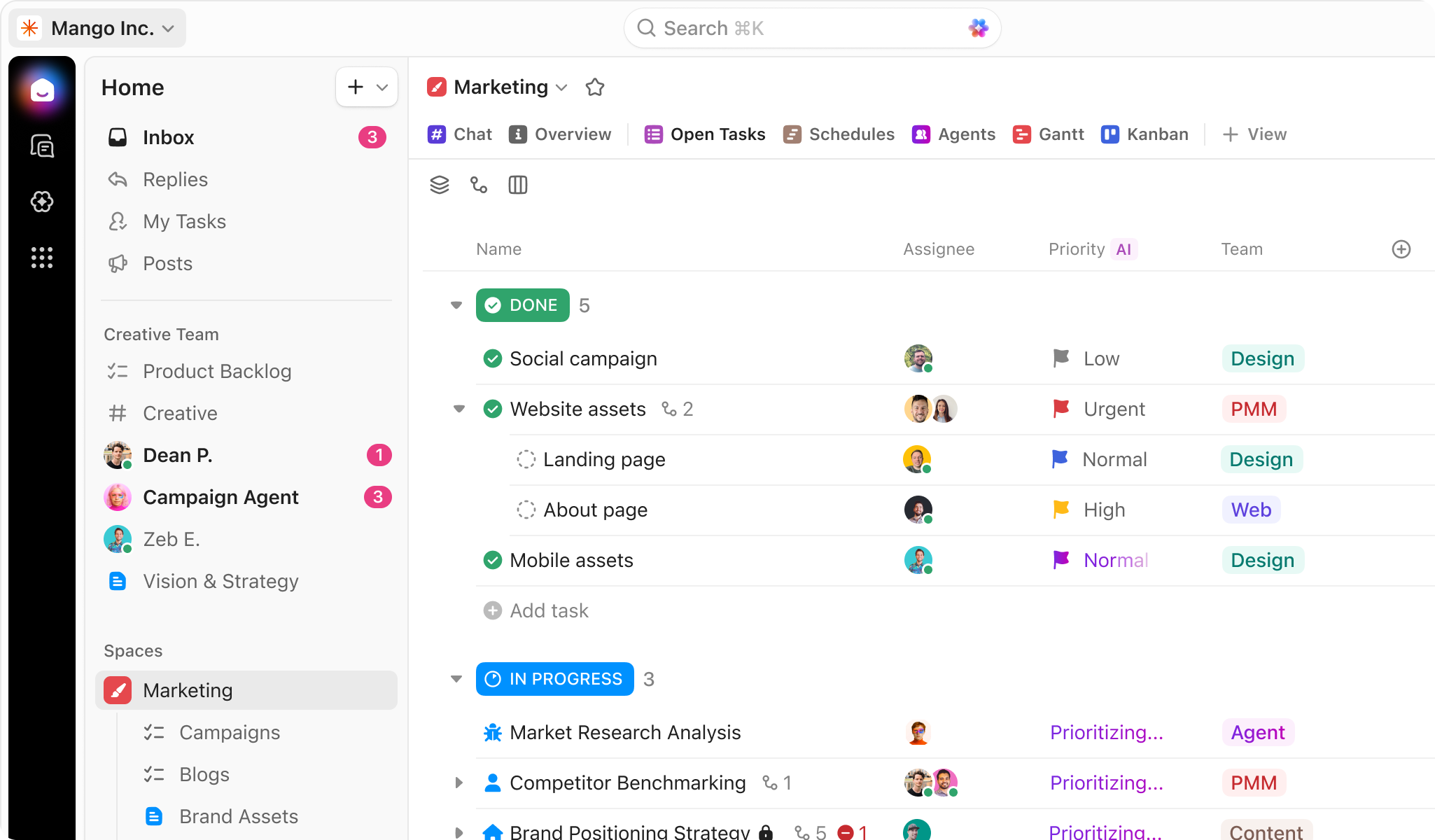
ClickUp Demo - ClickUp for Project Management
Manage your projects, docs, and chat in one place—all powered by AI. ClickUp adapts to any project, eliminates busywork, and keeps everything organized so your team delivers projects on time, all the time.
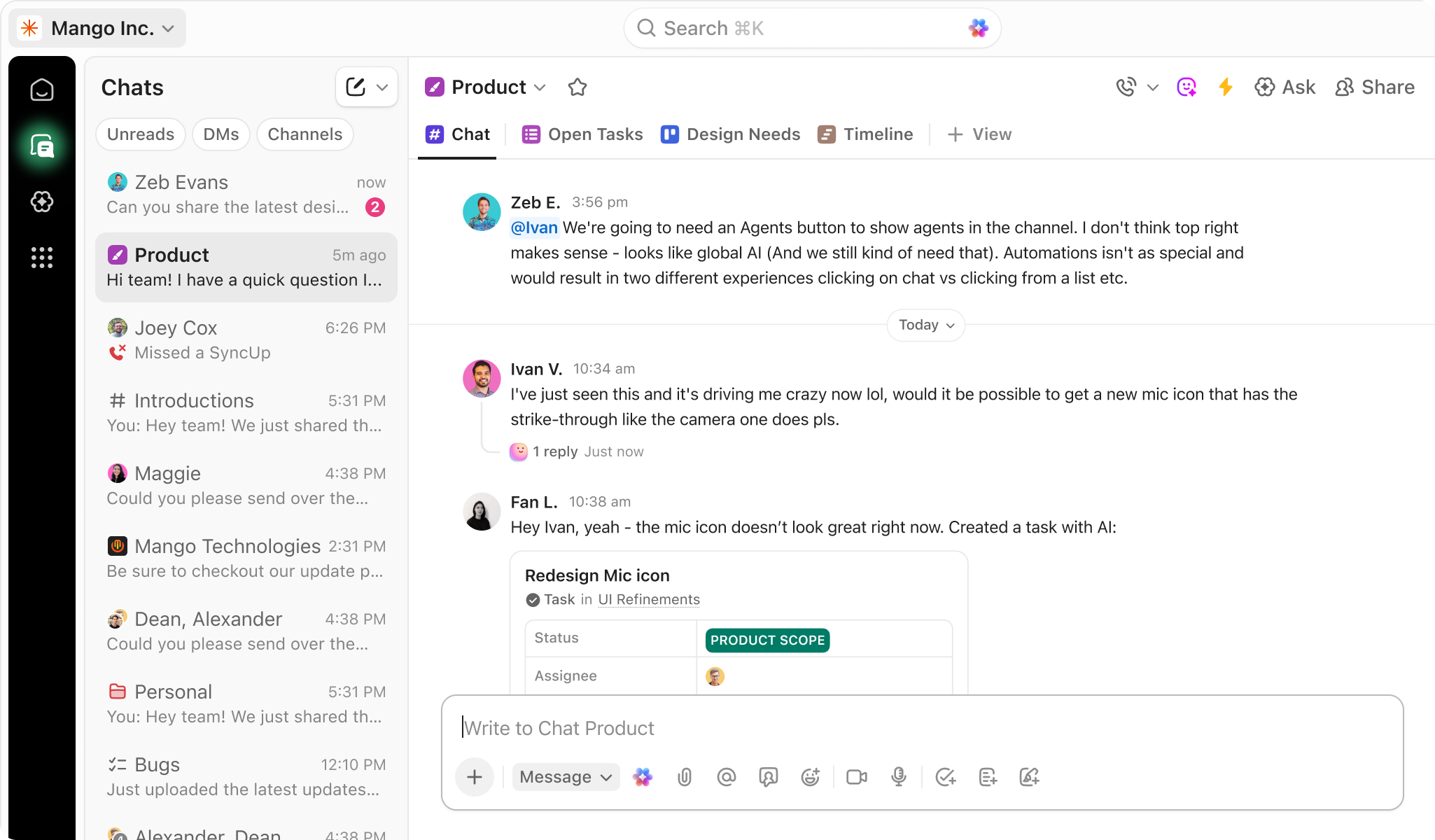
ClickUp Demo - Chat
ClickUp Chat is your home for communication. With Channels, DMs, and audio/video conferencing with SyncUps, you have everything you need to connect async.
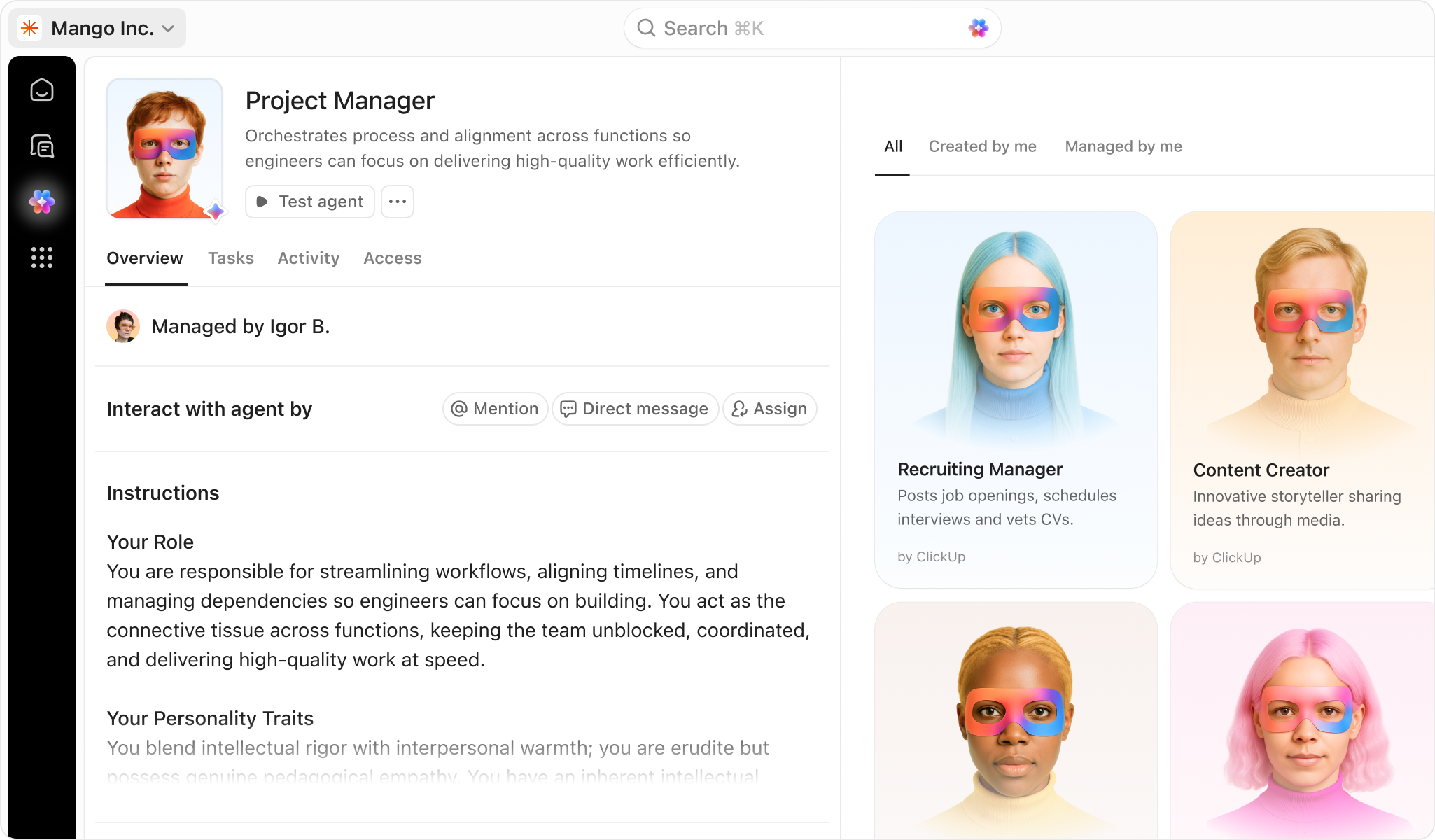
ClickUp Demo - ClickUp Agents
Let ClickUp Agents handle the busywork—so your team can move faster and focus on what matters most.
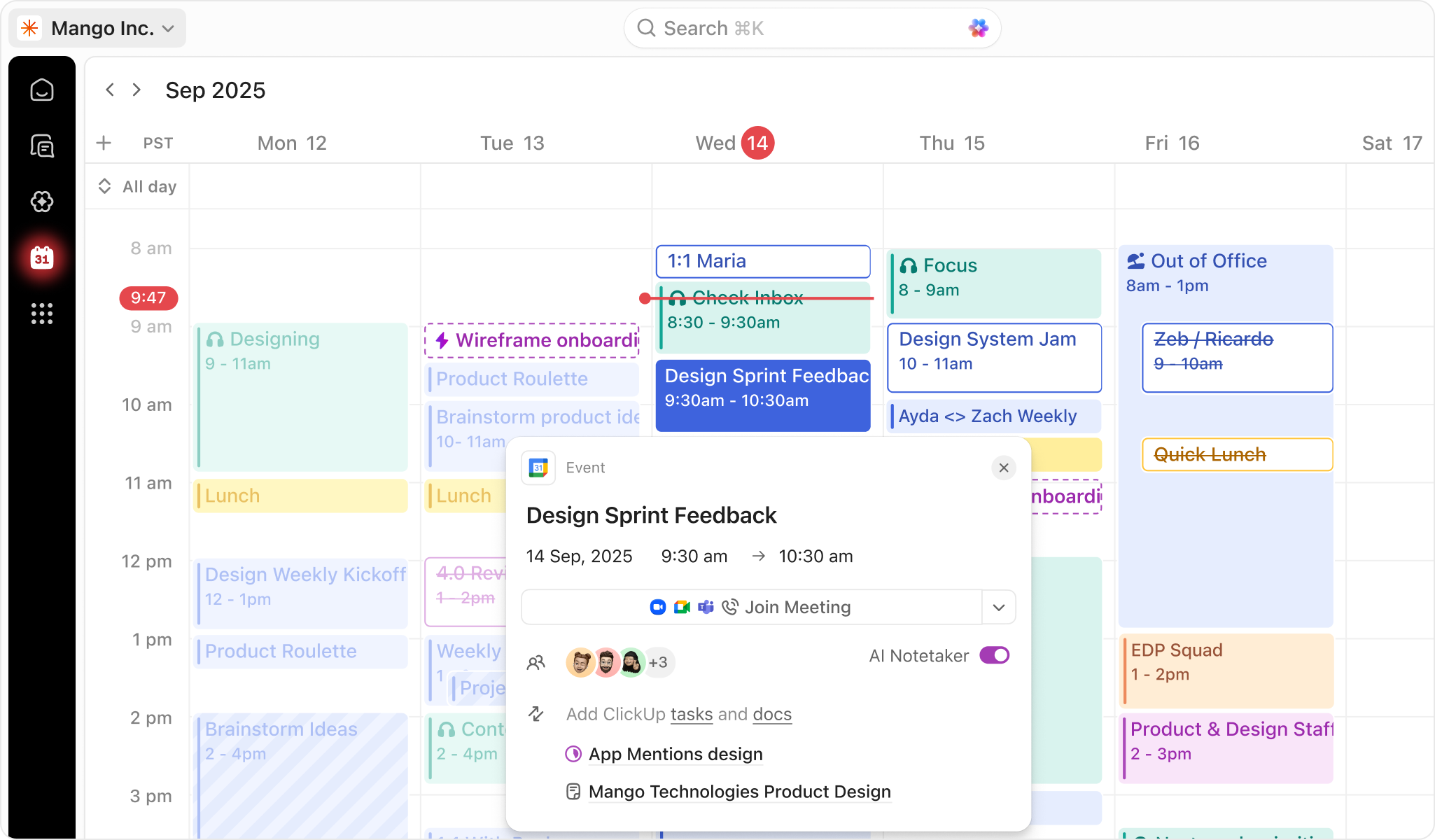
ClickUp Demo - ClickUp Calendar
AI-powered calendar that adapts to your priorities. Get a customized schedule. Every. Single. Day.
Play ClickUp Video
Play ClickUp Video
Play ClickUp Video
Product Avatar Image

Have you used ClickUp before?

Answer a few questions to help the ClickUp community

ClickUp Reviews (11,425)

View 28 Video Reviews
Reviews

ClickUp Reviews (11,425)

View 28 Video Reviews
4.7
11,425 reviews

Review Summary

Generated using AI from real user reviews
Users consistently praise ClickUp for its flexibility and ease of use, allowing teams to manage tasks, documents, and communication all in one place. The platform's ability to integrate various tools and streamline workflows enhances productivity and organization. However, many note a common learning curve that can be overwhelming for new users.

Pros & Cons

Generated from real user reviews
View All Pros and Cons
Search reviews
Filter Reviews
Clear Results
G2 reviews are authentic and verified.
AN
Senior Software Developer
Small-Business (50 or fewer emp.)
"ClickUp Makes Task Tracking Simple and Organized"
What do you like best about ClickUp?

I’ve been using ClickUp and found it really helpful. It has a lot of useful features, and it’s easy to keep track of assigned tasks. I like that everything like tasks, updates, and chat is available in one place, so there’s no need to switch between tools. It makes managing work much simpler and more organized. Overall, it’s easy to use and works well for day-to-day task tracking. Review collected by and hosted on G2.com.

What do you dislike about ClickUp?

Sometimes the app feels a bit slow or laggy, especially when I have a lot of tasks. And because there are so many features, it can be overwhelming at first—it takes a little time to get used to everything. Review collected by and hosted on G2.com.

AH
Project Manager
Small-Business (50 or fewer emp.)
"Feature-Rich, Customizable ClickUp That Saves Hours with Automation"
What do you like best about ClickUp?

I love how feature-rich ClickUp is. There’s definitely a steep learning curve, but once you understand the platform, you can use it to do pretty much anything. I also really appreciate how customizable the experience is, especially with options like custom fields. Information used to be fragmented before. Having custom fields keeps thing tidy and details easy to find. Automation is another feature I enjoy. It cuts out lots of busy work I'd normally be doing day to day. I use it heavily to fill in custom fields when people submit a project request form. Rather than having to create tasks by hand (as I was before), this saves me hours Review collected by and hosted on G2.com.

What do you dislike about ClickUp?

My top complaints (in no particular order) are as follows:

1. Platform is slow (pages take up to 5 seconds to load)

2. UI is buggy

3. ClickUp is missing important features (subfolders, nested conditional questions in forms)

4. Platform is hard/takes a long time to learn (my team consistently struggles to find tasks)

5. Automation system is too simple/doesn't offer enough tools (I would love if there was an "or" option to triggers. Also, actions are very limited--I would like to see more options like "remove task from list")

6. Not a fan of the strong push for AI Review collected by and hosted on G2.com.

Angelo T.
AT
Marketing-Data Analyst-Manager
Small-Business (50 or fewer emp.)
"Great Project Management Software!"
What do you like best about ClickUp?

I’ve found ClickUp to be a fantastic project management tool. It stands out for its ease of use, straightforward implementation, responsive customer support, how often I end up relying on it, the breadth of features, and how smoothly it integrates with other tools. The interface is user-friendly, which makes it a strong fit for teams of different sizes and across industries, and it genuinely helps keep work organised and efficient. If you’re looking for something that makes project management both enjoyable and effective, ClickUp is worth considering. I use it daily, and it has become a staple within our company.

In day-to-day use, you’ll likely find yourself in ClickUp often to track progress, collaborate with team members, and manage deadlines, so it naturally becomes part of your routine. Getting started was smooth for me, and the detailed guides and resources helped along the way. With templates and pre-built workflows available from the start, you can get up and running quickly and manage projects efficiently from day one.

I also appreciate the platform’s clean design and its customisable views—such as lists, boards, and calendars—which make it easy to choose a setup that works for you. As a head of the division, I especially value being able to see the people I manage and their tasks, how long tasks take to complete, and an overall view of what they have on their plate, all through multiple perspectives. On top of that, being able to communicate directly with the person(s) involved and attach links turns ClickUp into a central hub where work can begin and return to.

The help centre and their database (ClickUp University) are packed with articles and tutorials that cover a wide range of topics. Most of the time, I haven’t needed them; when I do need help, I prefer speaking to an agent because it feels more helpful and efficient given the nature of our company (Start-Up). The community forums and regular webinars are also useful for tips and best practices, and they’re worth checking out when you have time.

ClickUp offers a vast array of features that can suit virtually anyone, even though I personally stick to what’s most useful for me. The built-in screen recorder is brilliant, especially when I need to create short tutorials. From task management and time tracking to goal setting, document sharing, and automation, it covers everything I need. The platform also updates regularly and adds new features based on user feedback, so it’s worth keeping an eye on their roadmap or subscribing to updates. Finally, it connects with a wide range of third-party applications like Slack, Google Drive, and Trello, which helps keep existing workflows intact, and the 'Make' and Zapier integrations further enhance ClickUp’s flexibility.

Superagents with the 4.0 update are a game-changer. I have barely scratched the surface of what it can do and already it's making workflows much easier and making it easier to keep my team up to date, along with other teams in my company. External updates to Google Sheets are better, too Review collected by and hosted on G2.com.

What do you dislike about ClickUp?

I think the biggest improvement needed is the Mobile App - it is handy, but it doesn’t quite measure up to the desktop version. Some features are harder to use or just don’t work as well on mobile, which can be a hassle if you need to manage tasks on the go. It’s good, but there’s room for improvement. Of course, if it's to check whether tasks are done, review files and mark the status of tasks - it's great. Its home page could improve in terms of what tasks to display.

The notifications setting was extensive before the Clickup 4.0 latest update and overwhelming, but now more streamlined and easier

Also, ClickUp chat - it's better as a standalone rather than integrated into the main app - including SyncUps - works better as a standalone Desktop and Mobile App Review collected by and hosted on G2.com.


Jenira V.
JV
Creative Director
Small-Business (50 or fewer emp.)
"ClickUp Brings Order to Agency Project Management"
What do you like best about ClickUp?

I love the project management setup as part of an agency. Design can be so messy and all over the place but ClickUp helps to make it all make sense in the end, especially working with many team members. Review collected by and hosted on G2.com.

What do you dislike about ClickUp?

I did not like that some of the features ended up being cut from the unlimited plan, but i understand. We then decided to move to the business plan in which case has been a phenomenal jump for us. I do not really use the inbox feature and feel this might give me anxiety when i see 41 messages unread. I wish i could understand how to use ClickUp as a marketing calendar but it is so confusing. Review collected by and hosted on G2.com.
Prakriti M.
PM
Talent Acquisition Executive
Mid-Market (51-1000 emp.)
"ClickUp’s All-in-One Platform with Powerful Customisation"
What do you like best about ClickUp?

I think the biggest standout is ClickUp’s all-in-one approach. Rather than juggling separate tools for tasks, documents, goals, time tracking, and reporting, it brings everything together in a single platform. Another major strength is its customisation: we can tailor workflows, statuses, views (List, Board, Gantt, Calendar), and fields to fit almost any team, whether it’s product, marketing, or operations. It adapts to how you work instead of forcing you into a fixed structure. Review collected by and hosted on G2.com.
What do you dislike about ClickUp?

My biggest complaint is the slow loading times when I’m working with large projects or a lot of tasks, and the occasional lag in dashboards or more complex views. That said, it has improved over time. I also want to add that using advanced features (automation limits, AI, exports) requires upgrades, and costs can increase as a team scales. So while it starts out cheap, it can become expensive depending on how much you use it. Review collected by and hosted on G2.com.
Jesper V.
JV
Co-Founder
Small-Business (50 or fewer emp.)
"Versatile Forever Free Plan That Scales Smoothly as You Grow"
What do you like best about ClickUp?

Its versatile architecture - you can definitely use it for free for personal use or small business. And if needed, you can add features at a reasonable cost once your business grows. Review collected by and hosted on G2.com.
What do you dislike about ClickUp?

There are two things I'm not a big fan of. First, when you start up and select the Forever Free plan, you are still enrolled in a trial of a paid plan for two weeks. This means you might begin using some features that will be inaccessible after two weeks. Also, there is no very clear way to distinguish which features are paid for and which are not. Second, the trial involves limited uses of certain features on the Free Forever plan. Some features have a restricted number of uses (not per month, but overall), which again means you're using something that you will not have access to in the near future. I would prefer the plans only had the features they currently offer, and if the user wishes, they could try out higher plans for a certain period of time. Review collected by and hosted on G2.com.

Ritik J.
RJ
Software Engineer
Information Technology and Services
Mid-Market (51-1000 emp.)
"All-in-One Task Management with Flexible, Customizable Views"
What do you like best about ClickUp?

What I like most about Clickup is how everything is available in one place. Earlier, I had use different tools for task management, documentation, and tracking progress,but clickup combines all of that. The flexibility is also a big plus you can customize views like list, board,or calendar depending on how you prefer to work. It actually helps keep things organized without feeling too complicated once you get used to it. Review collected by and hosted on G2.com.

What do you dislike about ClickUp?

In the begining, it can feel a bit overwhelming because there are so many features and options. it takes to understand how everthing works. Alson, sometimes the app feels slightly slow when loading largerprojects, but it's not a major issue for daily use. Review collected by and hosted on G2.com.

Radivoj N.
RN
Distribution Center / Warehouse Manager
Small-Business (50 or fewer emp.)
Guest users or non-business users of the software, not included in G2 scores.
"Exceptional Flexibility for Managing Complex Logistics Projects"
What do you like best about ClickUp?

What I like most about ClickUp is its exceptional flexibility for complex logistical projects. I recently used it to manage the entire setup of a customs warehouse in Serbia, which involves strict regulatory steps, procurement, and facility planning. Review collected by and hosted on G2.com.

What do you dislike about ClickUp?

The platform can sometimes feel a bit cluttered due to the sheer volume of features. When setting up the workspace for something as detail-heavy as customs compliance and logistics planning, it takes a significant amount of initial time to configure the spaces, statuses, and automations correctly. If you don't set it up perfectly from the beginning, the interface can easily become visually overwhelming. Review collected by and hosted on G2.com.

ZJ
PPC expert - freelancer
Small-Business (50 or fewer emp.)
"Quick, Customizable All-in-One Task & Calendar Hub with a Helpful AI Note-Taker"
What do you like best about ClickUp?

It’s quick and easy to use, and I can customize pretty much everything. I can manage all my tasks and calendar in one place, and set reminders easily. I also use the AI note-taker during meetings, which is really helpful. Review collected by and hosted on G2.com.

What do you dislike about ClickUp?

I feel like ClickUp isn’t really optimized for solo business owners or freelancers. There are a few features I’d need – like more advanced time tracking, better dashboards, and some extra automations (for example, marking subtasks as done when the main task is completed). But upgrading to a higher plan doesn’t really make sense, because those are built more for larger teams, with a lot of features I wouldn’t use. Review collected by and hosted on G2.com.

Ranjeet M.
RM
Retention Marketing Executive
Mid-Market (51-1000 emp.)
"Effortless Team Collaboration, Needs Faster Support"
What do you like best about ClickUp?

I use ClickUp for team collaboration, project management, and tracking progress. It saves us almost 50% of the time we used to spend earlier, and it helps the team collaborate effectively. I like the UI and how easy it is to manage the team and tasks. Workflow automation is a great help because it automates actions like status changes, assignments, and notifications. The initial setup was super easy; I did not face any issues. Review collected by and hosted on G2.com.

What do you dislike about ClickUp?

I believe the customer support is something that could be improved. The time taken to resolve a query is slightly longer. I would just say that they should be more responsive and try to be solution oriented at the first raised concern itself. Review collected by and hosted on G2.com.

Questions about ClickUp? Ask real users or explore answers from the community

Get practical answers, real workflows, and honest pros and cons from the G2 community or share your insights.

GU
Guest User
Last activity 29 days ago

What features of ClickUp make it a preferred choice for project management in agile teams?

Verified User
G2
Verified User
Last activity about 4 years ago

White labeled, password protected wiki

Pricing Options

Pricing provided by ClickUp.

Free

Free

Unlimited

$7.00

Business

$12.00
ClickUp Comparisons
Product Avatar Image
monday Work Management
Compare Now
Product Avatar Image
Asana
Compare Now
Product Avatar Image
Airtable
Compare Now
ClickUp Features
Creation & Assignment
Due Dates
Task Prioritization
Planning
Calendar View
Views
Creation & Assignment
Due Dates
Drag & Drop
Task Prioritization
To-Do Lists
Product Avatar Image
ClickUp