
Compare this with other toolsSave it to your board and evaluate your options side by side.
Save to board

Looker Studio Reviews & Product Details

Profile Status

This profile is currently managed by Looker Studio but has limited features.

Are you part of the Looker Studio team? Upgrade your plan to enhance your branding and engage with visitors to your profile!

Value at a Glance

Averages based on real user reviews.

Time to Implement

1 month

Return on Investment

12 months

Looker Studio Media

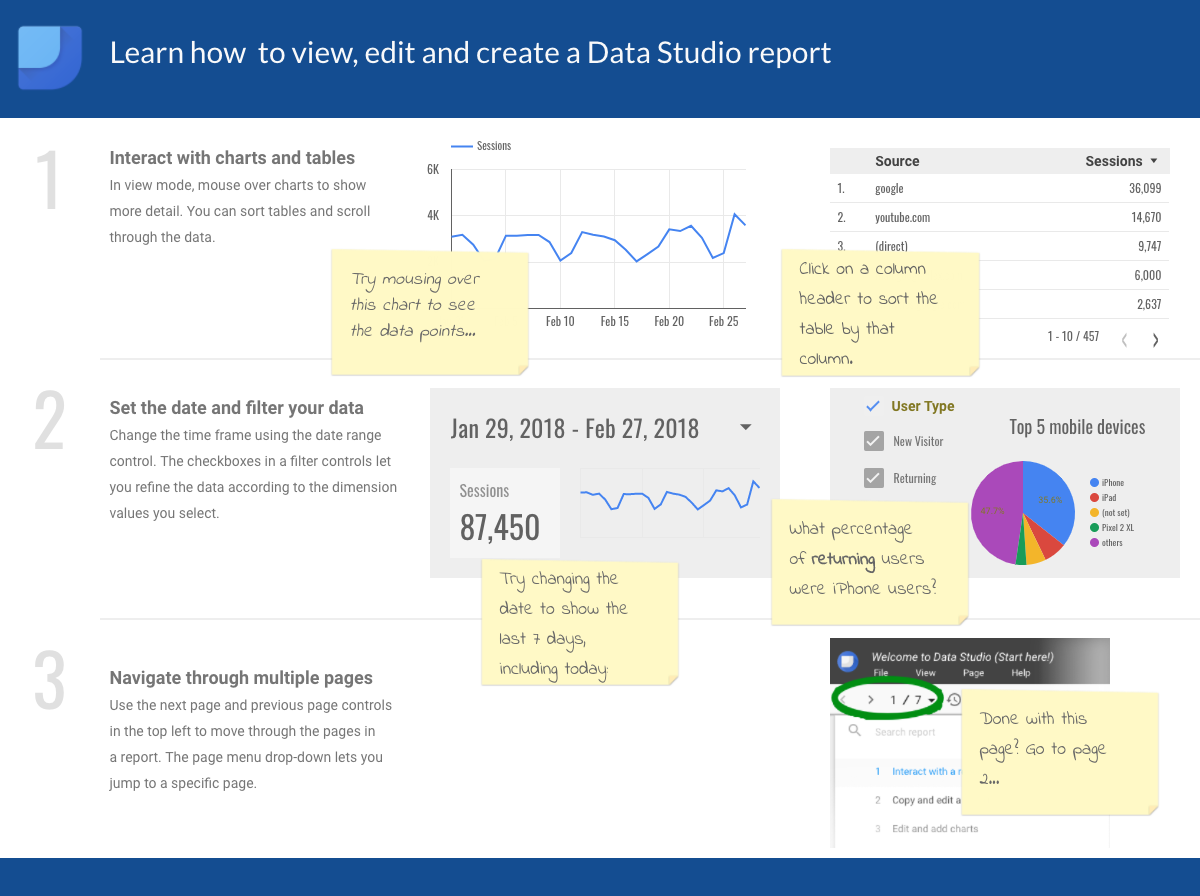
Looker Studio Demo - Sample Adwords Report
See and share your AdWords data reports in a highly visual format. View more sample reports at https://www.google.com/analytics/data-studio/gallery/
Looker Studio Demo - Sample Any Data Report
Make your own data easily come to life in beautiful charts and graphs. View more sample reports at https://www.google.com/analytics/data-studio/gallery/
Looker Studio Demo - Sample Wild Nature Website Google Analytics Report
Fully customize the look and feel of your dashboard reports. View more sample reports at https://www.google.com/analytics/data-studio/gallery/
Looker Studio Demo - Sample Marketing Report
Show your website performance, like top countries by session and engagement by demographic. View more sample reports at https://www.google.com/analytics/data-studio/gallery/
Product Avatar Image

Have you used Looker Studio before?

Answer a few questions to help the Looker Studio community

Looker Studio Reviews (465)

View 1 Video Reviews
Reviews

Looker Studio Reviews (465)

View 1 Video Reviews
4.4
465 reviews

Review Summary

Generated using AI from real user reviews
Users consistently praise Looker Studio for its ease of use and ability to create interactive dashboards quickly. The integration with various data sources, especially Google products, allows for seamless report generation, making it accessible even for those with limited technical skills. However, some users note that performance can be slow with large datasets, which may hinder efficiency.

Pros & Cons

Generated from real user reviews
View All Pros and Cons
Search reviews
Filter Reviews
Clear Results
G2 reviews are authentic and verified.
BAALAJI M.
BM
Business Development Manager
Information Technology and Services
Mid-Market (51-1000 emp.)
"Looker Studio Centralizes Our Data with Effortless, Quick Real-Time Dashboards"
What do you like best about Looker Studio?

What I like best about Looker Studio is how it helps me track my business data effectively in one single place. Working in business management, I deal with a lot of different data points and revenue tracking daily. Looker Studio makes it easy to pull all that information together so I’m not jumping between different spreadsheets. It’s a free tool that connects directly to Google Sheets and Ads, which saves me hours of manual reporting. I love the drag-and-drop features that let me build professional dashboards that stay updated automatically. It gives me a clear, real-time view of our performance without the usual headache of manual data entry. Review collected by and hosted on G2.com.

What do you dislike about Looker Studio?

Nothing so far. I feel the user interface could be upgraded to look better and feel more polished. Review collected by and hosted on G2.com.

Candy N.
CN
Global Digital Marketing Expert
Marketing and Advertising
Small-Business (50 or fewer emp.)
"Useful for cross-channel reporting, with some limitations"
What do you like best about Looker Studio?

Looker Studio is a useful tool for building shareable, real-time dashboards that pull data from multiple marketing channels. It’s flexible and visually customisable, and it makes it straightforward to present performance data to stakeholders in a clear, accessible format. I also find the ability to connect Google Ads, Analytics, and other data sources in one place especially helpful for reporting and keeping everything consolidated. Review collected by and hosted on G2.com.

What do you dislike about Looker Studio?

Looker Studio can feel limited when it comes to more advanced data modelling and complex calculations. Performance may slow down with larger datasets, and some connectors can be unreliable or end up requiring workarounds. Customisation beyond the basic visualisations also feels somewhat restrictive, especially compared with more advanced BI tools. Review collected by and hosted on G2.com.

Verified User in Retail
AR
Small-Business (50 or fewer emp.)
"Free, Simple, Real-Time Data Visuals"
What do you like best about Looker Studio?

What I like best about Looker Studio is how easily it connects to all my data in one place. Since it’s a Google product, it links up instantly with things like Google Ads, Sheets, and Analytics without any technical setup. This saves me a massive amount of time because I no longer have to jump between different websites or manually copy numbers into a spreadsheet just to see how my projects are performing.

I also love the drag-and-drop design, which makes it simple to build professional-looking reports. You don't need to be a data expert or know how to code to create clear charts and tables that are easy to read. It gives me the flexibility to move things around and customize the look so that the most important information stands out, making the data feel much less overwhelming for anyone viewing it.

Finally, the real-time sharing and collaboration features are a huge plus. It works just like a Google Doc, so I can send a single link to my team or clients, and they always see the most up-to-date numbers. This solves the problem of sending out old PDFs that become outdated the next day. Being able to work on a report with others at the same time makes the whole process faster and keeps everyone on the same page. Review collected by and hosted on G2.com.

What do you dislike about Looker Studio?

The biggest issue is that it can become very slow when you have a lot of data. If your report is pulling from a large spreadsheet or a complex database, the charts can take a long time to load or might even "break" and show an error message. It feels great for small projects, but as soon as your business grows and you have thousands of rows of information, the platform can start to feel laggy and unresponsive.

I also find the customization options a bit limited compared to other professional tools. While the drag-and-drop system is easy to use, there are times when you want to change a specific detail—like the exact placement of a label or a unique chart style—and the system simply won't let you do it. You often have to work around the tool’s rigid rules, which can be frustrating when you’re trying to make a report look exactly the way a client wants it.

Finally, blending data from different sources is often a headache. If you want to combine information from two different places (like matching your Facebook Ad spend with your Google Analytics sales), the "data blending" feature is prone to errors. It’s not very smart at matching things up automatically, so you often end up with missing numbers or confusing results that require a lot of manual troubleshooting to fix. Review collected by and hosted on G2.com.

Mohamed Razeeth  M.
MM
Data engineer
Small-Business (50 or fewer emp.)
"Looker Studio Makes Multi-Source Data Easy to Visualize and Share"
What do you like best about Looker Studio?

I use Looker Studio for creating interactive dashboards and reports by connecting data from multiple sources such as Google Analytics, databases, and spreadsheets. It helps visualize data in a clear and meaningful way, making it easier to track performance, analyze trends, and share insights with teams or stakeholders. Review collected by and hosted on G2.com.

What do you dislike about Looker Studio?

Looker Studio can sometimes be slow when working with large datasets or complex dashboards, which affects performance. The customization options, while useful, can feel limited compared to more advanced BI tools. Occasionally, data connections may break or require reauthentication, which can interrupt workflows. Improving speed, adding more advanced customization features, and making data connections more stable would make the platform even better. Review collected by and hosted on G2.com.

Saïd K.
SK
USER ACQUISITION MANAGER
Photography
Small-Business (50 or fewer emp.)
"Perfect tool for data visualisation"
What do you like best about Looker Studio?

What I like best about Looker Studio is how easy it is to build dashboards that are directly connected to different datasources. I really like that I can plug spreadsheets, ads platforms, analytics tools, etc., and see everything in one single report. It’s quite fast to create simple visualisations and share them with other teams, even if they are not very data-savvy. For exemple, I can build a dashboard that shows acquisition KPIs by channel and it updates automatically without me reworking slides every week. The fact that everything is online makes collaboration really simple. Review collected by and hosted on G2.com.

What do you dislike about Looker Studio?

What I like less about Looker Studio is that performance can become slow when there are too many charts or when the data source is heavy. Sometimes the dashboard takes a long time to load or refresh, which is a bit annoying when you just need a quick check. Some features feel a bit limited compared to more advanced BI tools, especially for complex calculations or modeling. Also, the design options are not always super flexible, so getting a dashboard to look “perfect” can take too much time. And when connectors break, it’s not always clear why. Review collected by and hosted on G2.com.

V K.
VK
Manager Digital Marketing
Real Estate
Small-Business (50 or fewer emp.)
"Effortless Data Visualization and Real-Time Reporting"
What do you like best about Looker Studio?

Looker Studio makes data visualization and reporting easy. It allows me to connect multiple data sources and create interactive dashboards without needing advanced technical skills.

I especially like the flexibility in customizing charts and reports, and the fact that dashboards update in real time makes it easy to share insights with stakeholders. It’s a great tool for turning raw data into clear, easy-to-understand visuals. Review collected by and hosted on G2.com.

What do you dislike about Looker Studio?

While Looker Studio is very useful, there are a few things I dislike. The interface can sometimes feel a bit slow, especially when working with large or complex data sources.

I’ve also noticed that some advanced customizations and calculations are limited, and troubleshooting data connection issues isn’t always straightforward. Better performance and more flexibility in advanced features would really improve the overall experience. Review collected by and hosted on G2.com.

Nicolás A.
NA
Media Buyer
Mid-Market (51-1000 emp.)
"Unified and Easy-to-Use Dashboard, Ideal for Quick Reports"
What do you like best about Looker Studio?

Having a single dashboard with data from all the platforms you use in your company makes report generation an automatic task. The portfolio of available platforms to connect data is very robust.

The learning curve is really short; it is a tool that, once you learn the basics, becomes very intuitive to create dashboards. Review collected by and hosted on G2.com.

What do you dislike about Looker Studio?

Data processing becomes limited, a programming language that falls short for performing slightly more advanced data analysis. Making connections or joins between data sources also makes the processing of those same connections impossible.

On the other hand, at the design level, the dashboards are basic. Review collected by and hosted on G2.com.

Trevor I.
TI
Digital Marketing Analyist - Web Analytics & SEO
Enterprise (> 1000 emp.)
"Free, Customizable Reporting with Smooth Multi-Source Integration"
What do you like best about Looker Studio?

It's a free customizable report creator that can integrate multiple data sources. The filters provide the ability to clean data, and in some cases combine data from multiple data sources. Review collected by and hosted on G2.com.

What do you dislike about Looker Studio?

Some data connectors have limits for api pulls. The default setting in Looker pulls these sources on refreshes. It took a bit to learn how to prevent this in the settings by limiting data pulls. Review collected by and hosted on G2.com.

Verified User in Marketing and Advertising
UM
Small-Business (50 or fewer emp.)
"Flexible, Powerful Dashboards That Make Data Actionable"
What do you like best about Looker Studio?

What I like best about Looker Studio is how flexible it is for turning data into visuals.

You can pull in multiple sources, like Google Analytics, Ads or Sheets, and see everything in one dashboard. The drag-and-drop interface makes building reports faster, and it’s easy to share with clients or teams.

It’s simple enough to create something useful quickly, but powerful enough to customise and drill into the details when needed. It makes data more understandable and actionable. Review collected by and hosted on G2.com.

What do you dislike about Looker Studio?

What I dislike about Looker Studio is that it can be slow and a bit clunky with large datasets.

Some visualisations aren’t very flexible, and customisation can get frustrating if you need something outside the standard templates.

It also relies heavily on the data being clean—if your sources aren’t set up properly, the reports can be misleading or break easily. Review collected by and hosted on G2.com.

Suayip Can O.
SO
Founder and SEO Consultant
Small-Business (50 or fewer emp.)
"Fast, Easy Reporting with Looker Studio for Google Analytics & Search Console"
What do you like best about Looker Studio?

This is a really great tool for reporting data quickly and easily from frequently used platforms like Google Analytics and Google Search Console, and sharing it with our clients. Review collected by and hosted on G2.com.

What do you dislike about Looker Studio?

Looker Studio is weak when it comes to integrating data from third-party tools outside the Google ecosystem, such as Bing or Yandex. It also doesn’t let you sort comparative charts by “delta.” The only way to do this is by blending data, which makes the process longer and more time-consuming. Review collected by and hosted on G2.com.

Questions about Looker Studio? Ask real users or explore answers from the community

Get practical answers, real workflows, and honest pros and cons from the G2 community or share your insights.

Karthik D.
KD
Karthik Dasari
Last activity over 3 years ago

Which is the best place where I can see more tutorials about Data Studio?

deniz y.
DY
deniz yavuz
Last activity over 4 years ago

utf-8 error

Pricing Insights

Averages based on real user reviews.

Time to Implement

1 month

Return on Investment

12 months

Average Discount

5%

Looker Studio Comparisons
Product Avatar Image
Looker
Compare Now
Product Avatar Image
Databox
Compare Now
Product Avatar Image
Kibana
Compare Now
Looker Studio Features
Reports Interface
Steps to Answer
Graphs and Charts
Historical Snapshots
Real-Time Updating
Email Reports
Graphs and Charts
Dashboards
Formats
Sharing
Product Avatar Image
Looker Studio