


Compare this with other toolsSave it to your board and evaluate your options side by side.
Save to board

Avis et détails du produit GoAnywhere MFT

Valeur en un coup d'œil

Moyennes basées sur les avis d'utilisateurs réels.

Temps de mise en œuvre

2 mois

Média de GoAnywhere MFT

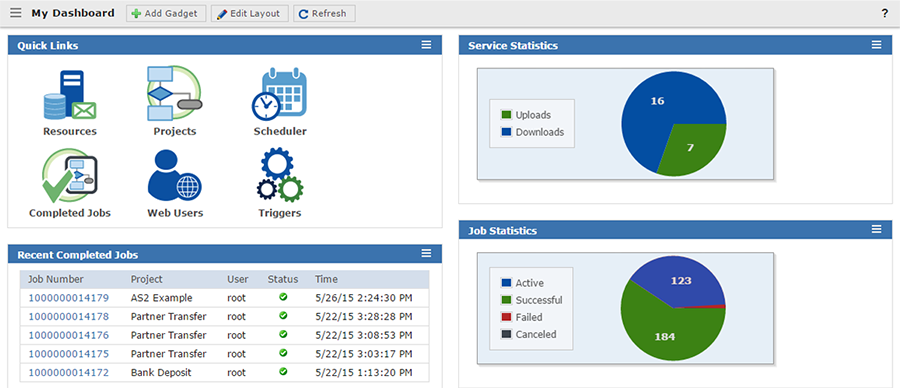
Démo de GoAnywhere MFT - GoAanywhere MFT Dashboard
GoAnywhere provides dozens of dashboard gadgets that display vital statistics and activity for your system. Admin users can customize and add gadgets, organize their layout, and even share dashboards with others.
Démo de GoAnywhere MFT - Project Explorer
From this menu, you can create projects, organize projects into folders, and secure the folders to make them accessible only to authorized users.
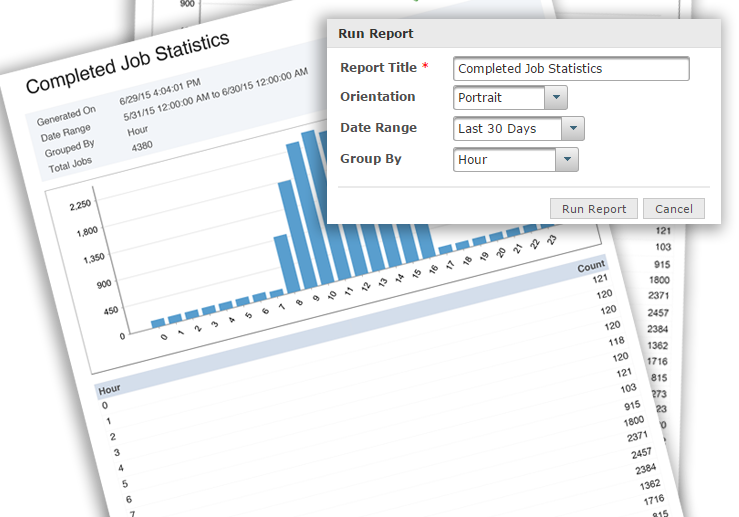
Démo de GoAnywhere MFT - Job Statistics & Reports
An essential feature for compliance auditing. Using the reporting feature in GoAnywhere, PDF reports can be created interactively or automatically that contain system, Project, and Web User activity. The Audit Logs page allows Admin Users to view and search logs for each service the Admin User ha...
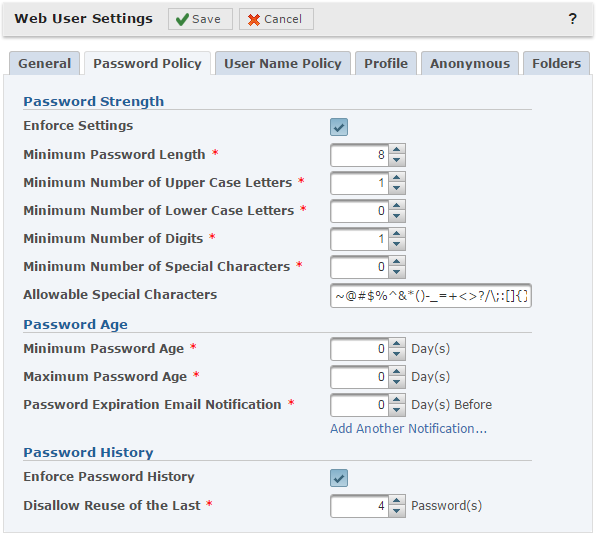
Démo de GoAnywhere MFT - Web User Settings
Both Admin and Web Users can be added to Groups with similar rights and responsibilities. There are also Admin and Web User security settings that can be customized for each user type.
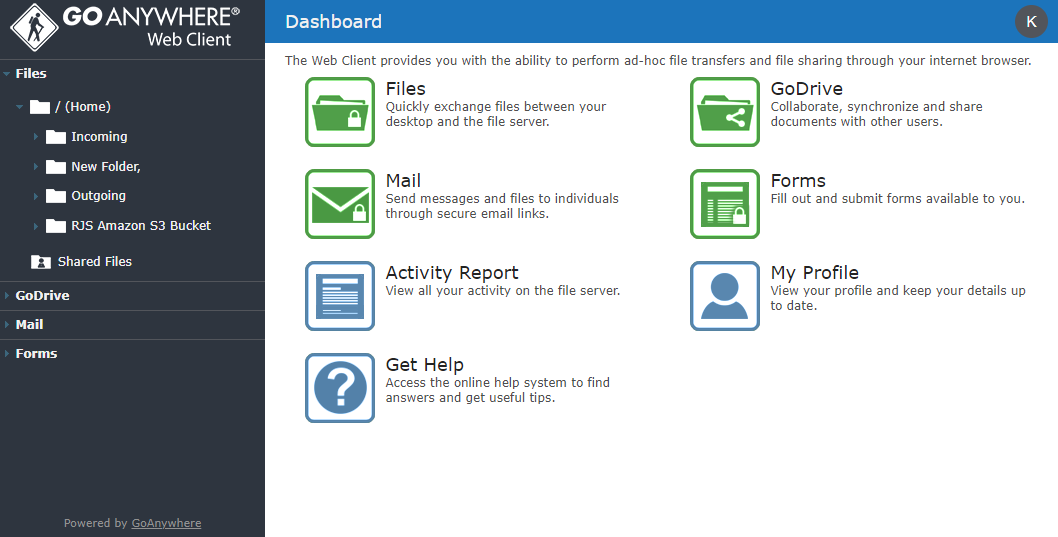
Démo de GoAnywhere MFT - GoAnywhere Web Client
Our modernized web client dashboard makes ad hoc file sharing between users and systems easy with simple drag-and-drop.
Démo de GoAnywhere MFT - EDI File Translation
With GoAnywhere’s built-in EDI features, you can centralize your encryption and data translation right in the product. No separate tools are required. This all-in-one approach will help you save the time and costs that are traditionally required to hard-code data maps. GoAnywhere’s other features...
Lancer la vidéo de GoAnywhere MFT
Image de l'avatar du produit

Avez-vous déjà utilisé GoAnywhere MFT auparavant?

Répondez à quelques questions pour aider la communauté GoAnywhere MFT

Avis GoAnywhere MFT (433)

Voir les avis vidéo de 1
Avis

Avis GoAnywhere MFT (433)

Voir les avis vidéo de 1
4.6
Avis 433

Review Summary

Generated using AI from real user reviews
Les utilisateurs louent constamment GoAnywhere MFT pour sa sécurité renforcée et son automatisation des flux de travail, qui réduisent considérablement l'effort manuel et améliorent la conformité. La gestion centralisée permet une surveillance et un suivi faciles des transferts de fichiers, rendant les opérations plus efficaces. Cependant, beaucoup notent une commune lors de la configuration initiale, qui peut être complexe pour les nouveaux utilisateurs.

Avantages & Inconvénients

Généré à partir de véritables avis d'utilisateurs
Voir tous les avantages et inconvénients
Rechercher des avis
Filtrer les avis
Effacer les résultats
Les avis G2 sont authentiques et vérifiés.
MM
Intern - PT India Commercial
Petite entreprise (50 employés ou moins)
"Secure, Reliable File Transfers with GoAnywhere MFT"
Qu'aimez-vous le plus à propos de GoAnywhere MFT?

The most helpful things i found about GoAnywhere MFT is that it combines security,automation and centralized management to a single system.Some of the upsides of GoAnywhere MFT are that it provides strong security, it's easy to use interface meaning that low coding is required, it's reliable and scalable with having good visibility and auditing.So fewer manual processes,better compliance and much more control over file transfers. Avis collecté par et hébergé sur G2.com.

Que n’aimez-vous pas à propos de GoAnywhere MFT?

One thing that i noticed while using it i found that though GoAnywhere MFT is powerful but that power brings complexity and overhead with it.Downsides of GoAnywhere MFT are like it's not beginner friendly, not having modern UI/UX, Setup is complex and experienced troubleshooting and it can be expensive also.These are some downsides that can be fixed. Avis collecté par et hébergé sur G2.com.


Dhvani P.
DP
full stack devloper
Petite entreprise (50 employés ou moins)
"Secure, Automated File Transfers Made Easy with GoAnywhere MFT"
Qu'aimez-vous le plus à propos de GoAnywhere MFT?

Strong security features – GoAnywhere MFT offers encryption, secure file transfer protocols (SFTP, FTPS), and compliance support, making data transfers highly secure.

Automation & scheduling – It allows you to automate file transfers, workflows, and repetitive tasks, saving time and reducing manual effort.

User-friendly interface – The web-based UI is easy to navigate, making it simple to manage transfers, monitor activity, and configure workflows without deep technical complexity. Avis collecté par et hébergé sur G2.com.

Que n’aimez-vous pas à propos de GoAnywhere MFT?

Expensive licensing – The pricing can be high, especially for smaller teams or startups.

Complex setup – Initial installation and configuration require time and technical expertise. Avis collecté par et hébergé sur G2.com.

Himanshu J.
HJ
Founder
Petite entreprise (50 employés ou moins)
"Transferts de fichiers sécurisés et automatisés facilités avec GoAnywhere MFT"
Qu'aimez-vous le plus à propos de GoAnywhere MFT?

Ce que j'aime le plus dans GoAnywhere MFT, c'est son fort accent sur la sécurité et l'automatisation. Il offre un moyen centralisé de gérer les transferts de fichiers avec des fonctionnalités telles que le cryptage et le FTPS. Les capacités d'automatisation sont également un grand avantage. Vous pouvez planifier et gérer des flux de travail complexes pour les transferts de fichiers sans avoir besoin d'une intervention manuelle constante, ce qui le rend très utile pour les environnements d'entreprise. Avis collecté par et hébergé sur G2.com.

Que n’aimez-vous pas à propos de GoAnywhere MFT?

Le principal inconvénient est que l'interface peut sembler un peu dépassée et pas aussi intuitive que les outils modernes. Il peut falloir un certain temps pour s'habituer à la navigation et à la configuration. De plus, la configuration initiale et le déploiement peuvent être complexes, surtout pour les équipes sans expérience préalable dans les systèmes de transfert de fichiers gérés. Avis collecté par et hébergé sur G2.com.

Timothy A.
TA
System Administrator III
Entreprise (> 1000 employés)
"Transfert de fichiers sans effort avec GoAnywhere MFT"
Qu'aimez-vous le plus à propos de GoAnywhere MFT?

J'aime que GoAnywhere MFT nous permette de créer des « projets », qui sont des scripts automatisés pour déplacer, copier ou supprimer des fichiers à un niveau granulaire. C'est excellent pour créer un processus automatisé rationalisé, surtout que nous avons de nombreux fichiers et rapports créés quotidiennement dans notre système EMR qui doivent être partagés. GoAnywhere MFT fonctionne parfaitement comme solution intermédiaire pour nos besoins de transfert de fichiers. J'apprécie également qu'il fonctionne avec SharePoint, vers lequel nous avons migré en tant que notre principale plateforme de gestion de fichiers. Le produit n'est pas trop difficile à configurer d'un point de vue informatique, bien qu'une aide de l'équipe informatique soit nécessaire pour une utilisation au niveau de l'entreprise. La polyvalence dans la gestion des différentes méthodes de transfert de fichiers est un grand avantage. Même si nous ne l'utilisons pas à son plein potentiel, je lui donnerais quand même une note de 9 sur 10 pour la recommandation. Avis collecté par et hébergé sur G2.com.

Que n’aimez-vous pas à propos de GoAnywhere MFT?

Je sais qu'il existe un module complémentaire Outlook pour GoAnywhere, mais ce serait bien d'avoir une petite version allégée d'un client GoAnywhere pour aider avec les utilisations générales de FTP. Avis collecté par et hébergé sur G2.com.

Réponse de Chris Bailey de GoAnywhere MFT

Timothy,

Merci pour la critique ! Pour les transferts généraux, vous pouvez utiliser le client de bureau GoAnywhere ou tout autre outil FTP tiers.

Le lien que j'ai joint ci-dessous vous permet de voter sur certaines fonctionnalités envisagées pour GoAnywhere et de soumettre des idées pour de nouvelles fonctionnalités (bouton en haut à droite). Il y a aussi un lien pour réserver un moment pour discuter avec moi de notre feuille de route, de tout problème avec notre service client, ou de toute idée que vous pourriez avoir. J'ai hâte d'avoir de vos nouvelles !

Voir comment GoAnywhere MFT s'est amélioré
NV
DevOps Engineer
Petite entreprise (50 employés ou moins)
"Reliable Automation with Some Room for Improvement"
Qu'aimez-vous le plus à propos de GoAnywhere MFT?

I like how reliable GoAnywhere MFT is. Once a workflow is set up, it runs smoothly without needing follow-ups. I appreciate the scheduling feature because I don't have to worry about missed transfers. The built-in SFTP and encryption simplify things, so I don't need to rely on multiple tools. I also like the consistency it offers; once things are configured, they run in the background without needing attention. The audit logs are very useful, making it easy to check what actually happened if something goes wrong. Avis collecté par et hébergé sur G2.com.

Que n’aimez-vous pas à propos de GoAnywhere MFT?

A few things can definitely be better, the UI feels a bit dated while managing workflows. Also, when something fails the error messages aren't always clear, so troubleshooting can take longer than expected. Initial setup was also a bit heavy it's not something you pick up instantly without some guidance. I would like to see a cleaner UI and better error messages in GoAnywhere MFT. Smarter alerts and a simpler setup process would also make it much easier to use day to day. Avis collecté par et hébergé sur G2.com.

Krisha  S.
KS
Petite entreprise (50 employés ou moins)
"Streamlined File Transfers with Robust Automation"
Qu'aimez-vous le plus à propos de GoAnywhere MFT?

I like how GoAnywhere MFT removes a lot of manual headache without being complicated. The workflow automation is a big win for me because it links multiple steps into one flow, making the process seamless. The scheduler is very reliable, ensuring everything happens automatically, like month-end reports or daily data pushes at fixed times without relying on someone to remember. I love having SFTP and encryption all in one place, which reduces risk and confusion. The audit logs are also a great feature because, during audits, everything is centralized. Overall, it's not just about transferring files but making the whole process predictable and stress-free. Avis collecté par et hébergé sur G2.com.

Que n’aimez-vous pas à propos de GoAnywhere MFT?

Error messages aren’t always clear, so troubleshooting sometimes takes longer than it should. Notifications and alerts could be smarter. Avis collecté par et hébergé sur G2.com.

KHUSHVANT S.
KS
Junior Software Engineer
Petite entreprise (50 employés ou moins)
"Secure Automation with Room for Improvement"
Qu'aimez-vous le plus à propos de GoAnywhere MFT?

I use GoAnywhere MFT for secure and automated file transfer between systems and partners. It helps ensure data is encrypted and transferred safely, managing everything without manual effort, making the process more reliable and secure. I like how GoAnywhere MFT combines strong security with easy automation, allowing us to securely transfer data with minimal manual effort. The workflows are straightforward to set up, saving time while giving us confidence that our data is protected. It fit well into our overall workflows, securely moving data between APIs, cloud, and internal servers. It's secure, reliable, and great for automating file transfer, which really improves efficiency. GoAnywhere MFT helped us standardize, automate, and secure the file transfer process much better. Avis collecté par et hébergé sur G2.com.

Que n’aimez-vous pas à propos de GoAnywhere MFT?

One thing that could be improved is the user interface; it feels a bit outdated and not always very intuitive. Also, troubleshooting issues can take time, especially when trying to understand detailed logs. It works well overall, but a more modern UI and easier debugging would make it even better. The initial setup was okay but not the easiest. Installation was straightforward, but configuring workflows and security settings took some time. There's a bit of a learning curve, but once everything is set up, it runs smoothly. Avis collecté par et hébergé sur G2.com.

PA
DevOps Engineer
Marché intermédiaire (51-1000 employés)
"Automated and Secure Data Transfers, Minor UI Drawbacks"
Qu'aimez-vous le plus à propos de GoAnywhere MFT?

I really appreciate GoAnywhere MFT for its automation workflow, which is a huge advantage as once it's configured, everything runs smoothly without manual monitoring. The support for secure protocols like SFTP and FTPS gives us confidence when dealing with confidential data. It also saves a lot of time by replacing repetitive daily tasks like file transfers and scheduling reports without manual intervention. The built-in encryption and secure protocols mean I don't have to worry about data exposure, and it's important for compliance and internal security standards. Functionality-wise, it's a solid tool, security-wise it's robust, and the reliability is excellent. I definitely recommend it to anyone who wants to avoid the daily hassle of data transfers. Avis collecté par et hébergé sur G2.com.

Que n’aimez-vous pas à propos de GoAnywhere MFT?

I think the UI could be more modern and intuitive compared to some newer tools like MOVEit, etc. and sometimes troubleshooting of workflows take some time. The initial setup can be more easy and guided for new users because for advanced workflows and security config it took some time. Initial setup took some time while configuring workflows and security protocols, so fine-tuning integration and permission took some time, so there might be some initial learning for new user. Avis collecté par et hébergé sur G2.com.

Vedant S.
VS
Intern – Technical & Client Coordination
Petite entreprise (50 employés ou moins)
"Reliable Automation with Improvement Potential in UI"
Qu'aimez-vous le plus à propos de GoAnywhere MFT?

I like that GoAnywhere MFT offers reliable automation, handling file transfers without manual effort and making the whole process smoother and less stressful. The automation helps a lot because once a workflow is set, it runs consistently on schedule, reducing human errors and ensuring important files are delivered on time. It saves effort and makes our daily operations more dependable. Additionally, it works well with APIs, cloud storage services, and our internal servers to move and manage data across different systems. Avis collecté par et hébergé sur G2.com.

Que n’aimez-vous pas à propos de GoAnywhere MFT?

One thing that could be improved in GoAnywhere MFT is the user interface, as it can feel a bit complex and not very modern. Also, troubleshooting could be easier with clearer error messages and simpler logs. The overall usability of the interface can feel a bit complicated at times, and the logs aren't always easy to interpret, so troubleshooting takes extra effort. Avis collecté par et hébergé sur G2.com.

Ashish V.
AV
Artificial Intelligence Engineer
Marché intermédiaire (51-1000 employés)
"Reliable Automation with Room for UI Improvement"
Qu'aimez-vous le plus à propos de GoAnywhere MFT?

I like GoAnywhere MFT for its ability to automate file transfers, which really helps reduce manual work and saves us a lot of time by handling repetitive tasks without effort. It's fairly simple to use once you get the hang of it, and its strong security gives me confidence with encrypted and safe file transfers, especially when dealing with sensitive data. I find it integrates well with APIs, cloud storage, and internal servers, making connections between various systems smooth and reliable. Avis collecté par et hébergé sur G2.com.

Que n’aimez-vous pas à propos de GoAnywhere MFT?

I find the user interface of GoAnywhere MFT a bit outdated and not always very intuitive. Troubleshooting can sometimes be time-consuming because the logs aren't always easy to interpret. The UI could be more modern and easier to navigate with simpler workflow design. For troubleshooting, clearer error messages and more helpful logs or alerts would make it quicker to identify and fix issues. Avis collecté par et hébergé sur G2.com.

Des questions sur GoAnywhere MFT? Demandez à de vrais utilisateurs ou explorez les réponses de la communauté

Obtenez des réponses pratiques, des flux de travail réels et des avantages et inconvénients honnêtes de la communauté G2 ou partagez vos idées.

JR
Joshua Rodriguez
Dernière activité il y a plus de 4 ans

Est-ce une priorité de mettre à jour pour chaque nouvelle version publiée ?

1 vote positif
3
Rejoindre la conversation
GU
Guest User
Dernière activité il y a presque 2 ans

À quoi sert GoAnywhere MFT ?

0 votes positifs
1
Rejoindre la conversation

Informations sur les prix

Moyennes basées sur les avis d'utilisateurs réels.

Temps de mise en œuvre

2 mois

Retour sur investissement

11 mois

Remise moyenne

10%

Comparaisons GoAnywhere MFT
Image de l'avatar du produit
Progress MOVEit
Comparer maintenant
Image de l'avatar du produit
Globalscape
Comparer maintenant
Image de l'avatar du produit
Cleo
Comparer maintenant
Fonctionnalités de GoAnywhere MFT
Équilibrage
Intégration d’applications
Accélération du transfert de fichiers
Cryptage
Extensibilité
Rapports et analyses
Contrôle d’accès
conformité
Provisionnement et gouvernance
Équilibrage
Image de l'avatar du produit
GoAnywhere MFT