


Comparez cela avec d'autres outilsEnregistrez-le sur votre tableau et évaluez vos options côte à côte.
Enregistrer sur le tableau

Avis et détails du produit Adobe Acrobat

Tarification

Tarification fournie par Adobe Acrobat.

Acrobat Studio for teams

À partir de $29.99
2 License Par mois

Intégrations Adobe Acrobat

(118)
Vérifié par Adobe Acrobat

Média de Adobe Acrobat

Démo de Adobe Acrobat - Fill & Sign Feature
Easily fill and sign PDF forms from anywhere and on any device. You can also collect signatures, digitally track progress, and automatically archive the signed document.
Démo de Adobe Acrobat - Liquid Mode for Acrobat
With Liquid Mode in Adobe Acrobat Reader mobile app, you can effortlessly read PDFs on phones and tablets without having to pinch and zoom. Quickly navigate lengthy documents with intelligent outline and search tools, while maximizing readability and comfort with font size and line spacing that ...
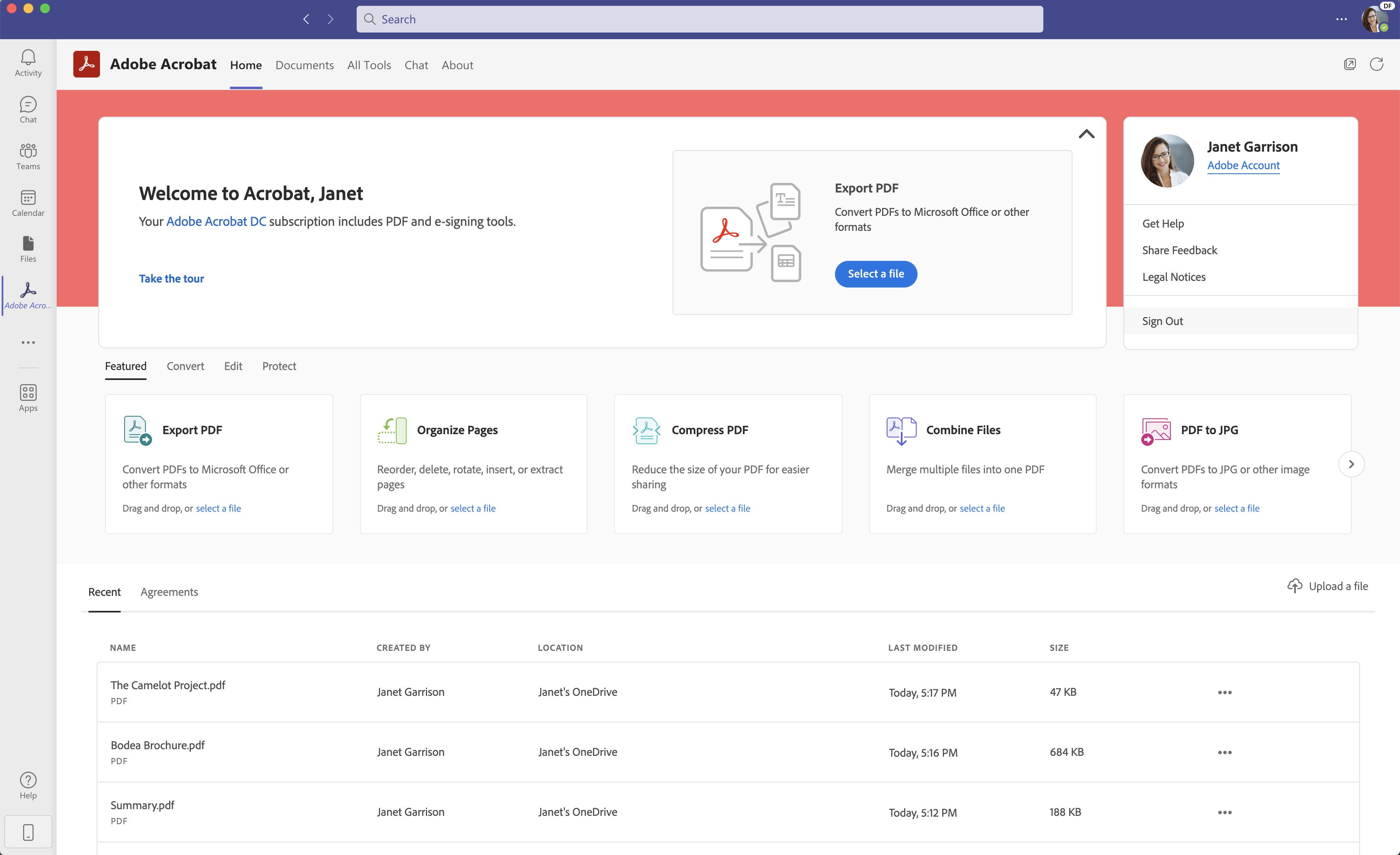
Démo de Adobe Acrobat - Acrobat for Microsoft Teams
Seamlessly create, edit, convert, and share PDF files all from within Microsoft Teams – as part of Acrobat integrations with Microsoft 365 apps.
Démo de Adobe Acrobat - Adobe Scan
With Adobe Scan mobile app, easily capture and convert documents into high-quality, interactive PDF documents you can fill out, sign, and share. Eliminate the hassle of finding a printer, filling a form by hand, and scanning it again.
Get faster insights with AI, create standout content with Adobe Express, and use the PDF tools you trust, all in one place.
Lancer la vidéo de Adobe Acrobat
Get faster insights with AI, create standout content with Adobe Express, and use the PDF tools you trust, all in one place.
Image de l'avatar du produit

Avez-vous déjà utilisé Adobe Acrobat auparavant?

Répondez à quelques questions pour aider la communauté Adobe Acrobat

Avis Adobe Acrobat (4,965)

Voir les avis vidéo de 5
Avis

Avis Adobe Acrobat (4,965)

Voir les avis vidéo de 5
4.5
Avis 4,965

Résumé de l'examen

Généré à l'aide de l'IA à partir de véritables avis d'utilisateurs
Les utilisateurs louent constamment Adobe Acrobat pour sa facilité d'utilisation et ses fonctionnalités d'édition robustes, qui simplifient les tâches de gestion de documents telles que l'édition, la signature et la conversion de PDF. Beaucoup apprécient sa capacité à gérer des documents complexes tout en maintenant l'intégrité du formatage, ce qui en fait un choix fiable pour les professionnels. Cependant, certains utilisateurs notent que le logiciel peut sembler cher et gourmand en ressources, en particulier sur les appareils plus anciens.

Avantages & Inconvénients

Généré à partir de véritables avis d'utilisateurs
Voir tous les avantages et inconvénients
Rechercher des avis
Filtrer les avis
Effacer les résultats
Les avis G2 sont authentiques et vérifiés.
Yash A.
YA
Sr. Designer and Software Tester
Production médiatique
Petite entreprise (50 employés ou moins)
Utilisateurs invités ou non professionnels du logiciel, non inclus dans les scores G2.
"Efficient All-in-One PDF Solution Featuring AI, OCR, and E-Signatures"
Qu'aimez-vous le plus à propos de Adobe Acrobat?

I value most about Adobe Acrobat is its all-in-one functionality and intuitive interface, which makes it easy to create and manage professional PDFs. The AI Assistant is a big advantage, helping me quickly summarize long documents, while OCR accurately converts scanned files into editable text. Its seamless integration with Microsoft 365 and Google Drive improves our workflow, especially for e-signatures, saving time and boosting ROI. Performance is reliable even with heavy files, and the platform is easy to use with minimal onboarding. Avis collecté par et hébergé sur G2.com.

Que n’aimez-vous pas à propos de Adobe Acrobat?

While Acrobat is the industry standard, its subscription pricing can be quite expensive for small businesses or individual users, especially compared to free or more affordable alternatives. Additionally, accessing direct customer support can be challenging; although the help documentation is extensive, getting personalized assistance with specific billing issues or technical bugs often takes longer than anticipated. Avis collecté par et hébergé sur G2.com.

Kumar G.
KG
Associate - Principal
Logiciels informatiques
Entreprise (> 1000 employés)
"Fast, User-Friendly PDF Workflow with Helpful Support and AI Chat"
Qu'aimez-vous le plus à propos de Adobe Acrobat?

Adobe acrobat has been instrumental product with user friendly interface and has clean UI to interact with different options. I use this product in my company for reading the pdf documents, creating new, document,, e signing, creating pdf and merging the pdf documents on my day to day work. The product opens fast and I have seamless experience in terms of navigation browse option and final output generation. The recent AI enabled chat feature is really helpful for interactive conversation with the pdf document. Currently we are using MS Sharepoint for working with PDF docs using Adobe Acrobat. Since the product has enterprise subscription by the company and competitive discount ~45% was received last year. The product support team is helpful to resolve the issues within stipulated time frame. Highly recommended software for pdf documents. Avis collecté par et hébergé sur G2.com.

Que n’aimez-vous pas à propos de Adobe Acrobat?

Adobe acrobat isn't free, even trial requires card information for initial signup so you can't try individually without a valid card for initial 7 days trial only. Trial period also comes with limitation of the product usage.. If you have only pdf read requirement then reader version is free but playing around the pdf docs requires subscription. Sometimes large files opening causes the software stuck and system hangs. Avis collecté par et hébergé sur G2.com.

Shoaib  N.
SN
Sales Executive
Marché intermédiaire (51-1000 employés)
Utilisateurs invités ou non professionnels du logiciel, non inclus dans les scores G2.
"AI Assistant Makes Chatting With PDFs and One-Click Summaries Effortless"
Qu'aimez-vous le plus à propos de Adobe Acrobat?

The New AI Assistant has been a game-changer for me. I can chat with my PDFs and ask questions, and the one-click summaries make it easy to generate summaries or even draft emails based on the document content without leaving the app. Avis collecté par et hébergé sur G2.com.

Que n’aimez-vous pas à propos de Adobe Acrobat?

There is nothing much to dislike about adobe acrobat. However If you sign up for a "monthly" plan that is actually an "annual plan paid monthly," they often charge a 50% remaining-contract fee if you try to cancel early. Avis collecté par et hébergé sur G2.com.

MW
Sales Administration Support
Technologie de l'information et services
Petite entreprise (50 employés ou moins)
"Easy-to-Use Tool for Image Markups, Screenshots, and Floor Plan Annotations"
Qu'aimez-vous le plus à propos de Adobe Acrobat?

I like that it’s very easy to use and helps me mark up the images I need to annotate. It’s been helpful because I use it to draw on images, circle items, and add graphics to floor plans or to customer quotes. It’s also useful for taking screenshots and removing key elements, like images I want to modify for graphics or web design. Avis collecté par et hébergé sur G2.com.

Que n’aimez-vous pas à propos de Adobe Acrobat?

When I first started using it, I didn’t find it very intuitive to figure out where certain functions were located. I know now that basic things like editing text or viewing image layers are easy to find, but in the beginning it took some trial and error, plus reading the help docs and doing a few searches, to get the answers I needed. Also, with certain documents, when I try to change the view or edit, there can be too many layers and it ends up locking up my computer. I’ve found that simply changing the view lets me re-orient the image without causing my PC to freeze when the layers start going all wacky. Avis collecté par et hébergé sur G2.com.

Bobby M.
BM
Staff Software Test Engineer
Entreprise (> 1000 employés)
"Fast, Beautiful UI with Powerful Sharing and AI Summaries in Acrobat by Bobby"
Qu'aimez-vous le plus à propos de Adobe Acrobat?

Structured view for the data and formatted to be presented for any documentation. The data is able to share for the others to review. The Acrobat reader allows us to open the pdf formatted documents to be esigned and shared as a quickest means. The new AI features in acrobat allows to summarize the documentation in case if we need a quick overview.

It's easy to be integrated for the documents to open in acrobat. The UI/ UX is good and beautifully presentable. The documents are able to open faster relying on the performance enhancements by the Acrobat.

The new pricing is affordable in case if we need any documents be edited. Avis collecté par et hébergé sur G2.com.

Que n’aimez-vous pas à propos de Adobe Acrobat?

The only drawback these days while using the Acrobat is with the buy option which pops in multiple times unlike the prior days where it was ok in using the reader for viewing as free. Avis collecté par et hébergé sur G2.com.

Surbhi B.
SB
Writer
Petite entreprise (50 employés ou moins)
Utilisateurs invités ou non professionnels du logiciel, non inclus dans les scores G2.
"All-in-One PDF Tool with a Simple UI and Seamless Cross-Device Access"
Qu'aimez-vous le plus à propos de Adobe Acrobat?

I mainly use the software for PDFs, and I have found it extremely useful. It's a one-solution-for-all product that lets me manage, create highlights, convert, and perform other tasks, which saves time and works well. The user interface is really simple, and this makes navigation easy. I have used other readers as well and have found them to have poor navigation, which affects the overall quality. I can edit the PDF well, and it allows me to e-sign, which is quite important for contracts and invoices. It works smoothly across desktop, mobile, and cloud, so I can access files anywhere. Also, I recently used a new AI feature that gives me quick summaries, saving time. Another good aspect is the onboarding. As software, it is very simple to get started with. There are not many technical or complex steps that can throw off someone who is not tech-savvy. Avis collecté par et hébergé sur G2.com.

Que n’aimez-vous pas à propos de Adobe Acrobat?

This is a bit hard to pinpoint. But if there is something to be pointed then one is the pricing. While this is not too much for beginners, it can be a breaking point at times. Also, there should be some simpler features. Like the drag and drop or real-time working with team as in Docs, these can be good addition. Alsom these are the features that people actually need to save time. If those are in pro, these basic features need to be there in the primary model as well. Avis collecté par et hébergé sur G2.com.

Sagar J.
SJ
Consultant
Entreprise (> 1000 employés)
"User-Friendly PDF Editing with Powerful Security and Digitization Features"
Qu'aimez-vous le plus à propos de Adobe Acrobat?

Adobe Acrobat was a useful PDF editing software for my day to day work deliverables, not only for turning around official work documents quickly, but also for editing my personal PDF files. I found the software interface really user-friendly and easy for new users to get started with.

The editing capabilities Adobe Acrobat provides for PDFs are exactly what professionals like myself would need to get documents edited and sent out quickly. It allowed me to edit text, graphics, and images, and it also made it easy to add my official signature to work documents. I also used the redact feature very often when sharing highly confidential documents, which was a super useful option in my opinion.

Another helpful feature that I used very often was the Scan & OCR which worked very accurately and helped digitize paper documents in a short amount of time, saving on manual digitization effort.

Finally, the security features—like being able to password-protect documents and sign them digitally—were very helpful while sending out documents to clients in official settings. Avis collecté par et hébergé sur G2.com.

Que n’aimez-vous pas à propos de Adobe Acrobat?

While working with larger PDF files, I’ve noticed that Adobe sometimes lagged and took a long time to process the document, which was frustrating. It also crashed a few times when I was dealing with bigger files, which isn’t ideal—especially when I was on a time crunch to meet tight deadlines.

I also feel that the subscription cost of Adobe Acrobat can be quite expensive for many users. Avis collecté par et hébergé sur G2.com.

Muhammad O.
MO
Salesforce Business Analyst
Technologie de l'information et services
Petite entreprise (50 employés ou moins)
Utilisateurs invités ou non professionnels du logiciel, non inclus dans les scores G2.
"Easy to use PDF tool that saves me a lot of time"
Qu'aimez-vous le plus à propos de Adobe Acrobat?

Adobe Acrobat is very convenient for working with PDF files. It lets me quickly access, organize, and manage my PDF documents without any hassle. Features like viewing, sharing, and filling out forms are especially helpful. I often use it to open documents, make small edits, and sign files when needed, which saves me a lot of time. The performance feels smooth, and the layout makes it easy to find what I’m looking for. Overall, it makes handling documents faster and keeps everything more organized. Avis collecté par et hébergé sur G2.com.

Que n’aimez-vous pas à propos de Adobe Acrobat?

One downside is that many useful editing features require a subscription. It can also take a while to load larger PDF files, and on lower-end systems the application can feel a bit heavy at times. The user interface may be slightly confusing for new users at first, so there can be a small learning curve. Overall, though, it works well for basic PDF viewing and sharing. Avis collecté par et hébergé sur G2.com.

Prem C.
PC
Full stack developer
Logiciels informatiques
Petite entreprise (50 employés ou moins)
Utilisateurs invités ou non professionnels du logiciel, non inclus dans les scores G2.
"La centrale PDF qui s'intègre réellement dans les flux de travail de développement"
Qu'aimez-vous le plus à propos de Adobe Acrobat?

Honnêtement, ce qui m'a conquis, c'est la façon dont Adobe Acrobat s'intègre parfaitement dans un environnement de développement rapide où le délai de traitement des documents est important. Je travaille sur plusieurs projets clients simultanément, et les capacités d'édition à elles seules m'ont fait gagner d'innombrables heures. Je peux plonger dans n'importe quel PDF, restructurer le contenu, échanger des pages ou ajouter des annotations sans jamais avoir besoin du fichier source. Les outils de commentaire et de marquage sont vraiment utiles lors des cycles de révision de conception. Je peux déposer des commentaires précis directement sur les maquettes d'interface utilisateur ou les documents techniques et les partager en quelques minutes. Le flux de travail de signature électronique mérite une mention spéciale : ce qui nécessitait auparavant d'imprimer, de signer, de numériser et d'envoyer par e-mail est maintenant une tâche de deux minutes. Pour les contrats, les NDA et les approbations des clients, cela a été un véritable changement de jeu. J'apprécie également la cohérence de l'apparence des documents sur chaque appareil et système d'exploitation, ce qui est très important lors de la livraison de documents soignés à des clients non techniques. Avis collecté par et hébergé sur G2.com.

Que n’aimez-vous pas à propos de Adobe Acrobat?

Les performances peuvent subir une baisse notable lorsqu'on travaille avec des PDF lourds en graphismes ou à plusieurs couches sur du matériel de milieu de gamme. La structure tarifaire semble également élevée pour les développeurs indépendants ou les petits studios qui n'ont pas besoin de l'ensemble complet des fonctionnalités d'entreprise. Certains outils avancés nécessitent une véritable courbe d'apprentissage avant de devenir intuitifs. Avis collecté par et hébergé sur G2.com.

Thomas L.
TL
Director, Media & Digital Marketing
Entreprise (> 1000 employés)
"Essential PDF Editing with Outstanding Accessibility Tools"
Qu'aimez-vous le plus à propos de Adobe Acrobat?

If I had a nickel for every PDF I've had to edit over the years, I'd be a very wealthy man. I really appreciate being able to organize pages, combine PDFs, update text, use forms and e-signatures, and take advantage of some of the security tools. However, what I value most is the accessibility checker. It's always important to me to ensure that any PDF hosted online is compliant. Avis collecté par et hébergé sur G2.com.

Que n’aimez-vous pas à propos de Adobe Acrobat?

I don't have many complaints about the product, as it seems to be the industry standard. That said, I do find Docusign to be much more user-friendly when it comes to their e-signature feature. Avis collecté par et hébergé sur G2.com.

Des questions sur Adobe Acrobat ? Demandez à de vrais utilisateurs ou explorez les réponses de la communauté.

Obtenez des réponses pratiques, des flux de travail réels et des avantages et inconvénients honnêtes de la communauté G2 ou partagez vos idées.

GU
Guest User
Dernière activité il y a 17 jours

Quelle est la différence entre Adobe Acrobat DC et Adobe Acrobat Reader DC ?

3 Votes positifs
4
Rejoignez la conversation
GU
Guest User
Dernière activité il y a 5 jours

Comment Adobe Acrobat redéfinit-il la manière dont les professionnels travaillent avec les PDF pour la documentation et la collaboration ?

7 Votes positifs
5
Rejoignez la conversation

Options de tarification

Tarification fournie par Adobe Acrobat.

Acrobat Studio for teams

À partir de $29.99
2 License Par mois

Acrobat Pro for teams

À partir de $23.99
2 License Par mois

Acrobat Studio for Individuals

$24.99
1 Single User Par mois
Comparaisons Adobe Acrobat
Image de l'avatar du produit
Foxit PDF Editor
Comparer maintenant
Image de l'avatar du produit
PDF-XChange Editor
Comparer maintenant
Image de l'avatar du produit
Nitro PDF
Comparer maintenant
Fonctionnalités de Adobe Acrobat
Signature de documents
Protéger
Gestion des documents
Numérisation de documents
Taille
Modifier les champs
Nouveau PDF
Historique des revisions
Éditeur de document
Image de l'avatar du produit
Adobe Acrobat