2026 Best Software Awards are here!See the list

Best Vendor Management Software for Small Business

Nathan Calabrese
NC
Researched and written by Nathan Calabrese

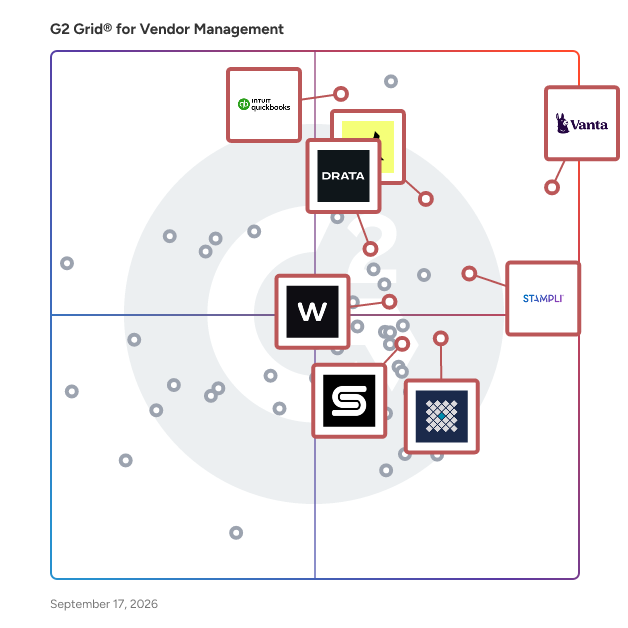
Products classified in the overall Vendor Management category are similar in many regards and help companies of all sizes solve their business problems. However, small business features, pricing, setup, and installation differ from businesses of other sizes, which is why we match buyers to the right Small Business Vendor Management to fit their needs. Compare product ratings based on reviews from enterprise users or connect with one of G2's buying advisors to find the right solutions within the Small Business Vendor Management category.

In addition to qualifying for inclusion in the Vendor Management Software category, to qualify for inclusion in the Small Business Vendor Management Software category, a product must have at least 10 reviews left by a reviewer from a small business.

Show More
Show Less

G2 takes pride in showing unbiased reviews on user satisfaction in our ratings and reports. We do not allow paid placements in any of our ratings, rankings, or reports. Learn about our scoring methodologies.

1 filter applied
Clear All

16 Listings in Small Business Vendor Management Available

(2,343)4.6 out of 5
Optimized for quick response
4th Easiest To Use in Vendor Management software
View top Consulting Services for Vanta
  • Overview
    Expand/Collapse Overview
  • Product Description
    How are these determined?Information
    This description is provided by the seller.

    Vanta is the leading AI trust management platform that lets you manage your trust, risk, and compliance programs—all in a single platform. Thousands of fast-growing companies—like Atlassian, Quora, an

    Users
    • CTO
    • CEO
    Industries
    • Computer Software
    • Information Technology and Services
    Market Segment
    • 55% Small-Business
    • 39% Mid-Market
    User Sentiment
    How are these determined?Information
    These insights, currently in beta, are compiled from user reviews and grouped to display a high-level overview of the software.
    • Vanta is a compliance management tool that automates the process of preparing for audits like SOC 2, ISO 27001, HIPAA, and GDPR by integrating with user tools to collect evidence automatically.
    • Reviewers appreciate Vanta's ease of use, its ability to integrate with various tools, and its automation of evidence collection, which saves significant time and effort.
    • Users mentioned issues with Vanta's pricing, particularly for smaller companies, occasional difficulties with integrations, and a desire for more robust reporting and vendor risk management features.
  • Pros and Cons
    Expand/Collapse Pros and Cons
  • Vanta Pros and Cons
    How are these determined?Information
    Pros and Cons are compiled from review feedback and grouped into themes to provide an easy-to-understand summary of user reviews.
    Pros
    Ease of Use
    798
    Compliance
    606
    Integrations
    463
    Automation
    457
    Time-saving
    446
    Cons
    Integration Issues
    207
    Pricing Issues
    178
    Expensive
    173
    Limited Integrations
    172
    Missing Features
    165
  • User Satisfaction
    Expand/Collapse User Satisfaction
  • Vanta features and usability ratings that predict user satisfaction
    8.9
    Ease of Use
    Average: 8.9
    8.1
    Usage Tracking
    Average: 8.1
    6.5
    Deferred Revenue
    Average: 7.7
    6.5
    Revenue Accrual
    Average: 7.6
  • Seller Details
    Expand/Collapse Seller Details
  • Seller Details
    Seller
    Vanta
    Company Website
    Year Founded
    2018
    HQ Location
    San Francisco, California
    Twitter
    @TrustVanta
    4,236 Twitter followers
    LinkedIn® Page
    www.linkedin.com
    1,624 employees on LinkedIn®
Product Description
How are these determined?Information
This description is provided by the seller.

Vanta is the leading AI trust management platform that lets you manage your trust, risk, and compliance programs—all in a single platform. Thousands of fast-growing companies—like Atlassian, Quora, an

Users
  • CTO
  • CEO
Industries
  • Computer Software
  • Information Technology and Services
Market Segment
  • 55% Small-Business
  • 39% Mid-Market
User Sentiment
How are these determined?Information
These insights, currently in beta, are compiled from user reviews and grouped to display a high-level overview of the software.
  • Vanta is a compliance management tool that automates the process of preparing for audits like SOC 2, ISO 27001, HIPAA, and GDPR by integrating with user tools to collect evidence automatically.
  • Reviewers appreciate Vanta's ease of use, its ability to integrate with various tools, and its automation of evidence collection, which saves significant time and effort.
  • Users mentioned issues with Vanta's pricing, particularly for smaller companies, occasional difficulties with integrations, and a desire for more robust reporting and vendor risk management features.
Vanta Pros and Cons
How are these determined?Information
Pros and Cons are compiled from review feedback and grouped into themes to provide an easy-to-understand summary of user reviews.
Pros
Ease of Use
798
Compliance
606
Integrations
463
Automation
457
Time-saving
446
Cons
Integration Issues
207
Pricing Issues
178
Expensive
173
Limited Integrations
172
Missing Features
165
Vanta features and usability ratings that predict user satisfaction
8.9
Ease of Use
Average: 8.9
8.1
Usage Tracking
Average: 8.1
6.5
Deferred Revenue
Average: 7.7
6.5
Revenue Accrual
Average: 7.6
Seller Details
Seller
Vanta
Company Website
Year Founded
2018
HQ Location
San Francisco, California
Twitter
@TrustVanta
4,236 Twitter followers
LinkedIn® Page
www.linkedin.com
1,624 employees on LinkedIn®
(3,692)4.0 out of 5
8th Easiest To Use in Vendor Management software
View top Consulting Services for QuickBooks Online
Entry Level Price:$38.00
  • Overview
    Expand/Collapse Overview
  • Product Description
    How are these determined?Information
    This description is provided by the seller.

    Easy Online Accounting to Organize Your Finances in One Place. Run your entire business with the #1 small business cloud accounting solution!

    Users
    • Owner
    • President
    Industries
    • Accounting
    • Construction
    Market Segment
    • 81% Small-Business
    • 15% Mid-Market
    User Sentiment
    How are these determined?Information
    These insights, currently in beta, are compiled from user reviews and grouped to display a high-level overview of the software.
    • QuickBooks Online is a cloud-based accounting software that integrates with banks and offers features such as invoicing, payroll, and financial reporting.
    • Reviewers like the software's ease of use, real-time access, automatic bank feeds, powerful reporting, and the ability to manage finances from anywhere, making bookkeeping faster, accurate, and well-organized.
    • Reviewers noted issues with high subscription costs, occasional disconnection or miscategorization of bank feeds, limited customization for complex accounting needs, and slow or inconsistent customer support.
  • Pros and Cons
    Expand/Collapse Pros and Cons
  • QuickBooks Online Pros and Cons
    How are these determined?Information
    Pros and Cons are compiled from review feedback and grouped into themes to provide an easy-to-understand summary of user reviews.
    Pros
    Ease of Use
    254
    Cloud-Based
    72
    Integrations
    69
    Intuitive
    69
    Easy Access
    68
    Cons
    Missing Features
    81
    Expensive
    70
    Poor Customer Support
    52
    High Fees
    49
    Learning Curve
    46
  • User Satisfaction
    Expand/Collapse User Satisfaction
  • QuickBooks Online features and usability ratings that predict user satisfaction
    8.2
    Ease of Use
    Average: 8.9
    8.4
    Usage Tracking
    Average: 8.1
    8.2
    Deferred Revenue
    Average: 7.7
    8.3
    Revenue Accrual
    Average: 7.6
  • Seller Details
    Expand/Collapse Seller Details
  • Seller Details
    Seller
    Intuit
    Year Founded
    1983
    HQ Location
    Mountain View, California
    Twitter
    @Intuit
    80,540 Twitter followers
    LinkedIn® Page
    www.linkedin.com
    17,317 employees on LinkedIn®
    Ownership
    VIE:INTU
Product Description
How are these determined?Information
This description is provided by the seller.

Easy Online Accounting to Organize Your Finances in One Place. Run your entire business with the #1 small business cloud accounting solution!

Users
  • Owner
  • President
Industries
  • Accounting
  • Construction
Market Segment
  • 81% Small-Business
  • 15% Mid-Market
User Sentiment
How are these determined?Information
These insights, currently in beta, are compiled from user reviews and grouped to display a high-level overview of the software.
  • QuickBooks Online is a cloud-based accounting software that integrates with banks and offers features such as invoicing, payroll, and financial reporting.
  • Reviewers like the software's ease of use, real-time access, automatic bank feeds, powerful reporting, and the ability to manage finances from anywhere, making bookkeeping faster, accurate, and well-organized.
  • Reviewers noted issues with high subscription costs, occasional disconnection or miscategorization of bank feeds, limited customization for complex accounting needs, and slow or inconsistent customer support.
QuickBooks Online Pros and Cons
How are these determined?Information
Pros and Cons are compiled from review feedback and grouped into themes to provide an easy-to-understand summary of user reviews.
Pros
Ease of Use
254
Cloud-Based
72
Integrations
69
Intuitive
69
Easy Access
68
Cons
Missing Features
81
Expensive
70
Poor Customer Support
52
High Fees
49
Learning Curve
46
QuickBooks Online features and usability ratings that predict user satisfaction
8.2
Ease of Use
Average: 8.9
8.4
Usage Tracking
Average: 8.1
8.2
Deferred Revenue
Average: 7.7
8.3
Revenue Accrual
Average: 7.6
Seller Details
Seller
Intuit
Year Founded
1983
HQ Location
Mountain View, California
Twitter
@Intuit
80,540 Twitter followers
LinkedIn® Page
www.linkedin.com
17,317 employees on LinkedIn®
Ownership
VIE:INTU
G2 Advertising
Sponsored
G2 Advertising
Get 2x conversion than Google Ads with G2 Advertising!
G2 Advertising places your product in premium positions on high-traffic pages and on targeted competitor pages to reach buyers at key comparison moments.
(2,338)4.8 out of 5
Optimized for quick response
3rd Easiest To Use in Vendor Management software
View top Consulting Services for Ramp
Entry Level Price:Free
  • Overview
    Expand/Collapse Overview
  • Product Description
    How are these determined?Information
    This description is provided by the seller.

    Ramp is the ultimate platform for modern finance teams. From corporate cards and expense management software to bill payments and vendor management, Ramp is the all-in-one solution designed to automat

    Users
    • CEO
    • Controller
    Industries
    • Computer Software
    • Information Technology and Services
    Market Segment
    • 57% Small-Business
    • 38% Mid-Market
    User Sentiment
    How are these determined?Information
    These insights, currently in beta, are compiled from user reviews and grouped to display a high-level overview of the software.
    • Ramp is a financial management platform that allows users to track spending, reconcile receipts, and manage budgets.
    • Reviewers frequently mention the ease of use, the ability to upload receipts and track spending, and the helpful security features such as the ability to lock the credit card.
    • Reviewers experienced issues with the copy-and-paste feature, occasional system failures to recognize receipts, slow invoice processing times, and some found the reminder notifications to be annoying.
  • Pros and Cons
    Expand/Collapse Pros and Cons
  • Ramp Pros and Cons
    How are these determined?Information
    Pros and Cons are compiled from review feedback and grouped into themes to provide an easy-to-understand summary of user reviews.
    Pros
    Ease of Use
    776
    Expense Management
    433
    Efficiency
    295
    Receipt Management
    276
    Simple
    227
    Cons
    Missing Features
    108
    Receipt Management
    106
    Card Issues
    99
    Approval Issues
    83
    Manual Entry
    69
  • User Satisfaction
    Expand/Collapse User Satisfaction
  • Ramp features and usability ratings that predict user satisfaction
    9.5
    Ease of Use
    Average: 8.9
    8.6
    Usage Tracking
    Average: 8.1
    7.1
    Deferred Revenue
    Average: 7.7
    7.3
    Revenue Accrual
    Average: 7.6
  • Seller Details
    Expand/Collapse Seller Details
  • Seller Details
    Company Website
    Year Founded
    2019
    HQ Location
    New York
    Twitter
    @tryramp
    33,231 Twitter followers
    LinkedIn® Page
    www.linkedin.com
    3,780 employees on LinkedIn®
Product Description
How are these determined?Information
This description is provided by the seller.

Ramp is the ultimate platform for modern finance teams. From corporate cards and expense management software to bill payments and vendor management, Ramp is the all-in-one solution designed to automat

Users
  • CEO
  • Controller
Industries
  • Computer Software
  • Information Technology and Services
Market Segment
  • 57% Small-Business
  • 38% Mid-Market
User Sentiment
How are these determined?Information
These insights, currently in beta, are compiled from user reviews and grouped to display a high-level overview of the software.
  • Ramp is a financial management platform that allows users to track spending, reconcile receipts, and manage budgets.
  • Reviewers frequently mention the ease of use, the ability to upload receipts and track spending, and the helpful security features such as the ability to lock the credit card.
  • Reviewers experienced issues with the copy-and-paste feature, occasional system failures to recognize receipts, slow invoice processing times, and some found the reminder notifications to be annoying.
Ramp Pros and Cons
How are these determined?Information
Pros and Cons are compiled from review feedback and grouped into themes to provide an easy-to-understand summary of user reviews.
Pros
Ease of Use
776
Expense Management
433
Efficiency
295
Receipt Management
276
Simple
227
Cons
Missing Features
108
Receipt Management
106
Card Issues
99
Approval Issues
83
Manual Entry
69
Ramp features and usability ratings that predict user satisfaction
9.5
Ease of Use
Average: 8.9
8.6
Usage Tracking
Average: 8.1
7.1
Deferred Revenue
Average: 7.7
7.3
Revenue Accrual
Average: 7.6
Seller Details
Company Website
Year Founded
2019
HQ Location
New York
Twitter
@tryramp
33,231 Twitter followers
LinkedIn® Page
www.linkedin.com
3,780 employees on LinkedIn®
Entry Level Price:Free
  • Overview
    Expand/Collapse Overview
  • Product Description
    How are these determined?Information
    This description is provided by the seller.

    RecruitiFi is the next-generation Vendor Management System built to streamline third-party recruitment for both permanent placement hires and your contingent workforce. Designed for today’s enterpr

    Users
    • Director
    Industries
    • Staffing and Recruiting
    • Hospital & Health Care
    Market Segment
    • 65% Small-Business
    • 16% Mid-Market
    User Sentiment
    How are these determined?Information
    These insights, currently in beta, are compiled from user reviews and grouped to display a high-level overview of the software.
    • RecruitiFi is a vendor management system that streamlines the recruitment process and invoicing for both recruiters and clients.
    • Reviewers frequently mention the platform's ease of use, clear and transparent terms, and the ability to communicate directly with hiring managers, which leads to successful results and efficient recruitment.
    • Reviewers experienced limitations in communication, delays in responses from vendors, and issues with data accuracy, requiring them to submit an email to get it fixed.
  • Pros and Cons
    Expand/Collapse Pros and Cons
  • RecruitiFi Pros and Cons
    How are these determined?Information
    Pros and Cons are compiled from review feedback and grouped into themes to provide an easy-to-understand summary of user reviews.
    Pros
    Ease of Use
    44
    Customer Support
    26
    Business Growth
    18
    Candidate Management
    11
    Job Posting
    11
    Cons
    Candidate Management
    6
    Poor Customer Support
    6
    Inconvenience
    3
    Limited Filtering
    3
    Contact Information
    2
  • User Satisfaction
    Expand/Collapse User Satisfaction
  • RecruitiFi features and usability ratings that predict user satisfaction
    9.7
    Ease of Use
    Average: 8.9
    9.2
    Usage Tracking
    Average: 8.1
    9.2
    Deferred Revenue
    Average: 7.7
    9.2
    Revenue Accrual
    Average: 7.6
  • Seller Details
    Expand/Collapse Seller Details
  • Seller Details
    Company Website
    Year Founded
    2013
    HQ Location
    New York, NY
    LinkedIn® Page
    www.linkedin.com
    27 employees on LinkedIn®
Product Description
How are these determined?Information
This description is provided by the seller.

RecruitiFi is the next-generation Vendor Management System built to streamline third-party recruitment for both permanent placement hires and your contingent workforce. Designed for today’s enterpr

Users
  • Director
Industries
  • Staffing and Recruiting
  • Hospital & Health Care
Market Segment
  • 65% Small-Business
  • 16% Mid-Market
User Sentiment
How are these determined?Information
These insights, currently in beta, are compiled from user reviews and grouped to display a high-level overview of the software.
  • RecruitiFi is a vendor management system that streamlines the recruitment process and invoicing for both recruiters and clients.
  • Reviewers frequently mention the platform's ease of use, clear and transparent terms, and the ability to communicate directly with hiring managers, which leads to successful results and efficient recruitment.
  • Reviewers experienced limitations in communication, delays in responses from vendors, and issues with data accuracy, requiring them to submit an email to get it fixed.
RecruitiFi Pros and Cons
How are these determined?Information
Pros and Cons are compiled from review feedback and grouped into themes to provide an easy-to-understand summary of user reviews.
Pros
Ease of Use
44
Customer Support
26
Business Growth
18
Candidate Management
11
Job Posting
11
Cons
Candidate Management
6
Poor Customer Support
6
Inconvenience
3
Limited Filtering
3
Contact Information
2
RecruitiFi features and usability ratings that predict user satisfaction
9.7
Ease of Use
Average: 8.9
9.2
Usage Tracking
Average: 8.1
9.2
Deferred Revenue
Average: 7.7
9.2
Revenue Accrual
Average: 7.6
Seller Details
Company Website
Year Founded
2013
HQ Location
New York, NY
LinkedIn® Page
www.linkedin.com
27 employees on LinkedIn®
(1,861)4.6 out of 5
Optimized for quick response
1st Easiest To Use in Vendor Management software
Entry Level Price:Contact Us
  • Overview
    Expand/Collapse Overview
  • Product Description
    How are these determined?Information
    This description is provided by the seller.

    Stampli is the stress-free finance operations platform. Its AI-driven procure-to-pay solution runs processes from request through payment while remaining fully aligned to the ERP as the system of reco

    Users
    • Controller
    • Staff Accountant
    Industries
    • Accounting
    • Hospital & Health Care
    Market Segment
    • 61% Mid-Market
    • 27% Small-Business
    User Sentiment
    How are these determined?Information
    These insights, currently in beta, are compiled from user reviews and grouped to display a high-level overview of the software.
    • Stampli is a software used for processing and approving invoices, helping users to organize and find prior invoices quickly and efficiently.
    • Reviewers frequently mention the ease of use, clear instructions, and the ability to approve and disapprove invoices directly through the site, as well as the software's user-friendly layout and fast processing speed.
    • Reviewers mentioned issues with the back button functionality, difficulty in viewing previous invoices, slow processing time of invoices, and challenges with the Stampli Card process.
  • Pros and Cons
    Expand/Collapse Pros and Cons
  • Stampli Pros and Cons
    How are these determined?Information
    Pros and Cons are compiled from review feedback and grouped into themes to provide an easy-to-understand summary of user reviews.
    Pros
    Ease of Use
    669
    Invoicing
    350
    Intuitive
    307
    Efficiency
    300
    Customer Support
    289
    Cons
    Invoice Issues
    159
    Missing Features
    130
    Approval Issues
    119
    Technical Issues
    106
    Invoicing Issues
    104
  • User Satisfaction
    Expand/Collapse User Satisfaction
  • Stampli features and usability ratings that predict user satisfaction
    9.3
    Ease of Use
    Average: 8.9
    7.9
    Usage Tracking
    Average: 8.1
    7.1
    Deferred Revenue
    Average: 7.7
    7.3
    Revenue Accrual
    Average: 7.6
  • Seller Details
    Expand/Collapse Seller Details
  • Seller Details
    Seller
    Stampli
    Company Website
    Year Founded
    2015
    HQ Location
    Mountain View, California
    Twitter
    @stampli
    9,195 Twitter followers
    LinkedIn® Page
    www.linkedin.com
    303 employees on LinkedIn®
Product Description
How are these determined?Information
This description is provided by the seller.

Stampli is the stress-free finance operations platform. Its AI-driven procure-to-pay solution runs processes from request through payment while remaining fully aligned to the ERP as the system of reco

Users
  • Controller
  • Staff Accountant
Industries
  • Accounting
  • Hospital & Health Care
Market Segment
  • 61% Mid-Market
  • 27% Small-Business
User Sentiment
How are these determined?Information
These insights, currently in beta, are compiled from user reviews and grouped to display a high-level overview of the software.
  • Stampli is a software used for processing and approving invoices, helping users to organize and find prior invoices quickly and efficiently.
  • Reviewers frequently mention the ease of use, clear instructions, and the ability to approve and disapprove invoices directly through the site, as well as the software's user-friendly layout and fast processing speed.
  • Reviewers mentioned issues with the back button functionality, difficulty in viewing previous invoices, slow processing time of invoices, and challenges with the Stampli Card process.
Stampli Pros and Cons
How are these determined?Information
Pros and Cons are compiled from review feedback and grouped into themes to provide an easy-to-understand summary of user reviews.
Pros
Ease of Use
669
Invoicing
350
Intuitive
307
Efficiency
300
Customer Support
289
Cons
Invoice Issues
159
Missing Features
130
Approval Issues
119
Technical Issues
106
Invoicing Issues
104
Stampli features and usability ratings that predict user satisfaction
9.3
Ease of Use
Average: 8.9
7.9
Usage Tracking
Average: 8.1
7.1
Deferred Revenue
Average: 7.7
7.3
Revenue Accrual
Average: 7.6
Seller Details
Seller
Stampli
Company Website
Year Founded
2015
HQ Location
Mountain View, California
Twitter
@stampli
9,195 Twitter followers
LinkedIn® Page
www.linkedin.com
303 employees on LinkedIn®
(448)4.5 out of 5
6th Easiest To Use in Vendor Management software
View top Consulting Services for SAP Fieldglass
  • Overview
    Expand/Collapse Overview
  • Product Description
    How are these determined?Information
    This description is provided by the seller.

    Drive better business outcomes with a robust Vendor Management System (VMS) to find, engage, and manage your global external workforce – including temporary workers, freelancers, contractors, consulta

    Users
    • Recruiter
    • Assistant Manager
    Industries
    • Staffing and Recruiting
    • Information Technology and Services
    Market Segment
    • 41% Enterprise
    • 40% Mid-Market
    User Sentiment
    How are these determined?Information
    These insights, currently in beta, are compiled from user reviews and grouped to display a high-level overview of the software.
    • SAP Fieldglass is a platform that manages contracts, invoices, budgets, and external workforces, providing visibility and ensuring compliance.
    • Users like the centralized, structured workflows, automation features, real-time analytics, and seamless integration with SAP and other systems, which contribute to cost control, risk reduction, and improved efficiency.
    • Reviewers mentioned the complex user interface, rigid reporting, integration challenges, workflow inflexibility, and limited supplier insights as areas that could be improved.
  • Pros and Cons
    Expand/Collapse Pros and Cons
  • SAP Fieldglass Pros and Cons
    How are these determined?Information
    Pros and Cons are compiled from review feedback and grouped into themes to provide an easy-to-understand summary of user reviews.
    Pros
    Ease of Use
    48
    Time-Saving
    18
    Features
    17
    Visibility
    16
    Process Simplification
    13
    Cons
    Complex Setup
    18
    UX Improvement
    15
    Learning Curve
    14
    Slow Performance
    14
    Poor Navigation
    11
  • User Satisfaction
    Expand/Collapse User Satisfaction
  • SAP Fieldglass features and usability ratings that predict user satisfaction
    8.9
    Ease of Use
    Average: 8.9
    9.0
    Usage Tracking
    Average: 8.1
    8.7
    Deferred Revenue
    Average: 7.7
    8.8
    Revenue Accrual
    Average: 7.6
  • Seller Details
    Expand/Collapse Seller Details
  • Seller Details
    Seller
    SAP
    Company Website
    Year Founded
    1972
    HQ Location
    Walldorf
    Twitter
    @SAP
    297,319 Twitter followers
    LinkedIn® Page
    www.linkedin.com
    138,451 employees on LinkedIn®
Product Description
How are these determined?Information
This description is provided by the seller.

Drive better business outcomes with a robust Vendor Management System (VMS) to find, engage, and manage your global external workforce – including temporary workers, freelancers, contractors, consulta

Users
  • Recruiter
  • Assistant Manager
Industries
  • Staffing and Recruiting
  • Information Technology and Services
Market Segment
  • 41% Enterprise
  • 40% Mid-Market
User Sentiment
How are these determined?Information
These insights, currently in beta, are compiled from user reviews and grouped to display a high-level overview of the software.
  • SAP Fieldglass is a platform that manages contracts, invoices, budgets, and external workforces, providing visibility and ensuring compliance.
  • Users like the centralized, structured workflows, automation features, real-time analytics, and seamless integration with SAP and other systems, which contribute to cost control, risk reduction, and improved efficiency.
  • Reviewers mentioned the complex user interface, rigid reporting, integration challenges, workflow inflexibility, and limited supplier insights as areas that could be improved.
SAP Fieldglass Pros and Cons
How are these determined?Information
Pros and Cons are compiled from review feedback and grouped into themes to provide an easy-to-understand summary of user reviews.
Pros
Ease of Use
48
Time-Saving
18
Features
17
Visibility
16
Process Simplification
13
Cons
Complex Setup
18
UX Improvement
15
Learning Curve
14
Slow Performance
14
Poor Navigation
11
SAP Fieldglass features and usability ratings that predict user satisfaction
8.9
Ease of Use
Average: 8.9
9.0
Usage Tracking
Average: 8.1
8.7
Deferred Revenue
Average: 7.7
8.8
Revenue Accrual
Average: 7.6
Seller Details
Seller
SAP
Company Website
Year Founded
1972
HQ Location
Walldorf
Twitter
@SAP
297,319 Twitter followers
LinkedIn® Page
www.linkedin.com
138,451 employees on LinkedIn®
(95)4.9 out of 5
Optimized for quick response
  • Overview
    Expand/Collapse Overview
  • Product Description
    How are these determined?Information
    This description is provided by the seller.

    Copla offers an advanced cybersecurity compliance platform for financial institutions, focusing on DORA while also supporting a range of other industry frameworks. Our platform simplifies compliance w

    Users
    No information available
    Industries
    • Financial Services
    • Information Technology and Services
    Market Segment
    • 69% Small-Business
    • 23% Mid-Market
    User Sentiment
    How are these determined?Information
    These insights, currently in beta, are compiled from user reviews and grouped to display a high-level overview of the software.
    • Copla is a compliance management platform that provides structured spaces for opportunities, dashboards for risk metrics, and tools for audit preparation and evidence management.
    • Reviewers like the platform's ability to centralize compliance documents, provide step-by-step guidance, automate evidence collection, and offer real-time overviews of compliance across various frameworks.
    • Users reported that the initial setup and integration with external cloud repositories can be challenging, some features are still under development, and certain advanced features require onboarding.
  • Pros and Cons
    Expand/Collapse Pros and Cons
  • Copla Pros and Cons
    How are these determined?Information
    Pros and Cons are compiled from review feedback and grouped into themes to provide an easy-to-understand summary of user reviews.
    Pros
    Compliance
    42
    Ease of Use
    42
    Time-saving
    30
    Auditing
    29
    Evidence Collection
    27
    Cons
    Difficult Setup
    12
    Integration Issues
    11
    Complex Setup
    9
    UX Improvement
    9
    Learning Curve
    8
  • User Satisfaction
    Expand/Collapse User Satisfaction
  • Copla features and usability ratings that predict user satisfaction
    9.4
    Ease of Use
    Average: 8.9
    9.0
    Usage Tracking
    Average: 8.1
    9.1
    Deferred Revenue
    Average: 7.7
    9.3
    Revenue Accrual
    Average: 7.6
  • Seller Details
    Expand/Collapse Seller Details
  • Seller Details
    Seller
    Copla
    Company Website
    Year Founded
    2023
    HQ Location
    N/A
    LinkedIn® Page
    www.linkedin.com
    41 employees on LinkedIn®
Product Description
How are these determined?Information
This description is provided by the seller.

Copla offers an advanced cybersecurity compliance platform for financial institutions, focusing on DORA while also supporting a range of other industry frameworks. Our platform simplifies compliance w

Users
No information available
Industries
  • Financial Services
  • Information Technology and Services
Market Segment
  • 69% Small-Business
  • 23% Mid-Market
User Sentiment
How are these determined?Information
These insights, currently in beta, are compiled from user reviews and grouped to display a high-level overview of the software.
  • Copla is a compliance management platform that provides structured spaces for opportunities, dashboards for risk metrics, and tools for audit preparation and evidence management.
  • Reviewers like the platform's ability to centralize compliance documents, provide step-by-step guidance, automate evidence collection, and offer real-time overviews of compliance across various frameworks.
  • Users reported that the initial setup and integration with external cloud repositories can be challenging, some features are still under development, and certain advanced features require onboarding.
Copla Pros and Cons
How are these determined?Information
Pros and Cons are compiled from review feedback and grouped into themes to provide an easy-to-understand summary of user reviews.
Pros
Compliance
42
Ease of Use
42
Time-saving
30
Auditing
29
Evidence Collection
27
Cons
Difficult Setup
12
Integration Issues
11
Complex Setup
9
UX Improvement
9
Learning Curve
8
Copla features and usability ratings that predict user satisfaction
9.4
Ease of Use
Average: 8.9
9.0
Usage Tracking
Average: 8.1
9.1
Deferred Revenue
Average: 7.7
9.3
Revenue Accrual
Average: 7.6
Seller Details
Seller
Copla
Company Website
Year Founded
2023
HQ Location
N/A
LinkedIn® Page
www.linkedin.com
41 employees on LinkedIn®
(90)4.5 out of 5
Optimized for quick response
15th Easiest To Use in Vendor Management software
Entry Level Price:Contact Us
  • Overview
    Expand/Collapse Overview
  • Product Description
    How are these determined?Information
    This description is provided by the seller.

    Gatekeeper cuts vendor costs by an average of $1.3 million in year one, while reducing contract cycle times by 75% and saving 400+ hours per audit. Powered by LuminIQ agentic AI, Gatekeeper is the onl

    Users
    No information available
    Industries
    • Information Technology and Services
    • Financial Services
    Market Segment
    • 49% Mid-Market
    • 29% Enterprise
    User Sentiment
    How are these determined?Information
    These insights, currently in beta, are compiled from user reviews and grouped to display a high-level overview of the software.
    • Gatekeeper is a contract management tool that manages contract records, sends automated notifications, and provides a reporting function for management.
    • Reviewers frequently mention the user-friendly interface, ease of use, efficient contract processing, and the ability to manage all contracts and vendors in one place, with automated alerts for contract renewals.
    • Users experienced limitations in customization options, particularly when setting up fields for different contract types, and reported that the system sometimes slows down with larger data sets, affecting the user experience.
  • Pros and Cons
    Expand/Collapse Pros and Cons
  • Gatekeeper Pros and Cons
    How are these determined?Information
    Pros and Cons are compiled from review feedback and grouped into themes to provide an easy-to-understand summary of user reviews.
    Pros
    Ease of Use
    28
    Customer Support
    17
    Implementation Ease
    13
    Contract Management
    12
    Customization
    12
    Cons
    Missing Features
    9
    Limited Customization
    7
    Expensive
    6
    High Fees
    6
    Difficult Customization
    4
  • User Satisfaction
    Expand/Collapse User Satisfaction
  • Gatekeeper features and usability ratings that predict user satisfaction
    9.0
    Ease of Use
    Average: 8.9
    7.8
    Usage Tracking
    Average: 8.1
    8.3
    Deferred Revenue
    Average: 7.7
    8.3
    Revenue Accrual
    Average: 7.6
  • Seller Details
    Expand/Collapse Seller Details
  • Seller Details
    Company Website
    Year Founded
    2010
    HQ Location
    London, United Kingdom
    Twitter
    @gatekeeperhq
    101 Twitter followers
    LinkedIn® Page
    www.linkedin.com
    116 employees on LinkedIn®
Product Description
How are these determined?Information
This description is provided by the seller.

Gatekeeper cuts vendor costs by an average of $1.3 million in year one, while reducing contract cycle times by 75% and saving 400+ hours per audit. Powered by LuminIQ agentic AI, Gatekeeper is the onl

Users
No information available
Industries
  • Information Technology and Services
  • Financial Services
Market Segment
  • 49% Mid-Market
  • 29% Enterprise
User Sentiment
How are these determined?Information
These insights, currently in beta, are compiled from user reviews and grouped to display a high-level overview of the software.
  • Gatekeeper is a contract management tool that manages contract records, sends automated notifications, and provides a reporting function for management.
  • Reviewers frequently mention the user-friendly interface, ease of use, efficient contract processing, and the ability to manage all contracts and vendors in one place, with automated alerts for contract renewals.
  • Users experienced limitations in customization options, particularly when setting up fields for different contract types, and reported that the system sometimes slows down with larger data sets, affecting the user experience.
Gatekeeper Pros and Cons
How are these determined?Information
Pros and Cons are compiled from review feedback and grouped into themes to provide an easy-to-understand summary of user reviews.
Pros
Ease of Use
28
Customer Support
17
Implementation Ease
13
Contract Management
12
Customization
12
Cons
Missing Features
9
Limited Customization
7
Expensive
6
High Fees
6
Difficult Customization
4
Gatekeeper features and usability ratings that predict user satisfaction
9.0
Ease of Use
Average: 8.9
7.8
Usage Tracking
Average: 8.1
8.3
Deferred Revenue
Average: 7.7
8.3
Revenue Accrual
Average: 7.6
Seller Details
Company Website
Year Founded
2010
HQ Location
London, United Kingdom
Twitter
@gatekeeperhq
101 Twitter followers
LinkedIn® Page
www.linkedin.com
116 employees on LinkedIn®
(188)4.7 out of 5
Optimized for quick response
11th Easiest To Use in Vendor Management software
Entry Level Price:Starting at $499.00
  • Overview
    Expand/Collapse Overview
  • Product Description
    How are these determined?Information
    This description is provided by the seller.

    Precoro is a cloud-based solution for procurement centralization & automation. It unifies your procurement operations, eliminates manual work, prevents maverick spend and drives savings — faster t

    Users
    • CEO
    Industries
    • Information Technology and Services
    • Computer Software
    Market Segment
    • 62% Mid-Market
    • 31% Small-Business
    User Sentiment
    How are these determined?Information
    These insights, currently in beta, are compiled from user reviews and grouped to display a high-level overview of the software.
    • Precoro is a procurement software that streamlines the process of sending purchase orders to suppliers and provides features for order tracking and reporting.
    • Reviewers frequently mention the user-friendly interface, efficient order tracking, and the ability to extract order reports for internal replenishment as key benefits of using Precoro.
    • Reviewers noted issues with the recent update to the SKU/Item/Description area which no longer displays longer descriptions, and some found the navigation and filters to be confusing.
  • Pros and Cons
    Expand/Collapse Pros and Cons
  • Precoro Pros and Cons
    How are these determined?Information
    Pros and Cons are compiled from review feedback and grouped into themes to provide an easy-to-understand summary of user reviews.
    Pros
    Ease of Use
    21
    Efficiency
    12
    Simplicity
    12
    Time-saving
    10
    Approval Process
    9
    Cons
    Not Intuitive
    5
    Feature Absence
    4
    Invoice Issues
    4
    Approval Process
    3
    Approval Process Issues
    3
  • User Satisfaction
    Expand/Collapse User Satisfaction
  • Precoro features and usability ratings that predict user satisfaction
    9.4
    Ease of Use
    Average: 8.9
    8.9
    Usage Tracking
    Average: 8.1
    8.9
    Deferred Revenue
    Average: 7.7
    9.2
    Revenue Accrual
    Average: 7.6
  • Seller Details
    Expand/Collapse Seller Details
  • Seller Details
    Seller
    Precoro
    Company Website
    Year Founded
    2014
    HQ Location
    Brooklyn, New York
    Twitter
    @PrecoroHQ
    849 Twitter followers
    LinkedIn® Page
    www.linkedin.com
    133 employees on LinkedIn®
Product Description
How are these determined?Information
This description is provided by the seller.

Precoro is a cloud-based solution for procurement centralization & automation. It unifies your procurement operations, eliminates manual work, prevents maverick spend and drives savings — faster t

Users
  • CEO
Industries
  • Information Technology and Services
  • Computer Software
Market Segment
  • 62% Mid-Market
  • 31% Small-Business
User Sentiment
How are these determined?Information
These insights, currently in beta, are compiled from user reviews and grouped to display a high-level overview of the software.
  • Precoro is a procurement software that streamlines the process of sending purchase orders to suppliers and provides features for order tracking and reporting.
  • Reviewers frequently mention the user-friendly interface, efficient order tracking, and the ability to extract order reports for internal replenishment as key benefits of using Precoro.
  • Reviewers noted issues with the recent update to the SKU/Item/Description area which no longer displays longer descriptions, and some found the navigation and filters to be confusing.
Precoro Pros and Cons
How are these determined?Information
Pros and Cons are compiled from review feedback and grouped into themes to provide an easy-to-understand summary of user reviews.
Pros
Ease of Use
21
Efficiency
12
Simplicity
12
Time-saving
10
Approval Process
9
Cons
Not Intuitive
5
Feature Absence
4
Invoice Issues
4
Approval Process
3
Approval Process Issues
3
Precoro features and usability ratings that predict user satisfaction
9.4
Ease of Use
Average: 8.9
8.9
Usage Tracking
Average: 8.1
8.9
Deferred Revenue
Average: 7.7
9.2
Revenue Accrual
Average: 7.6
Seller Details
Seller
Precoro
Company Website
Year Founded
2014
HQ Location
Brooklyn, New York
Twitter
@PrecoroHQ
849 Twitter followers
LinkedIn® Page
www.linkedin.com
133 employees on LinkedIn®
(60)4.8 out of 5
14th Easiest To Use in Vendor Management software
  • Overview
    Expand/Collapse Overview
  • Product Description
    How are these determined?Information
    This description is provided by the seller.

    Secfix is Europe's security and compliance automation platform made for SMBs and mid-market companies. The platform automates up to 90% of the effort to achieve ISO 27001, SOC 2, GDPR, NIS2 and other

    Users
    • CTO
    Industries
    • Computer Software
    • Information Technology and Services
    Market Segment
    • 82% Small-Business
    • 18% Mid-Market
    User Sentiment
    How are these determined?Information
    These insights, currently in beta, are compiled from user reviews and grouped to display a high-level overview of the software.
    • SecFix is a compliance platform that provides support for setting up an Information Security Management System (ISMS) in accordance with ISO 27001, offering a broad selection of manual evidence checks, predefined policies, and automated checks for cloud and similar areas.
    • Reviewers appreciate the clear structure and transparency of the platform, the intuitive user interface, the automation of tasks, and the excellent customer support that provides feedback within hours.
    • Users experienced occasional bugs, especially in the early stages of the platform's development, and some found the platform's document management could be more integrated, while others noted that the platform can sometimes be slow.
  • Pros and Cons
    Expand/Collapse Pros and Cons
  • Secfix Pros and Cons
    How are these determined?Information
    Pros and Cons are compiled from review feedback and grouped into themes to provide an easy-to-understand summary of user reviews.
    Pros
    Ease of Use
    43
    Customer Support
    31
    Helpful
    26
    Compliance
    24
    Guidance
    24
    Cons
    Integration Issues
    11
    Limited Integration
    9
    Limited Integrations
    8
    Missing Features
    8
    Limitations
    7
  • User Satisfaction
    Expand/Collapse User Satisfaction
  • Secfix features and usability ratings that predict user satisfaction
    9.1
    Ease of Use
    Average: 8.9
    5.6
    Usage Tracking
    Average: 8.1
    5.1
    Deferred Revenue
    Average: 7.7
    5.1
    Revenue Accrual
    Average: 7.6
  • Seller Details
    Expand/Collapse Seller Details
  • Seller Details
    Seller
    Secfix
    Company Website
    Year Founded
    2021
    HQ Location
    Munich, DE
    LinkedIn® Page
    www.linkedin.com
    30 employees on LinkedIn®
Product Description
How are these determined?Information
This description is provided by the seller.

Secfix is Europe's security and compliance automation platform made for SMBs and mid-market companies. The platform automates up to 90% of the effort to achieve ISO 27001, SOC 2, GDPR, NIS2 and other

Users
  • CTO
Industries
  • Computer Software
  • Information Technology and Services
Market Segment
  • 82% Small-Business
  • 18% Mid-Market
User Sentiment
How are these determined?Information
These insights, currently in beta, are compiled from user reviews and grouped to display a high-level overview of the software.
  • SecFix is a compliance platform that provides support for setting up an Information Security Management System (ISMS) in accordance with ISO 27001, offering a broad selection of manual evidence checks, predefined policies, and automated checks for cloud and similar areas.
  • Reviewers appreciate the clear structure and transparency of the platform, the intuitive user interface, the automation of tasks, and the excellent customer support that provides feedback within hours.
  • Users experienced occasional bugs, especially in the early stages of the platform's development, and some found the platform's document management could be more integrated, while others noted that the platform can sometimes be slow.
Secfix Pros and Cons
How are these determined?Information
Pros and Cons are compiled from review feedback and grouped into themes to provide an easy-to-understand summary of user reviews.
Pros
Ease of Use
43
Customer Support
31
Helpful
26
Compliance
24
Guidance
24
Cons
Integration Issues
11
Limited Integration
9
Limited Integrations
8
Missing Features
8
Limitations
7
Secfix features and usability ratings that predict user satisfaction
9.1
Ease of Use
Average: 8.9
5.6
Usage Tracking
Average: 8.1
5.1
Deferred Revenue
Average: 7.7
5.1
Revenue Accrual
Average: 7.6
Seller Details
Seller
Secfix
Company Website
Year Founded
2021
HQ Location
Munich, DE
LinkedIn® Page
www.linkedin.com
30 employees on LinkedIn®
(5,178)4.5 out of 5
Optimized for quick response
9th Easiest To Use in Vendor Management software
View top Consulting Services for Paylocity
  • Overview
    Expand/Collapse Overview
  • Product Description
    How are these determined?Information
    This description is provided by the seller.

    Paylocity delivers the most innovative technology bringing HR, Finance, and IT together in one modern, easy-to-use platform to empower teams, simplify processes, and deliver real results. Run payroll,

    Users
    • HR Manager
    • Controller
    Industries
    • Computer Software
    • Information Technology and Services
    Market Segment
    • 71% Mid-Market
    • 20% Small-Business
    User Sentiment
    How are these determined?Information
    These insights, currently in beta, are compiled from user reviews and grouped to display a high-level overview of the software.
    • Paylocity is a payroll platform that offers features such as timecards, payroll processing, HR features, and reporting tools.
    • Reviewers frequently mention the ease of use, the ability to streamline scheduling and payroll, and the platform's high degree of customizability as positive aspects.
    • Reviewers mentioned issues with customer service responsiveness, technical difficulties with the website, and challenges with initial setup and certain features like time tracking and benefits.
  • Pros and Cons
    Expand/Collapse Pros and Cons
  • Paylocity Pros and Cons
    How are these determined?Information
    Pros and Cons are compiled from review feedback and grouped into themes to provide an easy-to-understand summary of user reviews.
    Pros
    Ease of Use
    1,348
    Helpful
    661
    Customer Support
    603
    Intuitive
    562
    Simple
    552
    Cons
    Poor Customer Support
    483
    Missing Features
    333
    Learning Curve
    318
    Limited Features
    251
    Poor Support Services
    245
  • User Satisfaction
    Expand/Collapse User Satisfaction
  • Paylocity features and usability ratings that predict user satisfaction
    8.9
    Ease of Use
    Average: 8.9
    7.8
    Usage Tracking
    Average: 8.1
    7.0
    Deferred Revenue
    Average: 7.7
    7.2
    Revenue Accrual
    Average: 7.6
  • Seller Details
    Expand/Collapse Seller Details
  • Seller Details
    Seller
    Paylocity
    Company Website
    Year Founded
    1997
    HQ Location
    Schaumburg, IL
    Twitter
    @Paylocity
    4,587 Twitter followers
    LinkedIn® Page
    www.linkedin.com
    6,782 employees on LinkedIn®
Product Description
How are these determined?Information
This description is provided by the seller.

Paylocity delivers the most innovative technology bringing HR, Finance, and IT together in one modern, easy-to-use platform to empower teams, simplify processes, and deliver real results. Run payroll,

Users
  • HR Manager
  • Controller
Industries
  • Computer Software
  • Information Technology and Services
Market Segment
  • 71% Mid-Market
  • 20% Small-Business
User Sentiment
How are these determined?Information
These insights, currently in beta, are compiled from user reviews and grouped to display a high-level overview of the software.
  • Paylocity is a payroll platform that offers features such as timecards, payroll processing, HR features, and reporting tools.
  • Reviewers frequently mention the ease of use, the ability to streamline scheduling and payroll, and the platform's high degree of customizability as positive aspects.
  • Reviewers mentioned issues with customer service responsiveness, technical difficulties with the website, and challenges with initial setup and certain features like time tracking and benefits.
Paylocity Pros and Cons
How are these determined?Information
Pros and Cons are compiled from review feedback and grouped into themes to provide an easy-to-understand summary of user reviews.
Pros
Ease of Use
1,348
Helpful
661
Customer Support
603
Intuitive
562
Simple
552
Cons
Poor Customer Support
483
Missing Features
333
Learning Curve
318
Limited Features
251
Poor Support Services
245
Paylocity features and usability ratings that predict user satisfaction
8.9
Ease of Use
Average: 8.9
7.8
Usage Tracking
Average: 8.1
7.0
Deferred Revenue
Average: 7.7
7.2
Revenue Accrual
Average: 7.6
Seller Details
Seller
Paylocity
Company Website
Year Founded
1997
HQ Location
Schaumburg, IL
Twitter
@Paylocity
4,587 Twitter followers
LinkedIn® Page
www.linkedin.com
6,782 employees on LinkedIn®
(183)4.7 out of 5
Optimized for quick response
Entry Level Price:Contact Us
  • Overview
    Expand/Collapse Overview
  • Product Description
    How are these determined?Information
    This description is provided by the seller.

    Ncontracts is a leading provider of SaaS-based risk management and compliance solutions for financial services companies. Our GRC solutions help more than 5,000 banks, credit unions, mortgage compa

    Users
    No information available
    Industries
    • Banking
    • Financial Services
    Market Segment
    • 79% Mid-Market
    • 11% Small-Business
    User Sentiment
    How are these determined?Information
    These insights, currently in beta, are compiled from user reviews and grouped to display a high-level overview of the software.
    • Ncontracts is a risk management and compliance tool that provides data validation, error detection, and vendor risk management, along with features for document collection, compliance management, and vendor management.
    • Reviewers appreciate the peace of mind Ncontracts provides by ensuring legal compliance, its ability to store contracts and risk ratings in one place, and its unique managed service where a team of experts handles document collection.
    • Users mentioned that the user experience could be improved as there are too many clicks for simple tasks, the user interface feels outdated, and the setup and implementation process can be difficult and time-consuming.
  • Pros and Cons
    Expand/Collapse Pros and Cons
  • Ncontracts Pros and Cons
    How are these determined?Information
    Pros and Cons are compiled from review feedback and grouped into themes to provide an easy-to-understand summary of user reviews.
    Pros
    Customer Support
    18
    Ease of Use
    18
    Compliance Management
    13
    Useful
    13
    Features
    11
    Cons
    Data Management Issues
    5
    Integration Issues
    5
    Import Issues
    4
    Inadequate Reporting
    4
    Limited Integration
    4
  • User Satisfaction
    Expand/Collapse User Satisfaction
  • Ncontracts features and usability ratings that predict user satisfaction
    8.8
    Ease of Use
    Average: 8.9
    7.7
    Usage Tracking
    Average: 8.1
    5.0
    Deferred Revenue
    Average: 7.7
    5.0
    Revenue Accrual
    Average: 7.6
  • Seller Details
    Expand/Collapse Seller Details
  • Seller Details
    Company Website
    Year Founded
    2009
    HQ Location
    Brentwood, TN
    Twitter
    @Ncontracts
    1,804 Twitter followers
    LinkedIn® Page
    www.linkedin.com
    471 employees on LinkedIn®
Product Description
How are these determined?Information
This description is provided by the seller.

Ncontracts is a leading provider of SaaS-based risk management and compliance solutions for financial services companies. Our GRC solutions help more than 5,000 banks, credit unions, mortgage compa

Users
No information available
Industries
  • Banking
  • Financial Services
Market Segment
  • 79% Mid-Market
  • 11% Small-Business
User Sentiment
How are these determined?Information
These insights, currently in beta, are compiled from user reviews and grouped to display a high-level overview of the software.
  • Ncontracts is a risk management and compliance tool that provides data validation, error detection, and vendor risk management, along with features for document collection, compliance management, and vendor management.
  • Reviewers appreciate the peace of mind Ncontracts provides by ensuring legal compliance, its ability to store contracts and risk ratings in one place, and its unique managed service where a team of experts handles document collection.
  • Users mentioned that the user experience could be improved as there are too many clicks for simple tasks, the user interface feels outdated, and the setup and implementation process can be difficult and time-consuming.
Ncontracts Pros and Cons
How are these determined?Information
Pros and Cons are compiled from review feedback and grouped into themes to provide an easy-to-understand summary of user reviews.
Pros
Customer Support
18
Ease of Use
18
Compliance Management
13
Useful
13
Features
11
Cons
Data Management Issues
5
Integration Issues
5
Import Issues
4
Inadequate Reporting
4
Limited Integration
4
Ncontracts features and usability ratings that predict user satisfaction
8.8
Ease of Use
Average: 8.9
7.7
Usage Tracking
Average: 8.1
5.0
Deferred Revenue
Average: 7.7
5.0
Revenue Accrual
Average: 7.6
Seller Details
Company Website
Year Founded
2009
HQ Location
Brentwood, TN
Twitter
@Ncontracts
1,804 Twitter followers
LinkedIn® Page
www.linkedin.com
471 employees on LinkedIn®
  • Overview
    Expand/Collapse Overview
  • Product Description
    How are these determined?Information
    This description is provided by the seller.

    CloudEagle.ai is an AI-driven SaaS Management, Identity Governance, and Security solution that provides enterprises with a centralized command hub to detect, protect, govern, and optimize their SaaS a

    Users
    • Software Engineer
    Industries
    • Information Technology and Services
    • Computer Software
    Market Segment
    • 46% Mid-Market
    • 41% Small-Business
    User Sentiment
    How are these determined?Information
    These insights, currently in beta, are compiled from user reviews and grouped to display a high-level overview of the software.
    • CloudEagle is a software tool that provides visibility into SaaS usage, tracks renewals, and automates onboarding and offboarding processes.
    • Reviewers like the AI-powered renewal data extraction, contract detail centralization, self-service app catalog, and the Assisted Buying service which provides benchmark data for better negotiation.
    • Users reported issues with the initial data cleanup and integration, lack of historical data display on the dashboard, occasional lag in sync between the HRIS and the platform, and the billing being only available in USD.
  • Pros and Cons
    Expand/Collapse Pros and Cons
  • CloudEagle Pros and Cons
    How are these determined?Information
    Pros and Cons are compiled from review feedback and grouped into themes to provide an easy-to-understand summary of user reviews.
    Pros
    Automation
    23
    Ease of Use
    21
    Time-Saving
    18
    Tracking
    16
    Features
    14
    Cons
    Difficult Learning
    9
    Complex Setup
    7
    Difficult Setup
    6
    Setup Difficulty
    6
    Learning Curve
    5
  • User Satisfaction
    Expand/Collapse User Satisfaction
  • CloudEagle features and usability ratings that predict user satisfaction
    9.4
    Ease of Use
    Average: 8.9
    8.8
    Usage Tracking
    Average: 8.1
    8.9
    Deferred Revenue
    Average: 7.7
    8.6
    Revenue Accrual
    Average: 7.6
  • Seller Details
    Expand/Collapse Seller Details
  • Seller Details
    Year Founded
    2021
    HQ Location
    Palo Alto, US
    Twitter
    @cloudeagleai
    150 Twitter followers
    LinkedIn® Page
    www.linkedin.com
    75 employees on LinkedIn®
Product Description
How are these determined?Information
This description is provided by the seller.

CloudEagle.ai is an AI-driven SaaS Management, Identity Governance, and Security solution that provides enterprises with a centralized command hub to detect, protect, govern, and optimize their SaaS a

Users
  • Software Engineer
Industries
  • Information Technology and Services
  • Computer Software
Market Segment
  • 46% Mid-Market
  • 41% Small-Business
User Sentiment
How are these determined?Information
These insights, currently in beta, are compiled from user reviews and grouped to display a high-level overview of the software.
  • CloudEagle is a software tool that provides visibility into SaaS usage, tracks renewals, and automates onboarding and offboarding processes.
  • Reviewers like the AI-powered renewal data extraction, contract detail centralization, self-service app catalog, and the Assisted Buying service which provides benchmark data for better negotiation.
  • Users reported issues with the initial data cleanup and integration, lack of historical data display on the dashboard, occasional lag in sync between the HRIS and the platform, and the billing being only available in USD.
CloudEagle Pros and Cons
How are these determined?Information
Pros and Cons are compiled from review feedback and grouped into themes to provide an easy-to-understand summary of user reviews.
Pros
Automation
23
Ease of Use
21
Time-Saving
18
Tracking
16
Features
14
Cons
Difficult Learning
9
Complex Setup
7
Difficult Setup
6
Setup Difficulty
6
Learning Curve
5
CloudEagle features and usability ratings that predict user satisfaction
9.4
Ease of Use
Average: 8.9
8.8
Usage Tracking
Average: 8.1
8.9
Deferred Revenue
Average: 7.7
8.6
Revenue Accrual
Average: 7.6
Seller Details
Year Founded
2021
HQ Location
Palo Alto, US
Twitter
@cloudeagleai
150 Twitter followers
LinkedIn® Page
www.linkedin.com
75 employees on LinkedIn®
  • Overview
    Expand/Collapse Overview
  • Product Description
    How are these determined?Information
    This description is provided by the seller.

    Venminder is a market leader in third-party risk management solutions. Venminder caters to the complex requirements of third-party risk management with robust solutions and expert guidance. The mar

    Users
    No information available
    Industries
    • Banking
    • Financial Services
    Market Segment
    • 57% Mid-Market
    • 25% Small-Business
  • Pros and Cons
    Expand/Collapse Pros and Cons
  • Venminder Pros and Cons
    How are these determined?Information
    Pros and Cons are compiled from review feedback and grouped into themes to provide an easy-to-understand summary of user reviews.
    Pros
    Guidance
    3
    Risk Management
    3
    Vendor Management
    3
    Communication
    2
    Ease of Use
    2
    Cons
    Lack of Clarity
    2
    Dashboard Issues
    1
    Formatting Issues
    1
    Inconvenience
    1
    Information Overload
    1
  • User Satisfaction
    Expand/Collapse User Satisfaction
  • Venminder features and usability ratings that predict user satisfaction
    9.0
    Ease of Use
    Average: 8.9
    8.1
    Usage Tracking
    Average: 8.1
    7.1
    Deferred Revenue
    Average: 7.7
    7.2
    Revenue Accrual
    Average: 7.6
  • Seller Details
    Expand/Collapse Seller Details
  • Seller Details
    Company Website
    Year Founded
    2009
    HQ Location
    Brentwood, TN
    Twitter
    @Ncontracts
    1,804 Twitter followers
    LinkedIn® Page
    www.linkedin.com
    471 employees on LinkedIn®
Product Description
How are these determined?Information
This description is provided by the seller.

Venminder is a market leader in third-party risk management solutions. Venminder caters to the complex requirements of third-party risk management with robust solutions and expert guidance. The mar

Users
No information available
Industries
  • Banking
  • Financial Services
Market Segment
  • 57% Mid-Market
  • 25% Small-Business
Venminder Pros and Cons
How are these determined?Information
Pros and Cons are compiled from review feedback and grouped into themes to provide an easy-to-understand summary of user reviews.
Pros
Guidance
3
Risk Management
3
Vendor Management
3
Communication
2
Ease of Use
2
Cons
Lack of Clarity
2
Dashboard Issues
1
Formatting Issues
1
Inconvenience
1
Information Overload
1
Venminder features and usability ratings that predict user satisfaction
9.0
Ease of Use
Average: 8.9
8.1
Usage Tracking
Average: 8.1
7.1
Deferred Revenue
Average: 7.7
7.2
Revenue Accrual
Average: 7.6
Seller Details
Company Website
Year Founded
2009
HQ Location
Brentwood, TN
Twitter
@Ncontracts
1,804 Twitter followers
LinkedIn® Page
www.linkedin.com
471 employees on LinkedIn®
  • Overview
    Expand/Collapse Overview
  • Product Description
    How are these determined?Information
    This description is provided by the seller.

    Tradeshift is a global platform for AP Automation, e-Procurement, B2B Marketplaces and Embedded Finance. We provide companies with solutions to buy and sell goods and services. Our extensible platform

    Users
    • Office Manager
    • Director
    Industries
    • Information Technology and Services
    • Marketing and Advertising
    Market Segment
    • 68% Small-Business
    • 18% Mid-Market
  • User Satisfaction
    Expand/Collapse User Satisfaction
  • Tradeshift features and usability ratings that predict user satisfaction
    7.7
    Ease of Use
    Average: 8.9
    7.6
    Usage Tracking
    Average: 8.1
    7.1
    Deferred Revenue
    Average: 7.7
    7.1
    Revenue Accrual
    Average: 7.6
  • Seller Details
    Expand/Collapse Seller Details
  • Seller Details
    Year Founded
    2009
    HQ Location
    San Francisco, California
    Twitter
    @tradeshift
    6,600 Twitter followers
    LinkedIn® Page
    www.linkedin.com
    352 employees on LinkedIn®
Product Description
How are these determined?Information
This description is provided by the seller.

Tradeshift is a global platform for AP Automation, e-Procurement, B2B Marketplaces and Embedded Finance. We provide companies with solutions to buy and sell goods and services. Our extensible platform

Users
  • Office Manager
  • Director
Industries
  • Information Technology and Services
  • Marketing and Advertising
Market Segment
  • 68% Small-Business
  • 18% Mid-Market
Tradeshift features and usability ratings that predict user satisfaction
7.7
Ease of Use
Average: 8.9
7.6
Usage Tracking
Average: 8.1
7.1
Deferred Revenue
Average: 7.7
7.1
Revenue Accrual
Average: 7.6
Seller Details
Year Founded
2009
HQ Location
San Francisco, California
Twitter
@tradeshift
6,600 Twitter followers
LinkedIn® Page
www.linkedin.com
352 employees on LinkedIn®