Best Mobile Crash Reporting Software for Small Business

How Many Mobile Crash Reporting Software Products Does G2 Track?

Total Products under this Category: 23

Category Stats (Sep 2026)

  • Average Rating: 4.37/5 The average rating of products in this category, based on all submitted ratings
  • Top Trending Product: Sentry (+0.09%) - Among all products in this category, Sentry recorded the largest rating increase compared to last month

Last updated: September 16, 2026

How Does G2 Rank Mobile Crash Reporting Software Products?

Why You Can Trust G2's Software Rankings:

  • 30 Analysts and Data Experts
  • 1,400+ Authentic Reviews
  • 23+ Products
  • Unbiased Rankings

G2's software rankings are built on verified user reviews, rigorous moderation, and a consistent research methodology maintained by a team of analysts and data experts. Each product is measured using the same transparent criteria, with no paid placement or vendor influence. While reviews reflect real user experiences, which can be subjective, they offer valuable insight into how software performs in the hands of professionals. Together, these inputs power the G2 Score, a standardized way to compare tools within every category.

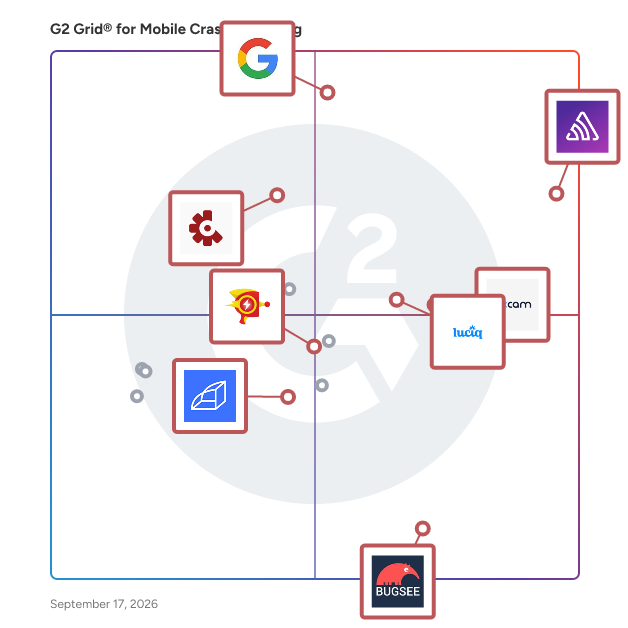
G2 Grid® for Mobile Crash Reporting Software

G2 Grid® for Mobile Crash Reporting Software plotting products by satisfaction and market presence

Highlighted products: Sentry, Google Firebase Crashlytics, Crashlytics, Luciq, UXCam, Rollbar, Bugsee, and Raygun.

Underlying data: [Grid® JSON](https://www.g2.com/categories/mobile-crash-reporting/grids.json?focus%5B%5D=sentry&focus%5B%5D=google-firebase-crashlytics&focus%5B%5D=crashlytics&focus%5B%5D=luciq&focus%5B%5D=uxcam&focus%5B%5D=rollbar&focus%5B%5D=bugsee&focus%5B%5D=raygun&segment=small-business)

Sentry

Sentry is an application monitoring and error tracking platform that helps developers identify, debug, and resolve software issues in production environments across web, mobile, desktop, game, and AI-powered applications. The platform captures errors, crashes, and performance problems in real time, providing developers with stack traces, user context, and diagnostic data needed to reproduce and fix bugs. Sentry supports over 100 programming languages and frameworks, including JavaScript, Python, Java, Ruby, PHP, Go, React, Django, and mobile platforms like iOS and Android. Core monitoring capabilities: - Error tracking groups similar errors into issues, showing frequency, affected users, and the exact code location where problems occur - Performance monitoring traces requests through distributed systems to identify slow database queries, API bottlenecks, and code-level performance problems - Session Replay records user interactions leading up to errors, capturing clicks, network activity, and console logs for easier reproduction - Logs captures structured log data from your applications alongside errors and traces, enabling search and filtering by message content, severity level, and custom attributes - AI observability provides visibility into LLM applications, AI agents, and Model Context Protocol servers, tracking prompts, model calls, tool usage, and token consumption Developers integrate Sentry by installing an SDK and adding a few lines of code to their application. The platform automatically captures unhandled exceptions, while developers can manually track custom errors and performance metrics. Sentry processes events in real time, sending alerts through Slack, email, PagerDuty, or other notification channels when issues occur. Additional features and capabilities: - AI-powered debugging through Seer, which analyzes errors to identify root causes and suggest code fixes with high accuracy - Distributed tracing that follows requests across microservices, serverless functions, and third-party APIs to pinpoint failure points - Custom dashboards and alerts for monitoring specific metrics, error rates, or performance thresholds important to each team - Profiling tools that provide code-level visibility into where time is being spent in production, identifying slow functions, call stacks, and performance regressions across backend services and frontend/mobile user flows - Workflow integrations with GitHub, Jira, GitLab, Azure DevOps, and other development tools to create tickets or link errors to commits automatically The platform serves development teams at organizations ranging from individual developers to large enterprises. More than 100,000 organizations use Sentry, processing billions of error events daily. Sentry offers both cloud-hosted and self-hosted deployment options, with pricing tiers based on event volume. A free tier supports small projects and individual developers.

Average Rating: 4.5/5.0

Total Reviews: 224

How Do G2 Users Rate Sentry?

  • Return: 6.7/10 (Category avg: 8.0/10)
  • Retention: 7.8/10 (Category avg: 8.0/10)
  • Engagement: 7.3/10 (Category avg: 8.1/10)
  • Has the product been a good partner in doing business?: 9.1/10 (Category avg: 8.6/10)

Who Is the Company Behind Sentry?

  • Seller: Sentry
  • Company Website:
  • Year Founded: 2011
  • HQ Location: San Francisco, CA
  • Twitter: @getsentry
    295 Twitter followers
  • LinkedIn® Page: www.linkedin.com
    448 employees on LinkedIn®

Who Uses This Product?

  • Who Uses This: Software Engineer, Senior Software Engineer
  • Top Industries: Computer Software, Information Technology and Services
  • Company Size: 60% Small, 29% Medium

What Do G2 Reviewers Say About Sentry?

AI-generated summary from verified user reviews

Pros
  • Users appreciate the ease of use of Sentry, allowing quick implementation and straightforward monitoring of applications.
  • Users value the insightful error tracking of Sentry, enabling quicker issue resolution and improved application observability.
  • Users praise Sentry for its efficient debugging capabilities, streamlining workflows and enhancing error tracking significantly.
  • Users find Sentry's monitoring features indispensable, offering versatility in observability and easy application monitoring.
  • Users value the strong integration and monitoring capabilities of Sentry, enabling efficient fault detection and alerts.
Cons
  • Users find Sentry's pricing issues challenging, especially with limited plan options and frequent budget increases.
  • Users experience frequent error budget exhaustion requiring constant adjustments, leading to monitoring challenges and unexpected failures.
  • Users find Sentry expensive, particularly for small projects, with limited plan options and high entry costs.
  • Users find the complex configuration of Sentry challenging, particularly during the initial setup and integration process.
  • Users find the UI to be complex and disorganized, particularly challenging for first-time users.

What Are Recent G2 Reviews of Sentry?

What Are G2 Users Discussing About Sentry?

Google Firebase Crashlytics

Firebase Crashlytics is a real-time crash reporting tool designed to help developers track, prioritize, and resolve stability issues in mobile applications. By automatically capturing and grouping crashes based on their impact on real users, Crashlytics enables teams to quickly identify and address the most critical issues, enhancing app quality and user experience. Key Features and Functionality: - Automatic Crash Reporting: Captures crashes immediately upon integration, providing real-time insights into app stability. - Intelligent Issue Grouping: Aggregates similar crashes into manageable issues, allowing developers to focus on the most impactful problems first. - AI-Powered Insights: Utilizes Gemini in Firebase to offer actionable insights and troubleshooting tips, accelerating the identification of root causes. - Seamless Integration: Works with industry-standard tools like Jira, Slack, BigQuery, and integrates directly into Android Studio, enabling developers to debug crashes without leaving their development environment. - Contextual Information: Provides detailed timelines and visualizations of events leading up to crashes, aiding in reproducing bugs and uncovering root causes. - Real-Time Release Monitoring: Tracks new release adoption and stability in real-time, allowing teams to address emerging issues before they affect a large user base. - Custom Logging and Breadcrumbs: Allows instrumentation of logs, keys, non-fatal events, and custom events to gather additional context on crashes. - Real-Time Alerts: Notifies teams of new, regressed, or escalating issues, ensuring critical crashes are addressed promptly. Primary Value and User Solutions: Firebase Crashlytics empowers development teams to maintain high app quality by providing comprehensive, real-time insights into app crashes and errors. By automating crash detection and offering intelligent analysis, it reduces the time spent on troubleshooting, allowing developers to focus on building new features and improving user experience. The integration with existing workflows and tools ensures a seamless debugging process, while real-time monitoring and alerts help in proactively managing app stability. Ultimately, Crashlytics aids in delivering a more reliable and robust application to end-users.

Average Rating: 4.4/5.0

Total Reviews: 32

How Do G2 Users Rate Google Firebase Crashlytics?

  • Return: 8.9/10 (Category avg: 8.0/10)
  • Retention: 8.9/10 (Category avg: 8.0/10)
  • Engagement: 9.2/10 (Category avg: 8.1/10)
  • Has the product been a good partner in doing business?: 7.9/10 (Category avg: 8.6/10)

Who Is the Company Behind Google Firebase Crashlytics?

  • Seller: Google
  • Year Founded: 1998
  • HQ Location: Mountain View, CA
  • Twitter: @google
    31,899,995 Twitter followers
  • LinkedIn® Page: www.linkedin.com
    301,144 employees on LinkedIn®
  • Ownership: NASDAQ:GOOG

Who Uses This Product?

  • Top Industries: Computer Software, Information Technology and Services
  • Company Size: 66% Small, 19% Large

What Do G2 Reviewers Say About Google Firebase Crashlytics?

AI-generated summary from verified user reviews

Pros
  • Users find the combination of services in Firebase Crashlytics valuable for effective application development.
  • Users love the 300 free credits offered by Firebase Crashlytics, making it easy to get started effectively.
Cons
  • Users find the complex documentation of Firebase Crashlytics challenging, requiring significant effort to understand for effective development.
  • Users find the complex and lengthy documentation of Firebase Crashlytics challenging for effective development.
  • Users find the complex and lengthy documentation of Firebase Crashlytics challenging to navigate for effective development.

What Are Recent G2 Reviews of Google Firebase Crashlytics?

What Are G2 Users Discussing About Google Firebase Crashlytics?

Crashlytics

Powerful, yet light weight mobile app crash reporting solution.

Average Rating: 4.5/5.0

Total Reviews: 68

How Do G2 Users Rate Crashlytics?

  • Has the product been a good partner in doing business?: 9.2/10 (Category avg: 8.6/10)

Who Is the Company Behind Crashlytics?

  • Seller: Twitter
  • Year Founded: 2006
  • HQ Location: San Francisco, CA
  • LinkedIn® Page: www.linkedin.com
    966 employees on LinkedIn®
  • Ownership: NYSE: TWTR
  • Total Revenue (USD mm): $3,716

Who Uses This Product?

  • Who Uses This: Software Engineer
  • Top Industries: Computer Software, Information Technology and Services
  • Company Size: 51% Small, 35% Large

What Are Recent G2 Reviews of Crashlytics?

What Are G2 Users Discussing About Crashlytics?

Luciq

Luciq is an Agentic Observability Platform specifically designed for AI mobile builders, aimed at assisting enterprise teams in delivering seamless app experiences at scale. This innovative solution leverages autonomous AI agents to identify anomalies, prioritize critical issues, and implement resolutions automatically, often before users are even aware of any problems. By transforming observability from a passive monitoring approach to a proactive action-oriented system, Luciq empowers teams to focus on building impactful features rather than merely fixing issues. Targeted primarily at enterprise-level organizations, Luciq caters to teams that require robust tools for maintaining app performance and user satisfaction. The platform is particularly beneficial for mobile developers, product managers, and ai teams who need to ensure that their applications function flawlessly in a competitive landscape. With its lightweight SDK that integrates in mere minutes, Luciq provides comprehensive visibility into app health, including performance anomalies, user signals, and session replays, enabling teams to make informed decisions based on real-time data. One of the standout features of Luciq is SmartResolve, which automates root cause analysis and generates actionable fixes. This capability significantly reduces the time spent on debugging, allowing teams to address issues swiftly and efficiently. Furthermore, Luciq’s Business Impact Dashboard offers insights into real-time experience metrics, correlating app performance with key business outcomes such as retention, revenue, and growth. This feature equips teams with the necessary data to understand how app performance directly influences their business objectives. Luciq is built to enhance enterprise workflows by ensuring that insights and fixes are delivered to the appropriate teams automatically. Its native integrations with popular tools like GitHub, Jira, Slack, and Zendesk facilitate seamless collaboration among team members, streamlining the process of addressing app issues. Additionally, Luciq adheres to enterprise-grade compliance standards, including SOC 2, HIPAA, and GDPR, ensuring that sensitive data remains secure throughout the observability process. As a trusted solution among global mobile leaders, Luciq not only helps teams accelerate their development cycles but also minimizes user churn and consistently delivers experiences that delight users while safeguarding revenue. By providing a comprehensive observability platform that combines advanced AI capabilities with user-centric features, Luciq stands out as a valuable asset for any enterprise aiming to enhance its mobile application performance.

Average Rating: 4.3/5.0

Total Reviews: 231

How Do G2 Users Rate Luciq?

  • Return: 8.3/10 (Category avg: 8.0/10)
  • Retention: 8.0/10 (Category avg: 8.0/10)
  • Engagement: 8.2/10 (Category avg: 8.1/10)
  • Has the product been a good partner in doing business?: 8.7/10 (Category avg: 8.6/10)

Who Is the Company Behind Luciq?

  • Seller: Luciq
  • Company Website:
  • Year Founded: 2014
  • HQ Location: California, USA
  • LinkedIn® Page: www.linkedin.com
    201 employees on LinkedIn®

Who Uses This Product?

  • Who Uses This: Software Engineer, Android Developer
  • Top Industries: Computer Software, Information Technology and Services
  • Company Size: 61% Small, 27% Medium

What Do G2 Reviewers Say About Luciq?

AI-generated summary from verified user reviews

Pros
  • Users appreciate the ease of use of Luciq, enabling quick diagram creation and effortless data visualization.
  • Users value the user-friendly interface of Luciq, making complex data insights easy to manage and act upon.
  • Users appreciate the effective bug detection capabilities of Luciq, enhancing auto diagnostics and server performance management.
  • Users value the efficiency of Luciq, finding it easy to manage and track important data effortlessly.
  • Users find it easy to identify errors and report bugs quickly with Luciq's features, enhancing their troubleshooting experience.
Cons
  • Users report a lack of necessary features in Luciq, hindering efficient problem resolution and issue management.
  • Users find Luciq to be expensive, which may limit its accessibility for some potential customers.
  • Users find the lack of tools for managing screenshots and AI features limits their efficiency and workflow.
  • Users struggle with memory leak bugs in Luciq, making troubleshooting and battery-related issues challenging.
  • Users are frustrated by the delays in accessing screenshots for reproduction steps, hindering efficient troubleshooting.

What Are Recent G2 Reviews of Luciq?

What Are G2 Users Discussing About Luciq?

UXCam

UXCam is a product analytics platform with integrated AI analyst, for mobile apps and websites. The company serves companies in 50+ countries and processes 100B+ data points every month. With UXCam, you can create funnels, retention charts, and dashboards to see what percentage of people are dropping off at each stage. Once you see a drop-off, you can zoom in and look at the recordings and heatmaps to understand why it happened. Book a free & quick demo on the UXCam website to learn more.

Average Rating: 4.6/5.0

Total Reviews: 209

How Do G2 Users Rate UXCam?

  • Return: 8.2/10 (Category avg: 8.0/10)
  • Retention: 8.2/10 (Category avg: 8.0/10)
  • Engagement: 8.7/10 (Category avg: 8.1/10)
  • Has the product been a good partner in doing business?: 9.2/10 (Category avg: 8.6/10)

Who Is the Company Behind UXCam?

  • Seller: UXCam
  • Year Founded: 2014
  • HQ Location: San Francisco, California
  • Twitter: @uxcam
    2,141 Twitter followers
  • LinkedIn® Page: www.linkedin.com
    78 employees on LinkedIn®

Who Uses This Product?

  • Who Uses This: CEO, Product Manager
  • Top Industries: Financial Services, Computer Software
  • Company Size: 56% Small, 29% Medium

What Do G2 Reviewers Say About UXCam?

AI-generated summary from verified user reviews

Pros
  • Users value the session replay feature of UXCam for insightful analysis and quick issue resolution.
  • Users praise the responsive customer support from UXCam, assisting in dashboard construction and issue resolution effectively.
  • Users find Error Tracking in UXCam invaluable for debugging and resolving issues through detailed session insights.
  • Users appreciate the easy user behavior tracking of UXCam, enabling quick access to valuable insights and optimizations.
  • Users value the insightful heatmaps from UXCam, making it easier to analyze user interactions and improve experiences.
Cons
  • Users find the dashboard overwhelming and not very user-friendly, requiring time to enhance their experience.
  • Users find the search difficulty due to limited dashboards and analytics options, complicating their user experience.
  • Users find the cluttered interface overwhelming, suggesting it could benefit from simplification to reduce information overload.
  • Users find the data overload on the dashboard overwhelming, suggesting a need for simplification upon first use.
  • Users find filtering issues and limited dashboard functionality hinder their ability to conduct thorough analytics.

What Are Recent G2 Reviews of UXCam?

What Are G2 Users Discussing About UXCam?

Rollbar

Go beyond crash reporting, error tracking, logging and error monitoring. Get instant and accurate alerts — plus a real-time feed — of all errors, including unhandled exceptions. Our automation-grade grouping uses machine learning to reduce noise and gives you error signals you can trust.

Average Rating: 4.5/5.0

Total Reviews: 165

G2 Deal: Rollbar Offer for G2 Customers

Rollbar and G2 customers can grow better together. Save 25% on eligible Rollbar plans for 6 months, or sign up for free at the link below. Get all the tools you need to Discover and fix errors faster wherever they happen.

View this exclusive G2 deal

How Do G2 Users Rate Rollbar?

  • Return: 5.6/10 (Category avg: 8.0/10)
  • Retention: 5.3/10 (Category avg: 8.0/10)
  • Engagement: 6.1/10 (Category avg: 8.1/10)
  • Has the product been a good partner in doing business?: 9.5/10 (Category avg: 8.6/10)

Who Is the Company Behind Rollbar?

  • Seller: Rollbar
  • Year Founded: 2012
  • HQ Location: San Francisco, CA
  • Twitter: @rollbar
    3,913 Twitter followers
  • LinkedIn® Page: www.linkedin.com
    28 employees on LinkedIn®

Who Uses This Product?

  • Who Uses This: Software Engineer, Senior Software Engineer
  • Top Industries: Computer Software, Information Technology and Services
  • Company Size: 62% Small, 26% Medium

What Do G2 Reviewers Say About Rollbar?

AI-generated summary from verified user reviews

Pros
  • Users find Rollbar's easy setup refreshing, noting its simplicity and lack of a learning curve compared to other tools.
  • Users appreciate the setup ease of Rollbar, noting its straightforward installation without a learning curve.
  • Users find Rollbar to be a simple tool to set up, with no steep learning curve compared to others.
Cons
  • Users experience mismatched error titles and descriptions, requiring manual checks that hinder efficiency in error handling.

What Are Recent G2 Reviews of Rollbar?

What Are G2 Users Discussing About Rollbar?

Bugsee

Bugsee is a bug and crash reporting tool for iOS and Android apps. Like a black box on an airplane, Bugsee locally records everything that the app is doing. Whenever a bug occurs, everything that led to it has already been recorded: - Video of user’s actions + touches (including in live apps) - All Network traffic - Console logs and more Also, recently, an independent benchmark for mobile crash reporters  named Bugsee as the #1 crash reporter for iOS — http://www.crashprobe.com/ios/ You can see a fully functional demo at bugsee.com/demo or watch the 100 seconds video - https://www.youtube.com/watch?v=0eChRvIm2qc

Average Rating: 4.9/5.0

Total Reviews: 18

How Do G2 Users Rate Bugsee?

  • Has the product been a good partner in doing business?: 9.3/10 (Category avg: 8.6/10)

Who Is the Company Behind Bugsee?

  • Seller: Bugsee
  • Year Founded: 2016
  • HQ Location: San Jose, CA
  • Twitter: @BugseeHQ
    4,274 Twitter followers
  • LinkedIn® Page: www.linkedin.com
    4 employees on LinkedIn®

Who Uses This Product?

  • Top Industries: Information Technology and Services
  • Company Size: 83% Small, 11% Medium

What Are Recent G2 Reviews of Bugsee?

Raygun

Get instant visibility into the health of your software to proactively identify and resolve issues before they impact your customers. Raygun's suite of digital experience monitoring tools surfaces actionable, customer-centric insights across your entire tech stack. Monitor and improve software quality and performance to deliver fast, error-free experiences that delight your customers and grow your business. Raygun's products cover three main areas, all fully integrated with each other to unlock deeply powerful insights, unlike anything your team has experienced before. Crash Reporting - Fix bugs with greater speed and accuracy. Go straight to the root cause of crashes and errors with granular diagnostics right down to the line of code. Replicate and resolve issues faster, improve reliability, and free up time for more meaningful work. Real User Monitoring - Deliver flawless software experiences. Understand your customer's digital experience with real-user insights you can trust across every user, session, and device. Monitor error and performance trends in real-time and proactively address business-critical issues before they impact your customers — and your revenue. APM - Out of this world application performance monitoring. Get unrivaled visibility into server-side performance. Uncover detailed, code-level insights into server-side performance with a comprehensive session trace breakdown that tells you exactly how your code executed, down to the millisecond. Raygun is the fastest way to improve your customers' digital experience. Try it for free today!

Average Rating: 4.3/5.0

Total Reviews: 123

How Do G2 Users Rate Raygun?

  • Return: 9.2/10 (Category avg: 8.0/10)
  • Retention: 8.7/10 (Category avg: 8.0/10)
  • Engagement: 8.1/10 (Category avg: 8.1/10)
  • Has the product been a good partner in doing business?: 8.5/10 (Category avg: 8.6/10)

Who Is the Company Behind Raygun?

  • Seller: Raygun
  • Year Founded: 2007
  • HQ Location: Wellington, New Zealand
  • Twitter: @raygunio
    2,877 Twitter followers
  • LinkedIn® Page: www.linkedin.com
    20 employees on LinkedIn®

Who Uses This Product?

  • Who Uses This: Software Engineer, Senior Software Engineer
  • Top Industries: Computer Software, Information Technology and Services
  • Company Size: 55% Small, 37% Medium

What Do G2 Reviewers Say About Raygun?

AI-generated summary from verified user reviews

Pros
  • Users praise the ease of use of Raygun, allowing for quick navigation and efficient issue identification.
  • Users find the ease of issue detection in Raygun excellent, providing clear insights and solutions quickly.
  • Users find the issue identification process easy, providing clear insights and guidance for fixes quickly.
  • Users value the navigation ease of Raygun, praising its smooth interface and user-friendly layout.
  • Users praise the problem-solving capabilities of Raygun, enabling quick identification and resolution of issues.
Cons
  • Users struggle with error handling in Raygun, finding it difficult to differentiate between similarly named databases during searches.
  • Users struggle with search accuracy, finding it difficult to differentiate between similarly named databases with errors.
  • Users face filtering issues in Raygun, struggling to distinguish similarly named databases during searches.
  • Users face inefficient search functionality, making it difficult to distinguish between similarly named databases with errors.
  • Users find the search difficulty challenging as similar database names complicate finding the correct one.

What Are Recent G2 Reviews of Raygun?

What Are G2 Users Discussing About Raygun?

Sauce Labs

In a world that relies on code, Sauce Labs strives to make it work for everyone, everywhere and every time. This is digital confidence. Sauce Labs is the leading provider of continuous test and error reporting solutions that gives companies confidence to deliver a trusted digital brand experience to their customers. The Sauce Labs Continuous Testing Cloud identifies quality signals in development and production, accelerating the ability to release and update web and mobile applications that look, function and perform exactly as they should on every browser, operating system and device, every single time. For more information, please visit https://saucelabs.com.

Average Rating: 4.3/5.0

Total Reviews: 171

How Do G2 Users Rate Sauce Labs?

  • Return: 7.5/10 (Category avg: 8.0/10)
  • Retention: 7.5/10 (Category avg: 8.0/10)
  • Engagement: 8.3/10 (Category avg: 8.1/10)
  • Has the product been a good partner in doing business?: 8.4/10 (Category avg: 8.6/10)

Who Is the Company Behind Sauce Labs?

  • Seller: Sauce Labs
  • Year Founded: 2008
  • HQ Location: San Francisco, CA
  • Twitter: @saucelabs
    12,590 Twitter followers
  • LinkedIn® Page: www.linkedin.com
    334 employees on LinkedIn®

Who Uses This Product?

  • Who Uses This: Software Engineer, Senior Software Engineer
  • Top Industries: Information Technology and Services, Computer Software
  • Company Size: 48% Large, 40% Medium

What Do G2 Reviewers Say About Sauce Labs?

AI-generated summary from verified user reviews

Pros
  • Users appreciate the ease of use of Sauce Labs, simplifying testing processes across various browsers and devices.
  • Users value the seamless automation of Sauce Labs, enhancing cross-browser testing and speeding up feedback significantly.
  • Users value the seamless cross-browser testing of Sauce Labs, enhancing efficiency with automated and live testing features.
  • Users appreciate the real-time testing capabilities of Sauce Labs, enhancing collaboration and speeding up the feedback process.
  • Users value the real device testing of Sauce Labs, enhancing the accuracy and effectiveness of their testing processes.
Cons
  • Users find the learning curve steep for Sauce Labs, requiring significant time to adapt and configure settings effectively.
  • Users find the setup complexity challenging, requiring significant time investment and adaptation for effective use.
  • Users find the difficult setup process overwhelming, especially for new users and smaller teams adapting to it.
  • Users find Sauce Labs to be expensive, especially when compared to other platforms, affecting budget considerations.
  • Users find the learning difficulty of Sauce Labs challenging, especially for new users navigating advanced features.

What Are Recent G2 Reviews of Sauce Labs?

What Are G2 Users Discussing About Sauce Labs?

Countly

Countly is a first-party digital analytics and customer engagement platform that gives organizations complete ownership of their data and product intelligence - across every device, channel, and deployment model. Built for teams that value privacy, autonomy, and long-term trust, Countly lets you capture, analyze, and act on behavioral data in real time, without the compromises of black-box SaaS tools and shared-clouds. With Countly, you control what’s tracked, where it’s stored, and how it’s used - whether on-premises or in your private cloud.

Average Rating: 4.1/5.0

Total Reviews: 20

How Do G2 Users Rate Countly?

  • Has the product been a good partner in doing business?: 7.5/10 (Category avg: 8.6/10)

Who Is the Company Behind Countly?

  • Seller: Countly
  • Company Website:
  • Year Founded: 2013
  • HQ Location: London, United Kingdom
  • Twitter: @gocountly
    6,748 Twitter followers
  • LinkedIn® Page: www.linkedin.com
    41 employees on LinkedIn®

Who Uses This Product?

  • Top Industries: Information Technology and Services
  • Company Size: 55% Small, 45% Large

What Do G2 Reviewers Say About Countly?

AI-generated summary from verified user reviews

Pros
  • Users appreciate the ease of use for open source and self-hosted deployments of Countly.
Cons
  • Users find a notable lack of recommendations for additional features and product-wise communication from Countly.
  • Users find additional features lacking in Countly, along with a gap in product-wise communication.
  • Users find limited features in Countly, particularly lacking in product-wise communication tools.
  • Users find missing features in Countly, particularly in product-wise communication, hindering their overall experience.

What Are Recent G2 Reviews of Countly?

What Are G2 Users Discussing About Countly?

Adam Crivello
AC
Researched and written by Adam Crivello
Updated