Best Big Data Processing And Distribution Systems

How Many Big Data Processing And Distribution Systems Products Does G2 Track?

Total Products under this Category: 123

Category Stats (Sep 2026)

  • Average Rating: 4.4/5 The average rating of products in this category, based on all submitted ratings
  • Top Trending Product: IBM Analytics Engine (+1.99%) - Among all products in this category, IBM Analytics Engine recorded the largest rating increase compared to last month

Last updated: September 26, 2026

How Does G2 Rank Big Data Processing And Distribution Systems Products?

Why You Can Trust G2's Software Rankings:

  • 30 Analysts and Data Experts
  • 9,500+ Authentic Reviews
  • 123+ Products
  • Unbiased Rankings

G2's software rankings are built on verified user reviews, rigorous moderation, and a consistent research methodology maintained by a team of analysts and data experts. Each product is measured using the same transparent criteria, with no paid placement or vendor influence. While reviews reflect real user experiences, which can be subjective, they offer valuable insight into how software performs in the hands of professionals. Together, these inputs power the G2 Score, a standardized way to compare tools within every category.

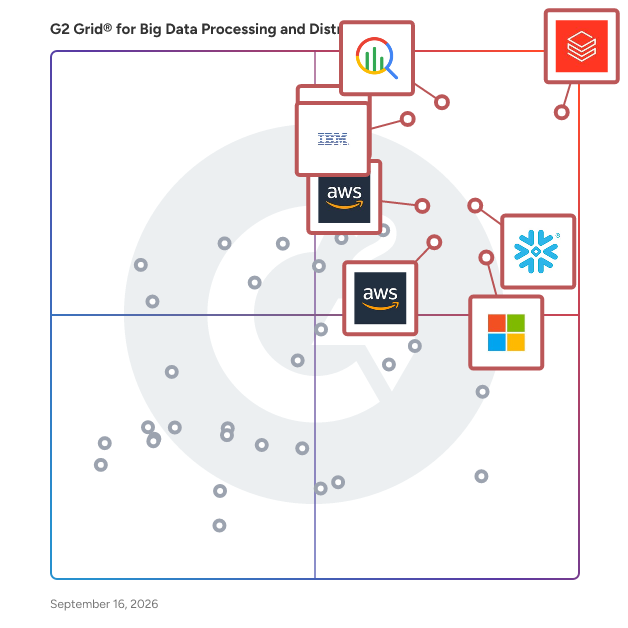
G2 Grid® for Big Data Processing And Distribution Systems

G2 Grid® for Big Data Processing And Distribution Systems plotting products by satisfaction and market presence

Highlighted products: Databricks, Google Cloud BigQuery, IBM watsonx.data, Snowflake, Apache Spark for Azure HDInsight, Amazon EMR, AWS Lake Formation, and Cloudera.

Underlying data: [Grid® JSON](https://www.g2.com/categories/big-data-processing-and-distribution/grids.json?focus%5B%5D=databricks&focus%5B%5D=google-cloud-bigquery&focus%5B%5D=ibm-watsonx-data&focus%5B%5D=snowflake&focus%5B%5D=apache-spark-for-azure-hdinsight&focus%5B%5D=amazon-emr&focus%5B%5D=aws-lake-formation&focus%5B%5D=cloudera)

Databricks

Databricks is the Data and AI company. More than 20,000 organizations worldwide — including adidas, AT&T, Bayer, Block, Mastercard, Rivian, Unilever, and 70% of the Fortune 500 — rely on the Databricks Data + AI Platform to build and scale data and AI apps, analytics, and agents. Headquartered in San Francisco with 30+ offices around the globe, Databricks offers a unified platform that includes Genie, Lakebase, Agent Bricks, Lakeflow, Lakehouse, and Unity Catalog. Founded in 2013 by the original creators of Apache Spark™, Delta Lake, MLflow and Unity Catalog, Databricks is built on an open lakehouse architecture that brings data, analytics and AI together. The platform is used by data engineers, data scientists, analysts, developers, machine learning teams, AI teams and business users to collaborate across the full data and AI lifecycle. Key Databricks capabilities include: - Data engineering: Build, automate and manage reliable batch, streaming and real-time data pipelines. - Analytics and business intelligence: Run SQL analytics, create dashboards and enable business teams to explore data. - Data governance: Discover, secure and manage data and AI assets across teams, clouds and workloads. - Machine learning and AI: Develop models, build generative AI applications and create production-grade AI agents. - Data applications: Build and deploy data-driven applications using governed enterprise data. Available across AWS, Azure and Google Cloud, Databricks helps organizations work across clouds, reduce data silos and simplify collaboration across teams and tools. Customers use Databricks for use cases such as customer personalization, fraud detection, predictive maintenance, real-time analytics, cybersecurity, healthcare research, financial risk management, supply chain optimization and AI-powered decision-making. Databricks is used across industries including financial services, healthcare and life sciences, retail, manufacturing, energy and the public sector. Organizations use the platform to modernize data infrastructure, accelerate AI adoption and turn enterprise data into business value.

Average Rating: 4.6/5.0

Total Reviews: 1,342

How Do G2 Users Rate Databricks?

  • Has the product been a good partner in doing business?: 8.9/10 (Category avg: 8.8/10)
  • Real-Time Data Collection: 8.8/10 (Category avg: 8.8/10)
  • Machine Scaling: 9.0/10 (Category avg: 8.6/10)
  • Data Preparation: 9.1/10 (Category avg: 8.6/10)

Who Is the Company Behind Databricks?

  • Seller: Databricks Inc.
  • Company Website:
  • Year Founded: 2013
  • HQ Location: San Francisco, CA
  • Twitter: @databricks
    92,269 Twitter followers
  • LinkedIn® Page: www.linkedin.com
    14,336 employees on LinkedIn®

Who Uses This Product?

  • Who Uses This: Data Engineer, Data Analyst
  • Top Industries: Information Technology and Services, Financial Services
  • Company Size: 47% Large, 38% Medium

What Do G2 Reviewers Say About Databricks?

AI-generated summary from verified user reviews

Pros
  • Users enjoy the ease of use and extensive features of Databricks, streamlining data warehousing and machine learning tasks.
  • Users appreciate the ease of use of Databricks, enhancing their experience with its intuitive interface and efficient features.
  • Users value the seamless integrations with AWS services that enhance efficiency and support diverse business needs.
  • Users value the seamless collaboration provided by Databricks, enhancing teamwork on data projects and insights sharing.
  • Users value the wide array of integrated analytical features in Databricks, enhancing efficiency and collaboration in data projects.
Cons
  • Users face a steep learning curve with Databricks, as its complexity can be confusing for newcomers.
  • Users note that the cost of Databricks can be quite high, particularly for large data projects and limited free options.
  • Users find the steep learning curve of Databricks challenging, particularly for those unfamiliar with big data tools.
  • Users find the complexity of Databricks challenging, especially during initial setup and navigation of advanced features.
  • Users encounter complex setup challenges with Databricks initially, but support helps resolve issues quickly.

What Are Recent G2 Reviews of Databricks?

What Are G2 Users Discussing About Databricks?

Google Cloud BigQuery

BigQuery is an AI-ready, petabyte-scale, and cost-effective data warehouse that lets you run analytics over vast amounts of data in near real time. Store 10 GiB of data and run up to 1 TiB of queries for free per month.

Average Rating: 4.5/5.0

Total Reviews: 1,144

How Do G2 Users Rate Google Cloud BigQuery?

  • Has the product been a good partner in doing business?: 8.6/10 (Category avg: 8.8/10)
  • Real-Time Data Collection: 8.7/10 (Category avg: 8.8/10)
  • Machine Scaling: 8.7/10 (Category avg: 8.6/10)
  • Data Preparation: 8.8/10 (Category avg: 8.6/10)

Who Is the Company Behind Google Cloud BigQuery?

  • Seller: Google
  • Year Founded: 1998
  • HQ Location: Mountain View, CA
  • Twitter: @google
    31,899,995 Twitter followers
  • LinkedIn® Page: www.linkedin.com
    301,144 employees on LinkedIn®
  • Ownership: NASDAQ:GOOG

Who Uses This Product?

  • Who Uses This: Data Engineer, Data Analyst
  • Top Industries: Information Technology and Services, Computer Software
  • Company Size: 38% Large, 35% Medium

What Do G2 Reviewers Say About Google Cloud BigQuery?

AI-generated summary from verified user reviews

Pros
  • Users value the ease of use of Google Cloud BigQuery, enabling fast analysis without needing to manage infrastructure.
  • Users appreciate the incredible speed of BigQuery, making data processing effortless and efficient for large datasets.
  • Users value the seamless integrations of Google Cloud BigQuery, enhancing analytics and supporting various data types effortlessly.
  • Users appreciate the fast querying capabilities of Google Cloud BigQuery, enabling quick analysis of massive datasets effortlessly.
  • Users value the query efficiency of BigQuery, enabling fast analysis of massive datasets with minimal effort.
Cons
  • Users find the cost structure expensive, especially with complex queries leading to rapidly escalating charges.
  • Users often face query issues with BigQuery, as inefficient queries can rapidly increase costs and complicate budgeting.
  • Users find the cost management challenging, facing unpredictable pricing and needing strict governance to maintain budgets.
  • Users face cost issues with Google Cloud BigQuery, often leading to unexpectedly high bills and budget management challenges.
  • Users find the steep learning curve for advanced features challenging, requiring significant time and effort to master.

What Are Recent G2 Reviews of Google Cloud BigQuery?

What Are G2 Users Discussing About Google Cloud BigQuery?

IBM watsonx.data

IBM® watsonx.data® helps you access, integrate and understand all your data —structured and unstructured—across any environment. It optimizes workloads for price and performance while enforcing consistent governance across sources, formats and teams. Watch the demo to learn how watsonx.data empowers you to build gen AI apps and powerful AI agents. Free Trial available: https://ibm.biz/Watsonx-data_Trial

Average Rating: 4.4/5.0

Total Reviews: 169

G2 Deal: Save 30% on your first monthly or annual subscription. Offer ends 15 April 2026.

Get 30% off your new monthly or annual watsonx.data Enterprise subscription. Optimize data workloads at a fraction of the cost. Offer ends 15 April 2026.

Price: ~~61.81~~ → 88.30

View this exclusive G2 deal

How Do G2 Users Rate IBM watsonx.data?

  • Has the product been a good partner in doing business?: 8.8/10 (Category avg: 8.8/10)
  • Real-Time Data Collection: 8.7/10 (Category avg: 8.8/10)
  • Machine Scaling: 8.7/10 (Category avg: 8.6/10)
  • Data Preparation: 8.8/10 (Category avg: 8.6/10)

Who Is the Company Behind IBM watsonx.data?

  • Seller: IBM
  • Company Website:
  • Year Founded: 1911
  • HQ Location: Armonk, New York, United States
  • Twitter: @IBMSecurity
    74,660 Twitter followers
  • LinkedIn® Page: www.linkedin.com
    344,328 employees on LinkedIn®

Who Uses This Product?

  • Who Uses This: Software Engineer, Software Developer
  • Top Industries: Computer Software, Information Technology and Services
  • Company Size: 34% Small, 32% Large

What Do G2 Reviewers Say About IBM watsonx.data?

AI-generated summary from verified user reviews

Pros
  • Users appreciate the ease of use of IBM watsonx.data, finding it reliable and efficient for data management.
  • Users value the seamless data integration and user-friendly interface of IBM watsonx.data for efficient analytics.
  • Users appreciate the organized and efficient data management of IBM watsonx.data, simplifying analytics and enhancing team collaboration.
  • Users value the seamless data source integration of IBM watsonx.data, enhancing efficiency and flexibility in their workflows.
  • Users appreciate the flexible analytics capabilities of IBM watsonx.data, enabling faster insights from diverse data sources.
Cons
  • Users find the steep learning curve of IBM watsonx.data challenging, hindering easy adoption for newcomers.
  • Users find the complexity of setting up IBM watsonx.data a barrier, especially for newcomers and small teams.
  • Users find the pricing steep for IBM watsonx.data, especially for smaller businesses with limited resources.
  • Users find the difficult setup process time-consuming, with a steep learning curve and extensive documentation review required.
  • Users find performance tuning difficult with IBM watsonx.data, especially for beginners and teams with limited IT resources.

What Are Recent G2 Reviews of IBM watsonx.data?

Snowflake

Snowflake makes enterprise AI easy, efficient and trusted. Thousands of companies around the globe, including hundreds of the world’s largest, use Snowflake’s AI Data Cloud to share data, build applications, and power their business with AI. The era of enterprise AI is here. Learn more at snowflake.com (NYSE: SNOW).

Average Rating: 4.6/5.0

Total Reviews: 713

How Do G2 Users Rate Snowflake?

  • Has the product been a good partner in doing business?: 9.0/10 (Category avg: 8.8/10)
  • Real-Time Data Collection: 9.0/10 (Category avg: 8.8/10)
  • Machine Scaling: 9.1/10 (Category avg: 8.6/10)
  • Data Preparation: 9.0/10 (Category avg: 8.6/10)

Who Is the Company Behind Snowflake?

  • Seller: Snowflake, Inc.
  • Company Website:
  • Year Founded: 2012
  • HQ Location: 135 Constitution Drive, Menlo Park CA
  • Twitter: @SnowflakeDB
    278 Twitter followers
  • LinkedIn® Page: www.linkedin.com
    12,574 employees on LinkedIn®

Who Uses This Product?

  • Who Uses This: Data Engineer, Data Analyst
  • Top Industries: Information Technology and Services, Computer Software
  • Company Size: 45% Medium, 42% Large

What Do G2 Reviewers Say About Snowflake?

AI-generated summary from verified user reviews

Pros
  • Users appreciate the ease of use of Snowflake, which simplifies data sharing and enhances productivity across teams.
  • Users value the reliable features and user-friendly interface of Snowflake, enhancing data management and analytics efficiency.
  • Users appreciate the ease of use and efficient data integration in Snowflake for their warehousing projects.
  • Users value the seamless scalability of Snowflake, enabling efficient handling of large datasets and workload changes without performance loss.
  • Users value the fast and efficient data processing capabilities of Snowflake, enhancing their analysis experience significantly.
Cons
  • Users highlight the high costs of Snowflake, making it less accessible for smaller businesses with limited budgets.
  • Users find feature limitations in Snowflake, such as lack of code blocks and restricted permissions, frustrating.
  • Users find the learning curve steep, requiring training due to its complexity and overwhelming interface for beginners.
  • Users often struggle with high costs due to unoptimized queries and inadequate cost control measures in Snowflake.
  • Users find the cost structure challenging, requiring time to optimize for efficient use of Snowflake.

What Are Recent G2 Reviews of Snowflake?

What Are G2 Users Discussing About Snowflake?

Apache Spark for Azure HDInsight

Apache Spark for Azure HDInsight is an open source processing framework that runs large-scale data analytics applications.

Average Rating: 4.1/5.0

Total Reviews: 13

How Do G2 Users Rate Apache Spark for Azure HDInsight?

  • Has the product been a good partner in doing business?: 8.0/10 (Category avg: 8.8/10)
  • Real-Time Data Collection: 8.9/10 (Category avg: 8.8/10)
  • Machine Scaling: 8.8/10 (Category avg: 8.6/10)
  • Data Preparation: 8.3/10 (Category avg: 8.6/10)

Who Is the Company Behind Apache Spark for Azure HDInsight?

  • Seller: Microsoft
  • Year Founded: 1975
  • HQ Location: Redmond, Washington
  • Twitter: @microsoft
    13,091,739 Twitter followers
  • LinkedIn® Page: www.linkedin.com
    232,750 employees on LinkedIn®
  • Ownership: MSFT

Who Uses This Product?

  • Company Size: 62% Medium, 23% Large

What Are Recent G2 Reviews of Apache Spark for Azure HDInsight?

What Are G2 Users Discussing About Apache Spark for Azure HDInsight?

Amazon EMR

Amazon EMR is a web-based service that simplifies big data processing, providing a managed Hadoop framework that makes it easy, fast, and cost-effective to distribute and process vast amounts of data across dynamically scalable Amazon EC2 instances.

Average Rating: 4.2/5.0

Total Reviews: 62

How Do G2 Users Rate Amazon EMR?

  • Has the product been a good partner in doing business?: 8.9/10 (Category avg: 8.8/10)
  • Real-Time Data Collection: 8.2/10 (Category avg: 8.8/10)
  • Machine Scaling: 8.7/10 (Category avg: 8.6/10)
  • Data Preparation: 8.8/10 (Category avg: 8.6/10)

Who Is the Company Behind Amazon EMR?

  • Seller: Amazon Web Services (AWS)
  • Year Founded: 2006
  • HQ Location: Seattle, WA
  • Twitter: @awscloud
    2,232,483 Twitter followers
  • LinkedIn® Page: www.linkedin.com
    147,094 employees on LinkedIn®
  • Ownership: NASDAQ: AMZN

Who Uses This Product?

  • Top Industries: Computer Software, Financial Services
  • Company Size: 59% Large, 21% Small

What Do G2 Reviewers Say About Amazon EMR?

AI-generated summary from verified user reviews

Pros
  • Users value the data integration capabilities of Amazon EMR, effectively managing large datasets from multiple sources.
  • Users find Amazon EMR's ease of use beneficial for running single jobs and accessing precise error logs.
  • Users value the efficiency with large datasets in Amazon EMR, enhancing their business logic processing capabilities.
Cons
  • Users often face performance issues due to scaling complications, requiring manual tuning to optimize functionality.
  • Users report that poor performance due to slow auto-scaling affects job execution and resource availability on EMR clusters.
  • Users report slow performance in auto-scaling for nodes, often causing job failures due to resource shortages.

What Are Recent G2 Reviews of Amazon EMR?

What Are G2 Users Discussing About Amazon EMR?

AWS Lake Formation

AWS Lake Formation is a fully managed service to build, manage, secure, and share data in data lakes in days. You can centralize security and governance, and enable data sharing across the organization.

Average Rating: 4.4/5.0

Total Reviews: 33

How Do G2 Users Rate AWS Lake Formation?

  • Has the product been a good partner in doing business?: 9.0/10 (Category avg: 8.8/10)
  • Real-Time Data Collection: 8.2/10 (Category avg: 8.8/10)
  • Machine Scaling: 8.5/10 (Category avg: 8.6/10)
  • Data Preparation: 7.9/10 (Category avg: 8.6/10)

Who Is the Company Behind AWS Lake Formation?

  • Seller: Amazon Web Services (AWS)
  • Year Founded: 2006
  • HQ Location: Seattle, WA
  • Twitter: @awscloud
    2,232,483 Twitter followers
  • LinkedIn® Page: www.linkedin.com
    147,094 employees on LinkedIn®
  • Ownership: NASDAQ: AMZN

Who Uses This Product?

  • Top Industries: Information Technology and Services
  • Company Size: 47% Small, 37% Large

What Are Recent G2 Reviews of AWS Lake Formation?

What Are G2 Users Discussing About AWS Lake Formation?

Cloudera

Cloudera is the only hybrid data and AI platform company that large organizations trust to bring AI to their data anywhere it lives. Unlike other providers, Cloudera delivers a consistent cloud experience that converges public clouds, on-prem data centers, and the edge, leveraging a proven open-source foundation. As the pioneer in big data, Cloudera empowers businesses to apply AI and assert control over 100% of their data, in all forms, improving security, governance, and real-time and predictive insights. The world’s largest brands across all industries rely on Cloudera to transform decision-making and ultimately boost bottom lines, safeguard against threats, and save lives. Cloudera Anywhere Cloud™: Build and scale applications across any environment. The modular hybrid data and AI platform engineered for the agentic era empowers teams to deploy production-grade data and AI workloads across multi-cloud, on-premises, and sovereign environments while maintaining digital sovereignty. The Cloudera data and AI platform includes: Cloudera AI: Deploy and scale any AI model, anywhere. Cloudera brings compute to governed data where it lives for Private AI anywhere by design. Complete control, security, and governance of mission-critical data, models, agents, and inference ensure faster sovereign AI deployments. Cloudera Data-in-Motion: Make fast decisions from real-time data anywhere. Move data with any structure from any source to any destination seamlessly across hybrid environments, enabling in-the-moment business-critical decisions by processing and analyzing real-time data anywhere, from the edge to AI, as business happens. Cloudera Open Data Lakehouse: Process any data, anywhere, for actionable insights. Make smart decisions with an open data lakehouse powered by Apache Iceberg that delivers trusted, reliable, and unified data to fuel agents, AI applications, and analytics, improving collaboration, breaking silos, and simplifying sharing. Cloudera Unified Data Fabric: Unify security and governance across the entire data estate. Move beyond fragmented data management: Break down silos and connect disparate data sources intelligently and securely to provide a unified view of all organizational data and centralized end-to-end control across complex hybrid data environments.

Average Rating: 4.2/5.0

Total Reviews: 190

How Do G2 Users Rate Cloudera?

  • Has the product been a good partner in doing business?: 8.5/10 (Category avg: 8.8/10)
  • Real-Time Data Collection: 8.1/10 (Category avg: 8.8/10)
  • Machine Scaling: 9.1/10 (Category avg: 8.6/10)
  • Data Preparation: 8.2/10 (Category avg: 8.6/10)

Who Is the Company Behind Cloudera?

  • Seller: Cloudera
  • Company Website:
  • Year Founded: 2008
  • HQ Location: Santa Clara, CA
  • Twitter: @cloudera
    106,442 Twitter followers
  • LinkedIn® Page: www.linkedin.com
    3,505 employees on LinkedIn®

Who Uses This Product?

  • Who Uses This: Data Engineer, Software Engineer
  • Top Industries: Information Technology and Services, Banking
  • Company Size: 39% Large, 35% Small

What Do G2 Reviewers Say About Cloudera?

AI-generated summary from verified user reviews

Pros
  • Users praise the user-friendly interface of Cloudera, highlighting its simplicity in managing big data efficiently.
  • Users value the easy scalability of Cloudera, enabling efficient management of large amounts of data effortlessly.
  • Users value the robust security features of Cloudera, ensuring safe and reliable data management across platforms.
  • Users value the comprehensive suite of tools in Cloudera for effective data management and analytics.
  • Users find Cloudera's scalability and centralized administration invaluable for efficient monitoring and management of data processes.
Cons
  • Users express concerns over the high costs of Cloudera, noting it's expensive for its complexity and maintenance.
  • Users find Cloudera's database to be complex, making it challenging for inexperienced professionals to utilize effectively.
  • Users find Cloudera's setup difficult to learn, particularly challenging for beginners without adequate tutorials or guidance.
  • Users find the poor documentation of Cloudera frustrating, complicating navigation and setup for complex data configurations.
  • Users often face access issues with Cloudera, particularly with unauthorized errors in Airflow tasks and limited documentation.

What Are Recent G2 Reviews of Cloudera?

What Are G2 Users Discussing About Cloudera?

Microsoft SQL Server

SQL Server 2017 brings the power of SQL Server to Windows, Linux and Docker containers for the first time ever, enabling developers to build intelligent applications using their preferred language and environment. Experience industry-leading performance, rest assured with innovative security features, transform your business with AI built-in, and deliver insights wherever your users are with mobile BI.

Average Rating: 4.4/5.0

Total Reviews: 2,132

How Do G2 Users Rate Microsoft SQL Server?

  • Has the product been a good partner in doing business?: 8.4/10 (Category avg: 8.8/10)
  • Real-Time Data Collection: 8.6/10 (Category avg: 8.8/10)
  • Machine Scaling: 8.2/10 (Category avg: 8.6/10)
  • Data Preparation: 8.5/10 (Category avg: 8.6/10)

Who Is the Company Behind Microsoft SQL Server?

  • Seller: Microsoft
  • Year Founded: 1975
  • HQ Location: Redmond, Washington
  • Twitter: @microsoft
    13,091,739 Twitter followers
  • LinkedIn® Page: www.linkedin.com
    232,750 employees on LinkedIn®
  • Ownership: MSFT

Who Uses This Product?

  • Who Uses This: Software Engineer, Software Developer
  • Top Industries: Information Technology and Services, Computer Software
  • Company Size: 45% Large, 37% Medium

What Do G2 Reviewers Say About Microsoft SQL Server?

AI-generated summary from verified user reviews

Pros
  • Users appreciate the ease of use of Microsoft SQL Server, highlighting its seamless integration and simplicity in management.
  • Users appreciate the robust database management of Microsoft SQL Server, enhancing performance and simplifying data handling.
  • Users appreciate the powerful performance of Microsoft SQL Server, recognizing it as an industry standard for databases.
  • Users appreciate the easy integrations of Microsoft SQL Server, enhancing their reporting and data management experience.
  • Users value the enterprise-grade security of Microsoft SQL Server, ensuring safety for sensitive data is prioritized.
Cons
  • Users find Microsoft SQL Server's high licensing costs a burden, especially for small businesses and budget constraints.
  • Users express concern about the high licensing costs of Microsoft SQL Server, making it tough for small businesses.
  • Users find the high licensing costs of Microsoft SQL Server a barrier for small businesses and budget constraints.
  • Users find the licensing costs steep, making Microsoft SQL Server less accessible for small businesses and limiting flexibility.
  • Users report slow performance of Microsoft SQL Server, especially when multitasking, affecting overall efficiency and usability.

What Are Recent G2 Reviews of Microsoft SQL Server?

What Are G2 Users Discussing About Microsoft SQL Server?

Azure Synapse Analytics

Azure Synapse Analytics is a cloud-based Enterprise Data Warehouse (EDW) that leverages Massively Parallel Processing (MPP) to quickly run complex queries across petabytes of data.

Average Rating: 4.4/5.0

Total Reviews: 37

How Do G2 Users Rate Azure Synapse Analytics?

  • Has the product been a good partner in doing business?: 8.3/10 (Category avg: 8.8/10)
  • Real-Time Data Collection: 7.8/10 (Category avg: 8.8/10)
  • Machine Scaling: 8.1/10 (Category avg: 8.6/10)
  • Data Preparation: 8.3/10 (Category avg: 8.6/10)

Who Is the Company Behind Azure Synapse Analytics?

  • Seller: Microsoft
  • Year Founded: 1975
  • HQ Location: Redmond, Washington
  • Twitter: @microsoft
    13,091,739 Twitter followers
  • LinkedIn® Page: www.linkedin.com
    232,750 employees on LinkedIn®
  • Ownership: MSFT

Who Uses This Product?

  • Top Industries: Information Technology and Services
  • Company Size: 45% Medium, 32% Large

What Do G2 Reviewers Say About Azure Synapse Analytics?

AI-generated summary from verified user reviews

Pros
  • Users appreciate the unified analytics experience of Azure Synapse Analytics, streamlining data processes and enhancing efficiency.
  • Users value the seamless integration and automation of Azure Synapse Analytics, enhancing efficiency in data analytics solutions.
  • Users value the seamless cloud integration of Azure Synapse Analytics, enhancing workflows and streamlining data analytics solutions.
  • Users value the cost-effective benefits of Azure Synapse Analytics, maximizing efficiency with flexible, on-demand resources.
  • Users value the seamless data integration capabilities of Azure Synapse Analytics, enhancing efficiency and reducing complexity in analytics solutions.
Cons
  • Users find cost estimation complex, especially with serverless queries and various resource management requirements.
  • Users find cost management complex, particularly when optimizing across serverless queries and Spark jobs without proper governance.
  • Users often face debugging issues with complex pipeline failures, resulting in increased troubleshooting time and frustration.
  • Users find difficult debugging issues due to lack of error transparency, complicating troubleshooting and performance tuning.
  • Users find Azure Synapse Analytics to be expensive, with costs complicating monitoring and optimization efforts.

What Are Recent G2 Reviews of Azure Synapse Analytics?

What Are G2 Users Discussing About Azure Synapse Analytics?

Teradata Autonomous Knowledge Platform

Teradata Autonomous Knowledge Platform activates enterprise intelligence by unifying data, knowledge and business context to achieve tangible outcomes. With Teradata, organizations can provide agents with full context for impact when it matters. Our solution lets businesses connect and scale on premises, in the cloud, or through a hybrid approach. Teradata delivers real business value with AI. Learn more at Teradata.com.

Average Rating: 4.3/5.0

Total Reviews: 354

How Do G2 Users Rate Teradata Autonomous Knowledge Platform?

  • Has the product been a good partner in doing business?: 8.2/10 (Category avg: 8.8/10)
  • Real-Time Data Collection: 7.9/10 (Category avg: 8.8/10)
  • Machine Scaling: 8.8/10 (Category avg: 8.6/10)
  • Data Preparation: 9.0/10 (Category avg: 8.6/10)

Who Is the Company Behind Teradata Autonomous Knowledge Platform?

Who Uses This Product?

  • Who Uses This: Data Engineer, Software Engineer
  • Top Industries: Information Technology and Services, Financial Services
  • Company Size: 69% Large, 22% Medium

What Do G2 Reviewers Say About Teradata Autonomous Knowledge Platform?

AI-generated summary from verified user reviews

Pros
  • Users highlight the extreme performance of Teradata Autonomous Knowledge Platform, emphasizing its speed in processing large data volumes.
  • Users value the high performance and scalability of Teradata for handling complex queries and data integration.
  • Users value the scalability of Teradata Autonomous Knowledge Platform, seamlessly integrating and managing vast data resources efficiently.
  • Users commend the extreme performance of Teradata, highlighting its speed in processing large datasets seamlessly.
  • Users value the fast processing of large datasets in Teradata, appreciating its stability and integration capabilities.
Cons
  • Users identify a steep learning curve for Teradata Autonomous Knowledge Platform, hindering new user adaptation and productivity.
  • Users find the steep learning curve of Teradata Autonomous Knowledge Platform challenging, especially for those less technically inclined.
  • Users find the complexity of the Teradata platform challenging, especially for non-technical users and new adopters.
  • Users struggle with the cost transparency of Teradata Autonomous Knowledge Platform, needing close management to avoid issues.
  • Users express concerns about the high cost of the Teradata Autonomous Knowledge Platform, highlighting affordability issues.

What Are Recent G2 Reviews of Teradata Autonomous Knowledge Platform?

What Are G2 Users Discussing About Teradata Autonomous Knowledge Platform?

Azure Data Lake Store

Azure Data Lake Storage is a cloud-based, enterprise-grade data lake solution designed to store and analyze massive amounts of data in its native format. It enables organizations to eliminate data silos by providing a single storage platform that supports structured, semi-structured, and unstructured data. This service is optimized for high-performance analytics workloads, allowing businesses to derive insights from their data efficiently. Key Features and Functionality: - Scalability: Offers virtually unlimited storage capacity, accommodating data of any size and type without the need for upfront capacity planning. - Security: Provides robust security mechanisms, including encryption at rest, advanced threat protection, and integration with Microsoft Entra ID (formerly Azure Active Directory) for role-based access control. - Integration: Seamlessly integrates with various Azure services such as Azure Databricks, Azure Synapse Analytics, and Azure HDInsight, facilitating comprehensive data processing and analytics. - Cost Optimization: Allows independent scaling of storage and compute resources, supports tiered storage options, and offers lifecycle management policies to optimize costs. - Performance: Supports high-throughput and low-latency data access, enabling efficient processing of large-scale analytics queries. Primary Value and Solutions Provided: Azure Data Lake Storage addresses the challenges of managing and analyzing vast amounts of diverse data by offering a scalable, secure, and cost-effective storage solution. It eliminates data silos, enabling organizations to store all their data in a single repository, regardless of format or size. This unified approach facilitates seamless data ingestion, processing, and visualization, empowering businesses to unlock valuable insights and drive informed decision-making. By integrating with popular analytics frameworks and Azure services, it streamlines the development of big data solutions, reducing time-to-insight and enhancing overall productivity.

Average Rating: 4.5/5.0

Total Reviews: 37

How Do G2 Users Rate Azure Data Lake Store?

  • Has the product been a good partner in doing business?: 8.7/10 (Category avg: 8.8/10)
  • Real-Time Data Collection: 9.1/10 (Category avg: 8.8/10)
  • Machine Scaling: 8.9/10 (Category avg: 8.6/10)
  • Data Preparation: 9.1/10 (Category avg: 8.6/10)

Who Is the Company Behind Azure Data Lake Store?

  • Seller: Microsoft
  • Year Founded: 1975
  • HQ Location: Redmond, Washington
  • Twitter: @microsoft
    13,091,739 Twitter followers
  • LinkedIn® Page: www.linkedin.com
    232,750 employees on LinkedIn®
  • Ownership: MSFT

Who Uses This Product?

  • Who Uses This: Senior Data Engineer
  • Top Industries: Information Technology and Services
  • Company Size: 45% Large, 33% Medium

What Do G2 Reviewers Say About Azure Data Lake Store?

AI-generated summary from verified user reviews

Pros
  • Users appreciate the easy integration with other Azure and non-Azure products, enhancing their data management experience.
  • Users value the fast processing capabilities of Azure Data Lake Store, enhancing data retrieval and integration seamlessly.
Cons
  • Users find it challenging due to the inability to see folder sizes and download entire folders, complicating their usage experience.

What Are Recent G2 Reviews of Azure Data Lake Store?

What Are G2 Users Discussing About Azure Data Lake Store?

Posit Team

Posit is a Public Benefit Corporation building open-source software and an enterprise data science platform. We created the RStudio IDE, Shiny, Positron, and Quarto — tools used by millions of data scientists, machine learning engineers, and researchers worldwide, including teams at 25% of the Fortune Global 100. Our commercial products help organizations put those tools into production: Posit Workbench provides centralized development environments supporting Positron, RStudio, VS Code, and Jupyter; Posit Connect handles publishing and deployment for Shiny, AI applications, Streamlit, Dash, FastAPI, Flask, Bokeh, and more; and Posit Package Manager provides security-compliant package management for R and Python.

Average Rating: 4.5/5.0

Total Reviews: 569

How Do G2 Users Rate Posit Team?

  • Has the product been a good partner in doing business?: 8.6/10 (Category avg: 8.8/10)
  • Real-Time Data Collection: 9.0/10 (Category avg: 8.8/10)
  • Machine Scaling: 7.9/10 (Category avg: 8.6/10)
  • Data Preparation: 8.7/10 (Category avg: 8.6/10)

Who Is the Company Behind Posit Team?

  • Seller: Posit
  • Year Founded: 2009
  • HQ Location: Boston, US
  • Twitter: @posit_pbc
    120,874 Twitter followers
  • LinkedIn® Page: www.linkedin.com
    441 employees on LinkedIn®

Who Uses This Product?

  • Who Uses This: Research Assistant, Graduate Research Assistant
  • Top Industries: Higher Education, Information Technology and Services
  • Company Size: 49% Large, 26% Medium

What Do G2 Reviewers Say About Posit Team?

AI-generated summary from verified user reviews

Pros
  • Users appreciate the ease of use of Posit Team, simplifying data analysis workflows and enhancing productivity.
  • Users praise Posit for its reliable performance and seamless integrations, enhancing productivity and simplifying workflows.
  • Users value Posit's commitment to open source software, enhancing productivity and integration with R programming.
  • Users appreciate the responsive and reliable customer support of Posit Team, enhancing their overall experience and productivity.
  • Users appreciate the easy integrations of Posit Team, enhancing their workflows with seamless compatibility with multiple tools.
Cons
  • Users experience slow performance with large datasets, which disrupts workflow and demands higher system requirements.
  • Users face a steep learning curve with Posit Team, making initial usage and advanced features challenging.
  • Users report performance issues with Posit Team, particularly during use with larger datasets and frequent crashes.
  • Users report a steep learning curve with Posit Team, making initial setup and advanced features challenging for newcomers.
  • Users face lagging performance with Posit Team, especially when handling large datasets, impacting overall productivity.

What Are Recent G2 Reviews of Posit Team?

What Are G2 Users Discussing About Posit Team?

Confluent

Today’s customers expect every digital experience to be immediate, connected, and personalized. That takes more than data at rest - it takes trusted data in motion. Confluent is the complete Data Streaming Platform for keeping data in motion from the moment business change occurs through processing, governance, and serving. Built by the original creators of Apache Kafka®, Confluent connects applications, services, and systems; processes streams in real time with Apache Flink®; and serves trusted, always-current data wherever it is needed across cloud, hybrid, and self-managed environments. With deployment options including fully managed Confluent Cloud, self-managed Confluent Platform and Brint-your-own-cloud Confluent WarpStream, teams can power event-driven applications, real-time analytics, AI, and operational workflows while choosing the operating model that fits their environment and turning live data into better customer experiences and business outcomes.

Average Rating: 4.4/5.0

Total Reviews: 111

How Do G2 Users Rate Confluent?

  • Has the product been a good partner in doing business?: 8.5/10 (Category avg: 8.8/10)
  • Real-Time Data Collection: 9.0/10 (Category avg: 8.8/10)
  • Machine Scaling: 8.2/10 (Category avg: 8.6/10)
  • Data Preparation: 7.8/10 (Category avg: 8.6/10)

Who Is the Company Behind Confluent?

  • Seller: IBM
  • Company Website:
  • Year Founded: 1911
  • HQ Location: Armonk, New York, United States
  • Twitter: @IBMSecurity
    74,660 Twitter followers
  • LinkedIn® Page: www.linkedin.com
    344,328 employees on LinkedIn®

Who Uses This Product?

  • Who Uses This: Software Engineer, Senior Software Engineer
  • Top Industries: Computer Software, Information Technology and Services
  • Company Size: 36% Large, 33% Small

What Do G2 Reviewers Say About Confluent?

AI-generated summary from verified user reviews

Pros
  • Users appreciate the simplicity and scalability of Confluent's managed cloud services, enhancing real-time data integration.
  • Users appreciate the effortless integration of Confluent's cloud services, enhancing their experience with Kafka and Flink.
  • Users appreciate the wide range of connectors in Confluent, enhancing real-time data integration effortlessly.
  • Users appreciate the effortless data integration offered by Confluent, enhancing real-time processing with robust tools and scalability.
  • Users appreciate the ease of use of Confluent, enjoying simplified data integration and a user-friendly interface.
Cons
  • Users note the high cost estimation with data growth and a steep learning curve for effective use.
  • Users find Confluent expensive as costs rise with data volume, and learning the system can be time-consuming.
  • Users face initial difficulties with a steep learning curve and costly pricing as data volumes increase.
  • Users find a lack of features in Confluent, especially in lower tiers, leading to increased costs and complexity.
  • Users face a steep learning curve with Confluent, requiring significant time to master its workflow and features.

What Are Recent G2 Reviews of Confluent?

What Are G2 Users Discussing About Confluent?

Kyvos Semantic Layer

Kyvos is a semantic layer for AI and BI. It gives organizations a single, consistent, business-friendly view of their entire data estate. By standardizing how data is defined and understood, Kyvos eliminates metric drift across BI tools and ensures that LLMs and AI agents work with governed business semantics rather than raw tables. Kyvos also delivers lightning-fast analytics at massive scale and high concurrency — including granular multidimensional analysis on the cloud — without the sluggish query times and escalating cloud costs that typically come with it. Why Organizations Use Kyvos Unified Semantic Foundation for AI and BI Kyvos semantic layer standardizes how metrics, KPIs, dimensions, hierarchies, relationships, calculations, and business rules are modelled across the enterprise — so that dashboards, analytics tools, notebooks, and AI systems all operate on the same understanding of the business. Kyvos enables: - Shared semantics — one common data language across every tool, team, and system - Governed access — data exploration within defined security, role, and permission boundaries - Platform interoperability — consistent semantic context across diverse platforms and environments - AI readiness — LLMs and agents work with governed business semantics rather than raw tables or ambiguous schema AI Grounded in Business Context Kyvos grounds AI systems in the governed semantic model, ensuring they operate on established business context rather than raw schemas — improving the accuracy, traceability, and reliability of AI-generated insights. Consistent Metrics Across BI Tools Kyvos centralizes metric and KPI definitions in the semantic layer and applies them consistently across every analytics interface — eliminating metric drift and improving trust in analytics. High-Performance Analytics at Scale Kyvos delivers high-performance analytics that scale with demand, enabling: - Sub-second query performance across massive datasets - High concurrency across thousands of users and workloads - Consistent response times regardless of data volume or concurrency - No performance degradation as adoption grows - Multidimensional Analytics on the Cloud Kyvos enables deep multidimensional analytics, supporting: - Granular analysis across billions of rows - Thousands of measures and dimensions in a single model - Fast drill-down across complex hierarchies - Full analytical depth without sacrificing query speed Cloud Cost Efficiency Kyvos serves analytics through its semantic layer rather than routing every query to the warehouse — reducing compute consumption across analytics and AI workloads. As adoption grows, organizations can scale users, workloads, and analytical complexity without a corresponding rise in warehouse compute costs.

Average Rating: 4.8/5.0

Total Reviews: 267

How Do G2 Users Rate Kyvos Semantic Layer?

  • Has the product been a good partner in doing business?: 9.6/10 (Category avg: 8.8/10)

Who Is the Company Behind Kyvos Semantic Layer?

  • Seller: Kyvos Insights
  • Year Founded: 2014
  • HQ Location: Los Gatos, CA
  • Twitter: @KyvosInsights
    689 Twitter followers
  • LinkedIn® Page: www.linkedin.com
    145 employees on LinkedIn®

Who Uses This Product?

  • Who Uses This: Senior Software Engineer, Software Engineer
  • Top Industries: Information Technology and Services, Computer Software
  • Company Size: 57% Medium, 38% Large

What Do G2 Reviewers Say About Kyvos Semantic Layer?

AI-generated summary from verified user reviews

Pros
  • Users appreciate the ease of use of Kyvos, allowing quick access to insights and simplifying complex data management.
  • Users appreciate the fast data processing of Kyvos, enabling instant analysis and visualization of large datasets.
  • Users value the remarkable speed and performance of Kyvos, enabling swift data analytics for large datasets.
  • Users appreciate the lightning-fast analytics of Kyvos Semantic Layer, making data processing and visualization seamless and efficient.
  • Users value the fast querying capabilities of Kyvos Semantic Layer, enabling quick analysis of large data volumes.
Cons
  • Users find the learning curve steep for Kyvos, especially with advanced features and MDX queries requiring specialized knowledge.
  • Users find the difficult setup of Kyvos Semantic Layer challenging, despite effective support easing the process.
  • Users find the initial setup and MDX complexity challenging, though support significantly eases the deployment process.
  • Users find feature limitations in Kyvos, particularly lacking advanced analytics and graphical options for data visualization.
  • Users find that learning difficulty can hinder new users' experience, despite abundant training resources available.

What Are Recent G2 Reviews of Kyvos Semantic Layer?

Bijou Barry
BB
Researched and written by Bijou Barry
Updated October 3, 2024

Learn More About Big Data Processing And Distribution Systems

What is Big Data Processing and Distribution Software?

Companies are seeking to extract more value from their data but they struggle to capture, store, and analyze all the data generated. With various types of business data being produced at a rapid rate, it is important for companies to have the proper tools in place for processing and distributing this data. These tools are critical for the management, storage, and distribution of this data, utilizing the latest technology such as parallel computing clusters, and modern Big Data processing distribution platforms now build in CI/CD and cloud integration so new pipelines can be deployed without manual infrastructure work. Unlike older tools which are unable to handle big data, this software is purpose built for large scale deployments and helps companies organize vast amounts of data.

The amount of data businesses produce is too much for a single database to handle. As a result, tools are invented to chop up computations into smaller chunks, which can be mapped to many computers to perform computations and processing. Businesses that have large volumes of data (upwards of 10 terabytes) and high calculation complexity reap the benefits of big data processing and distribution software. However, it should be noted that other types of data solutions, such as relational databases are still useful for businesses for specific use cases, such as line of business (LOB) data, which is typically transactional.

What Types of Big Data Processing and Distribution Software Exist?

There are different methods or manners in which big data processing and distribution takes place. The chief difference lies in the type of data that is being processed.

Stream processing

With stream processing, data is fed into analytics tools in real time, as soon as it is generated. This method is particularly useful in cases like fraud detection where results are critical at the moment.

Batch processing

Batch processing refers to a technique in which data is collected over time and is subsequently sent for processing. This technique works well for large quantities of data that are not time sensitive. It is often used when data is stored in legacy systems, such as mainframes, that cannot deliver data in streams. Cases such as payroll and billing may be adequately handled with batch processing. 

What are the Common Features of Big Data Processing and Distribution Software?

Based on G2 reviews, developers and big data architects evaluate big data processing and distribution software by comparing processing speed, integration breadth, and infrastructure management overhead. Big data processing and distribution software, with processing at its core, provides users with the capabilities they need to integrate their data for purposes such as analytics and application development. The following features help to facilitate these tasks:

Machine learning: This software helps accelerate data science projects for data experts, such as data analysts and data scientists, helping them operationalize machine learning models on structured or semistructured data using query languages such as SQL. Some advanced tools also work with unstructured data, although these products are few and far between.

Serverless: Users can get up and running quickly with serverless data warehousing, with the software provider focusing on the resource provisioning behind the scenes. Upgrading, securing, and managing infrastructure is handled by the provider, thus giving businesses more time to focus on their data and how to derive insights from it.

Storage and compute: With hosted options, users are enabled to customize the amount of storage and compute they want, tailored to their particular data needs and use case.

Data backup: Many products give the option to track and view historical data and allows them to restore and compare data over time.

Data transfer: Especially in the current data climate, data is frequently distributed across data lakes, data warehouses, legacy systems, and more. Many big data processing and distribution software products allow users to transfer data from external data sources on a scheduled and fully managed basis.

Integration: Most of these products allow integrations with other big data tools and frameworks such as the Apache big data ecosystem.

What are the Benefits of Big Data Processing and Distribution Software?

Analysis of big data allows business users, analysts, and researchers to make more informed and quicker decisions using data that was previously inaccessible or unusable. Businesses use advanced analytics techniques such as text analytics, machine learning, predictive analytics, data mining, statistics, and natural language processing to gain new insights from previously untapped data sources independently or together with existing enterprise data.

Using big data processing and distribution software, companies accelerate processes in big data environments. With open-source tools such as Apache Hadoop (along with commercial offerings, or otherwise), they are able to address the challenges they face around big data security, integration, analysis, and more.

Scalability: In contradistinction, with traditional data processing software, big data processing and distribution software is able to handle vast amounts of data in an effective and efficient manner and has the ability to scale as the data output increases.

Speed: With these products, businesses are able to achieve lightning-fast speeds, giving users the ability to process data in real time.

Sophisticated processing: Users have the ability to perform complex queries and are able to unlock the power of their data for tasks such as analytics and machine learning.

Who Uses Big Data Processing and Distribution Software?

In a data-driven organization, various departments and job types need to work together to deploy these tools successfully. While systems administrators and big data architects are the most common users of big data analytics software, self-service tools allow for a wider range of end users and can be leveraged by sales, marketing, and operations teams.

Developers: Users looking to develop big data solutions, including spinning up clusters and building and designing applications, use big data processing and distribution software.

System administrators: It may be necessary for businesses to employ specialists to make sure that data is being processed and distributed properly. Administrators, who are responsible for the upkeep, operation, and configuration of computer systems fulfill this task and ensure everything runs smoothly.

Big data architects: Translating business needs into data solutions is challenging. Architects bridge this gap, connecting with business leaders and data engineers alike to manage and maintain the data lifecycle.

What are the Alternatives to Big Data Processing and Distribution Software?

Alternatives to big data processing and distribution software can replace this type of software, either partially or completely:

Data warehouse software: Most companies have a large number of disparate data sources. To best integrate all their data, they implement data warehouse software. Data warehouses house data from multiple databases and business applications that allow business intelligence and analytics tools to pull all company data from a single repository. This organization is critical to the quality of the data that is ingested by analytics software.

NoSQL databases: While relational databases solutions excel with structured data, NoSQL databases more effectively store loosely structured and unstructured data. NoSQL databases pair well with relational databases if a company deals with diverse data that is collected by both structured and unstructured means.

Software Related to Big Data Processing and Distribution Software

Related solutions that can be used together with big data processing and distribution software include:

Data preparation software: Data preparation software helps companies with their data management. These solutions allow users to discover, combine, clean, and enrich data for simple analysis. Although big data processing and distribution software typically offer some data preparation features, businesses might opt for a dedicated preparation tool.

Big data analytics software: Businesses with a robust big data processing and distribution solution in place may begin to dig into their data and analyze it. They may adopt tools that are geared toward big data, called big data analytics software, which provides insights into large data sets that are collected from big data clusters.

Stream analytics software: When users are looking for tools specifically geared toward analyzing data in real time, stream analytics software can be helpful. These real-time processing tools help users analyze data in transfer through APIs, between applications, and more. This software is helpful with internet of things (IoT) data that may require frequent analysis in real time.

Log analysis software: Log analysis software is a tool that gives users the ability to analyze log files. This type of software typically includes visualizations and is particularly useful for monitoring and alerting purposes.

Challenges with Big Data Processing and Distribution Software

Software solutions can come with their own set of challenges. 

Need for skilled employees: Handling big data is not necessarily simple. Often, these tools require a dedicated administrator to help implement the solution and assist others with adoption. However, there is a shortage of skilled data scientists and analysts who are equipped to set up such solutions. Additionally, those same data scientists will be tasked with deriving actionable insights from within the data.

Without people skilled in these areas, businesses cannot effectively leverage the tools or their data. Even the self-service tools, which are to be used by the average business user, require someone to help deploy them. Companies can turn to vendor support teams or third-party consultants to assist if they are unable to bring a skilled professional in house.

Data organization: Big data solutions are only as good as the data that they consume. To get the most of the tool, that data needs to be organized. This means that databases should be set up correctly and integrated properly. This may require building a data warehouse, which stores data from a variety of applications and databases in a central location. Businesses may need to purchase a dedicated data preparation software as well to ensure that data is joined and clean for the analytics solution to consume in the right way. This often requires a skilled data analyst, IT employee, or an external consultant to help ensure data quality is at its finest for easy analysis.

User adoption: It is not always easy to transform a business into a data-driven company. Particularly at older companies that have done things the same way for years, it is not simple to force new tools upon employees, especially if there are ways for them to avoid it. If there are other options, they will most likely go that route. However, if managers and leaders ensure that these tools are a necessity in an employee’s routine tasks, then adoption rates will increase.

Which Companies Should Buy Big Data Processing and Distribution Software?

The implementation of data processing solutions can have a positive impact on businesses across a host of different industries.

Financial services: The use of big data processing and distribution in financial services can yield significant gains, such as for banks, which can use it for everything from processing credit score related data to distributing identification data. With big data processing and distribution software, data teams can process company data and deploy it to both internal and external applications.

Health care: Within healthcare, a large amount of data is produced, such as patient records, clinical trial data, and more. In addition, as the process of drug discovery is particularly costly and takes a significant amount of time, healthcare organizations are using this software to speed up the process, using data from past trials, research papers, and more.

Retail: In retail, especially e-commerce, personalization is important. The top retailers are recognizing the importance of big data processing and distribution software to provide customers with highly personalized experiences, based on factors such as previous behavior and location. With the proper software in place, these businesses can begin to get their data in order.

How to Buy Big Data Processing and Distribution Software

Requirements Gathering (RFI/RFP) for Big Data Processing and Distribution Software

If a company is just starting out and looking to purchase its first big data processing and distribution software, wherever a business is in its buying process, g2.com can help select the best big data processing and distribution software for the business.

The first step in the buying process must involve a careful look at how the data is stored, both on premises or in the cloud. If the company has amassed a lot of data, the need is to look for a solution that can grow with the organization. Although cloud solutions are on the rise, each business must evaluate their own data needs to make the right decision. 

Cloud is not always the answer, as it is not always a viable solution. Not all data experts have the luxury of working in the cloud for a number of reasons, including data security and issues related to latency. In cases such as health care, strict regulations such as HIPAA, require that data be secure. Therefore, on-premises solutions can be vital for some professionals, such as those in the healthcare industry and government sector, where privacy compliance is particularly strict and sometimes vital.

Users should think about the pain points, such as getting their data consolidated and collecting their data from disparate sources, and jot them down; these should be used to help create a checklist of criteria. Additionally, the buyer must determine the number of employees who will need to use this software, as this drives the number of licenses they are likely to buy. Taking a holistic overview of the business and identifying pain points can help the team springboard into creating a checklist of criteria. The checklist serves as a detailed guide that includes both necessary and nice-to-have features including budget, features, number of users, integrations, security requirements, cloud or on-premises solutions, and more.

Depending on the scope of the deployment, it might be helpful to produce an RFI, a one-page list with a few bullet points describing what is needed from a big data processing and distribution software.

Compare Big Data Processing and Distribution Software Products

Create a long list

From meeting the business functionality needs to implementation, vendor evaluations are an essential part of the software buying process. For ease of comparison after all demos are complete, it helps to prepare a consistent list of questions regarding specific needs and concerns to ask each vendor.

Create a short list

From the long list of vendors, it is helpful to narrow down the list of vendors and come up with a shorter list of contenders, preferably no more than three to five. With this list in hand, businesses can produce a matrix to compare the features and pricing of the various solutions.

Conduct demos

To ensure the comparison is thoroughgoing, the user should demo each solution on the shortlist with the same use case and datasets. This will allow the business to evaluate like for like and see how each vendor stacks up against the competition.

Selection of Big Data Processing and Distribution Software

Choose a selection team

Before getting started, it's crucial to create a winning team that will work together throughout the entire process, from identifying pain points to implementation. The software selection team should consist of members of the organization who have the right interest, skills, and time to participate in this process. A good starting point is to aim for three to five people who fill roles such as the main decision maker, project manager, process owner, system owner, or staffing subject matter expert, as well as a technical lead, IT administrator, or security administrator. In smaller companies, the vendor selection team may be smaller, with fewer participants multitasking and taking on more responsibilities.

Negotiation

Just because something is written on a company’s pricing page, does not mean it is fixed (although some companies will not budge). It is imperative to open up a conversation regarding pricing and licensing. For example, the vendor may be willing to give a discount for multi-year contracts or for recommending the product to others.

Final decision

After this stage, and before going all in, it is recommended to roll out a test run or pilot program to test adoption with a small sample size of users. If the tool is well used and well received, the buyer can be confident that the selection was correct. If not, it might be time to go back to the drawing board.

What Does Big Data Processing and Distribution Software Cost?

As mentioned above, big data processing and distribution software come as both on-premises and cloud solutions. Pricing between the two might differ, with the former often coming with more upfront costs related to setting up the infrastructure. 

As with any software, these platforms are frequently available in different tiers, with the more entry-level solutions costing less than the enterprise-scale ones. The former will frequently not have as many features and may have caps on usage. Vendors may have tiered pricing, in which the price is tailored to the users’ company size, the number of users, or both. This pricing strategy may come with some degree of support, which might be unlimited or capped at a certain number of hours per billing cycle.

Once set up, they do not often require significant maintenance costs, especially if deployed in the cloud. As these platforms often come with many additional features, businesses looking to maximize the value of their software can contract third-party consultants to help them derive insights from their data and get the most out of the software. Before evaluating the total cost of the solution, a business must carefully consider the full offering which they are purchasing, keeping in mind the cost of each component. It is not infrequent for businesses to sign a contract thinking they will only use a small portion of a given offering, only to realize after-the-fact that they benefited from and paid for a lot more.

Return on Investment (ROI)

Businesses decide to deploy big data processing and distribution software with the goal of deriving some degree of an ROI. As they are looking to recoup their losses that they spent on the software, it is critical to understand the costs associated with it. As mentioned above, these platforms typically are billed per user, which is sometimes tiered depending on the company size. More users will typically translate into more licenses, which means more money.

Users must consider how much is spent and compare that to what is gained, both in terms of efficiency as well as revenue. Therefore, businesses can compare processes between pre- and post-deployment of the software to better understand how processes have been improved and how much time has been saved. They can even produce a case study (either for internal or external purposes) to demonstrate the gains they have seen from their use of the platform.

Implementation of Big Data Processing and Distribution Software

How is Big Data Processing and Distribution Software Implemented?

Implementation differs drastically depending on the complexity and scale of the data. In organizations with vast amounts of data in disparate sources (e.g., applications, databases, etc.), it is often wise to utilize an external party, whether that be an implementation specialist from the vendor or a third-party consultancy. With vast experience under their belts, they can help businesses understand how to connect and consolidate their data sources and how to use the software efficiently and effectively.

Who is Responsible for Big Data Processing and Distribution Software Implementation?

It may require a lot of people, such as the chief technology officer (CTO) and chief information officer (CIO), as well as many teams, to properly deploy, including data engineers, database administrators, and software engineers. This is because, as mentioned, data can cut across teams and functions. As a result, it is rare that one person or even one team has a full understanding of all of a company’s data assets. With a cross-functional team in place, a business can begin to piece together data and begin the journey of data science, starting with proper data preparation and management.

Big Data Processing and Distribution FAQs

Small Business FAQs

What is the most affordable big data processing platform for SMBs?

Within the small business segment of Big Data Processing and Distribution, the platforms that come up most often are the ones with a genuine free entry tier rather than just a limited trial.

  • Databricks: Offers a free entry tier, and its price-to-value ratings hold up even as small teams start scaling their usage.
  • Google Cloud BigQuery: Also offers a free entry tier, with a pay-as-you-go model that lets small teams query data without provisioning dedicated infrastructure first.
  • Snowflake: Decoupling storage from compute lets small teams pay for what they actually use rather than sizing infrastructure for peak demand year-round.

What is the best big data processing platform for startups?

Startups evaluating small business big data processing tools tend to prioritize a platform a lean team can run without a dedicated infrastructure engineer.

  • Databricks: Its free entry tier and easy-to-use rating make it a common starting point for startups that don't yet have a dedicated data platform team.
  • Megaladata: A newer name in this data set, though it posts a perfect satisfaction score among the small number of startup reviewers using it so far.
  • GridGain: A smaller footprint so far, but its in-memory grid gives a small team real-time answers without needing to build out a separate caching layer.

Which big data processing platform is the most user-friendly for startups?

Ease of use matters most at this stage, since the person running data infrastructure is often the same person building the product.

  • Databricks: Consistently rated as easy to use, simplifying rather than complicating a small team's analytics setup.
  • Snowflake: The whole experience of consuming and transforming big data has been brought down to a manageable level, even for teams without a dedicated data platform.
  • Google Cloud BigQuery: A minimal, uncluttered UI lets a small team query with just SQL rather than needing to learn a new interface from scratch.

Which big data processing tool is easiest to set up for small teams?

Setup speed is one of the more differentiated ratings in this category, and small teams generally do best with a platform that's usable without a lengthy implementation project.

  • Snowflake: Posts some of the strongest setup ratings among smaller teams, consistent with its reputation for making big data consumption approachable.
  • Google Cloud BigQuery: Runs entirely in the cloud with no hardware to provision, which shortens the path from signup to a first query.
  • Databricks: Familiar enough that small teams switching from other tools describe simplified onboarding as one of its clearer strengths.

Which big data processing platform works best for lean teams running ETL pipelines?

Teams without a dedicated data engineering function tend to do best with platforms that handle the underlying infrastructure automatically rather than requiring manual cluster management.

  • Amazon EMR: Runs Spark ETL workloads and orchestrates large-scale pipelines without a lean team needing to manually set up the underlying infrastructure.
  • Databricks: Handles integrations between different data sources directly, which cuts down on the custom tooling a small team would otherwise need to build.
  • ILUM: A smaller footprint so far, but it's built to turn Spark delivery into a repeatable practice rather than one-off glue work for a small team.

Enterprise FAQs

What is best-rated big data processing software for large enterprises?

Within the Enterprise segment of Big Data Processing and Distribution, a smaller set of platforms have the review volume from large organizations to back up a strong rating.

  • Kyvos Semantic Layer: Holds one of the strongest enterprise ratings in the category, with speed gains holding up even as query volume from many users increases.
  • Databricks: Carries a large enterprise review base, with the same analytics-tier role it plays for smaller teams scaling up to reference architectures across big organizations.
  • ILUM: A smaller footprint at this scale so far, but its ability to run on-premise within an isolated, air-gapped data center is a strong draw for enterprise teams with strict security requirements.

What is the most reliable big data processing tool for enterprises?

Reliability at this scale tends to come down to support responsiveness, since large organizations need fast answers when a distributed job stalls partway through.

  • Databricks: Enterprise accounts report support scores among the strongest in the category, alongside its reputation for handling growing data volume without major disruption.
  • Starburst: Performance, support, and cost efficiency come up together as reasons enterprise teams choose it at scale.
  • Kyvos Semantic Layer: Support ratings hold up even as the platform handles complex queries from many concurrent enterprise users.

What is best-reviewed big data processing software for enterprise Hadoop and Spark workloads?

Enterprise-scale Hadoop and Spark deployments need a platform built to run those workloads directly rather than one that treats them as an afterthought.

  • Databricks: Its Spark-native architecture is what lets it scale from a single team's analytics work up to enterprise-wide reference architectures.
  • Amazon EMR: Handles Spark, Hadoop, and Hive workloads at large scale without requiring an enterprise team to manage the underlying cluster infrastructure by hand.
  • ILUM: A smaller footprint at enterprise scale so far, but its focus on repeatable Spark-on-Kubernetes delivery is built specifically for teams running these workloads constantly.

Which big data processing platform is best for querying across multiple data sources without moving the data first?

Enterprise data rarely lives in one place, and among the highest rated platforms for data silo unification, the common thread is treating workflow fragmentation as the actual problem to solve, letting teams query across systems directly rather than requiring a full migration first.

  • Starburst: Makes it easy to query data across different systems without moving everything into one place first, which feels practical and efficient in daily use.
  • IBM watsonx.data: Its open data lakehouse architecture is designed specifically to avoid forcing organizations into a single storage format or query engine.
  • Google Cloud BigQuery: Lets enterprise teams query across connected data sources directly, with dashboards and saved queries that stay accessible across the organization.

Which platform is best for orchestrating and scheduling large-scale big data workflows?

At enterprise volume, orchestration means coordinating many interdependent jobs across systems rather than scheduling a handful of standalone tasks.

  • Control-M: Provides a centralized platform for managing and automating complex workflows across multiple applications and operating systems, with scheduling capabilities that are robust and flexible.
  • Databricks: Coordinates large-scale data processing jobs as part of the same platform teams already use for analytics, cutting down on separate orchestration tooling.
  • Teradata Autonomous Knowledge Platform: Handles very large datasets efficiently, with fast, reliable query processing holding up even as complexity grows.

Which big data platforms are most adopted for multi-cloud data governance?

Governance gets harder the moment data spans more than one cloud provider, so the platforms that hold up best here are the ones built to enforce the same access rules and audit trail no matter which cloud a given workload runs on.

  • Databricks: Available across AWS, Azure, and Google Cloud by design, with Unity Catalog centralizing access control and governance "across teams, clouds and workloads" rather than per-region or per-cloud silos, one reviewer specifically credited it with resolving "a long-standing governance headache" across multi-regional workspace deployments.
  • IBM watsonx.data: Its open data lakehouse architecture is designed specifically to avoid locking organizations into a single storage format or cloud, which matters when governance needs to apply consistently regardless of where data physically sits.
  • Starburst: Lets enterprise teams query and govern access across systems and clouds without first consolidating everything into one location, which reviewers describe as practical for day-to-day multi-cloud use.