Best Screen Sharing Software

How Many Screen Sharing Software Products Does G2 Track?

Total Products under this Category: 73

Category Stats (Sep 2026)

  • Average Rating: 4.42/5 The average rating of products in this category, based on all submitted ratings
  • Top Trending Product: Watch and Learn (+0.21%) - Among all products in this category, Watch and Learn recorded the largest rating increase compared to last month

Last updated: September 15, 2026

How Does G2 Rank Screen Sharing Software Products?

Why You Can Trust G2's Software Rankings:

  • 30 Analysts and Data Experts
  • 157,000+ Authentic Reviews
  • 73+ Products
  • Unbiased Rankings

G2's software rankings are built on verified user reviews, rigorous moderation, and a consistent research methodology maintained by a team of analysts and data experts. Each product is measured using the same transparent criteria, with no paid placement or vendor influence. While reviews reflect real user experiences, which can be subjective, they offer valuable insight into how software performs in the hands of professionals. Together, these inputs power the G2 Score, a standardized way to compare tools within every category.

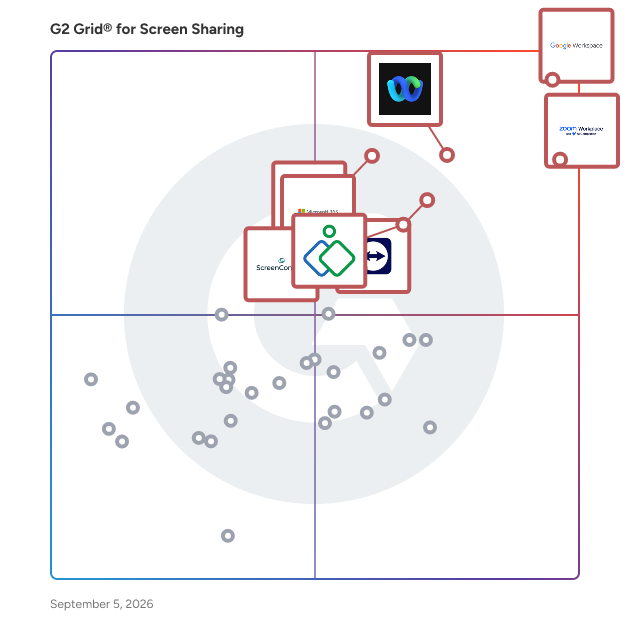
G2 Grid® for Screen Sharing Software

G2 Grid® for Screen Sharing Software plotting products by satisfaction and market presence

Highlighted products: Google Workspace, Zoom Workplace, Webex Suite, TeamViewer, Microsoft 365, Zoho Assist, GoTo Meeting, and ScreenConnect.

Underlying data: [Grid® JSON](https://www.g2.com/categories/screen-sharing/grids.json?focus%5B%5D=google-workspace&focus%5B%5D=zoom-workplace&focus%5B%5D=cisco-webex-suite&focus%5B%5D=teamviewer&focus%5B%5D=microsoft365&focus%5B%5D=zoho-assist&focus%5B%5D=goto-meeting&focus%5B%5D=screenconnect)

Google Workspace

Google Workspace is a comprehensive productivity and collaboration solution designed to help users streamline their work processes by integrating essential tools such as email, chat, file storage, and video conferencing into a unified platform. This suite of applications is tailored for businesses, educational institutions, and individuals looking to enhance their communication and collaboration efforts, all while leveraging the power of Google’s artificial intelligence. Targeted at a diverse audience, Google Workspace caters to teams of all sizes, from small startups to large enterprises. It is particularly beneficial for remote teams and organizations that prioritize collaboration across different locations. The platform supports various use cases, including project management, team communication, document sharing, and virtual meetings, making it an ideal choice for professionals who need to work together efficiently, regardless of their physical location. One of the key features of Google Workspace is its seamless integration of applications such as Gmail, Google Meet, Google Drive, and Google Docs. This interconnectedness allows users to switch effortlessly between tasks, whether they are sending emails, participating in video calls, or collaborating on documents in real-time. The AI capabilities embedded within the platform enhance user experience by providing smart suggestions, automating repetitive tasks, and improving search functionalities, ultimately saving time and increasing productivity. Additionally, Google Workspace prioritizes security and data protection, offering robust features such as two-factor authentication, advanced phishing protection, and customizable access controls. These measures ensure that sensitive information remains secure while allowing teams to collaborate freely. The platform also supports third-party integrations, enabling users to connect their favorite applications and tools, further enhancing their workflow. In summary, Google Workspace stands out in the productivity software category by providing a holistic approach to collaboration. Its user-friendly interface, combined with powerful AI-driven features and strong security protocols, makes it a valuable tool for anyone looking to improve their work processes and foster effective teamwork. Whether for managing projects, communicating with colleagues, or sharing files, Google Workspace is designed to meet the diverse needs of its users, making it an essential resource in today’s digital workplace.

Average Rating: 4.6/5.0

Total Reviews: 45,694

How Do G2 Users Rate Google Workspace?

  • Has the product been a good partner in doing business?: 9.0/10 (Category avg: 9.1/10)
  • Video Conferencing: 9.1/10 (Category avg: 8.8/10)
  • Live Preview: 8.9/10 (Category avg: 8.9/10)
  • Audio Conferencing: 9.0/10 (Category avg: 8.9/10)

Who Is the Company Behind Google Workspace?

  • Seller: Google
  • Year Founded: 1998
  • HQ Location: Mountain View, CA
  • Twitter: @google
    31,899,995 Twitter followers
  • LinkedIn® Page: www.linkedin.com
    301,144 employees on LinkedIn®
  • Ownership: NASDAQ:GOOG

Who Uses This Product?

  • Who Uses This: Student, Teacher
  • Top Industries: Information Technology and Services, Education Management
  • Company Size: 46% Small, 35% Medium

What Do G2 Reviewers Say About Google Workspace?

AI-generated summary from verified user reviews

Pros
  • Users appreciate the ease of use in Google Workspace, facilitating smooth and efficient workflow management.
  • Users love the seamless team collaboration in Google Workspace, enhancing communication and boosting productivity effortlessly.
  • Users love the seamless integrations in Google Workspace, enhancing efficiency with easy access to tools and scheduling.
  • Users praise the ease of use and integration in Google Workspace, enhancing productivity and collaboration seamlessly.
  • Users appreciate the seamless Google integration of Workspace, enhancing collaboration and efficiency across all tools.
Cons
  • Users face missing features in Google Workspace, such as limited offline capabilities and restrictions on accessing certain functionalities.
  • Users find the limited features of Google Workspace unnecessary for smaller teams, lacking essential tools for their needs.
  • Users find Google Workspace lacking features compared to other platforms, impacting effective campaign management and data handling.
  • Users find internet dependency challenging, as offline functionality is limited and issues with quality can arise.
  • Users find limited customization options in Google Workspace, particularly for calendars and forms, restricting flexibility and creativity.

What Are Recent G2 Reviews of Google Workspace?

What Are G2 Users Discussing About Google Workspace?

Zoom Workplace

Goodbye app overload. Hello effortless work. Work can be complicated. Your tools shouldn't be. Zoom Workplace connects all the ways you collaborate — from meetings to docs to chat and more — with built-in AI and seamless integrations that help teams focus and work flawlessly. Zoom Communications: Unified, Effortless Connection for Modern Work Bring every way your teams communicate—meetings, chat, calls, email, and scheduling—into one seamless experience. With Zoom, collaboration happens faster and more naturally across channels, without switching apps or losing context. From spontaneous chats to scheduled meetings and calls, everything stays connected, searchable, and secure—powered by one intuitive platform built for how modern teams work. Zoom Productivity: Workflows Connected, Work Effortless Transform how work gets done with AI-first collaboration that keeps people, content, and actions in one place. From brainstorming on whiteboards to co-creating in docs, sharing clips, and automating follow-ups, Zoom connects every step of your workflow. With Zoom Hub and integrated video management, knowledge stays organized, accessible, and actionable—so teams can move from idea to outcome without friction. Zoom Spaces: Smarter, Connected Workplaces for Every Team Bring your physical and hybrid environments to life with intelligent, connected spaces. Zoom Spaces unifies meeting rooms, desk reservations, digital signage, and visitor management into one seamless experience—making it simple to collaborate, navigate, and manage the workplace. Whether employees are remote, hybrid, or on-site, Zoom creates a consistent, secure, and flexible environment that keeps teams connected wherever work happens. Zoom Employee Engagement: Connect, Inspire, and Empower Every Employee Foster belonging and alignment with Workvivo by Zoom—a modern employee experience platform that unites communication, culture, and community in one place. From company-wide updates to recognition, feedback, and social engagement, Workvivo gives every employee a voice and a sense of connection. Built right into Zoom Workplace, it helps organizations strengthen culture, boost engagement, and keep teams informed and inspired—no matter where they work.

Average Rating: 4.5/5.0

Total Reviews: 53,606

How Do G2 Users Rate Zoom Workplace?

  • Has the product been a good partner in doing business?: 9.1/10 (Category avg: 9.1/10)
  • Video Conferencing: 9.3/10 (Category avg: 8.8/10)
  • Live Preview: 9.0/10 (Category avg: 8.9/10)
  • Audio Conferencing: 9.2/10 (Category avg: 8.9/10)

Who Is the Company Behind Zoom Workplace?

  • Seller: Zoom
  • Company Website:
  • Year Founded: 2011
  • HQ Location: San Jose, CA
  • Twitter: @zoom
    1,042,714 Twitter followers
  • LinkedIn® Page: www.linkedin.com
    14,013 employees on LinkedIn®

Who Uses This Product?

  • Who Uses This: Owner, Software Engineer
  • Top Industries: Information Technology and Services, Computer Software
  • Company Size: 51% Small, 31% Medium

What Do G2 Reviewers Say About Zoom Workplace?

AI-generated summary from verified user reviews

Pros
  • Users love the ease of use of Zoom Workplace, enjoying seamless access to features with just a click.
  • Users enjoy the easy-to-use video conferencing features of Zoom, facilitating smooth communication and collaboration in hybrid work settings.
  • Users appreciate the excellent video quality of Zoom Workplace, enhancing communication and making meetings more effective.
  • Users value the reliability of Zoom Workplace, ensuring seamless connectivity and stability even during adverse conditions.
  • Users appreciate the ease of collaboration in Zoom Workplace, especially with breakout rooms and seamless screen sharing.
Cons
  • Users note the limited features of Zoom Workplace, expressing a need for improved built-in collaboration tools.
  • Users experience Zoom issues like fatigue, connectivity problems, and confusing configurations that hinder their overall meeting effectiveness.
  • Users experience Zoom fatigue, notification overload, and connectivity issues, making long meetings feel overwhelming and impersonal.
  • Users often face connection issues with Zoom Workplace, leading to a frustrating and less seamless experience.
  • Users face video quality issues and discomfort with camera usage, impacting the overall experience of Zoom meetings.

What Are Recent G2 Reviews of Zoom Workplace?

What Are G2 Users Discussing About Zoom Workplace?

Webex Suite

Webex Suite is an all-in-one, AI-powered collaboration suite built to increase productivity and maximize teamwork in today’s hybrid work. With 8 powerful individual workflows – Meetings, Messaging, Calling, Webinar, Events, Polling, Whiteboarding and Video Messaging in one, Webex Suite delivers exceptional value, world-class user experiences, and incredible audio and video, anywhere on any device. With a variety of collaboration and AI innovations, such as Webex AI Assistant, Real-time Translation, Background Noise Removal, and more, Webex Suite delivers rich and innovative experiences for employees and customers, enabling them to seamlessly connect, collaborate, engage and get work done. Webex Suite is powered by the industry-leading Webex Platform that is secure, compliant, and easily managed with built-in pervasive intelligence, bringing AI innovations across the entire Webex portfolio. The entire Webex Suite can be managed via the single-pane-of-glass management tool, Webex Control Hub. Webex Suite is backed by Cisco’s industry-leading security and networking infrastructure that ensures the best quality video and audio communications. Webex Suite Workflows: Meetings: Drive more productive meetings with AI-powered experiences and high-quality audio and video. Messaging: Collaborate async with rich messaging, secure file sharing, and digital whiteboarding to keep work flowing between meetings. Calling: Stay connected with modern business phone system and flexible calling options. Webinar: Host high quality webinars and drive engagement with immersive content and interactive audience experiences. Events: Power virtual, in-person, and hybrid events with immersive multi-track agendas, ticketing, attendee networking, analytics, and more. Polling: Enable active participation in every meeting with quizzes, polling, and interactive Q&A. Whiteboarding: Unleash creativity with a digital whiteboarding solution for everyone, on any device. Video Messaging: Record, share ideas, engage, and facilitate real-time feedback with intuitive video messaging.

Average Rating: 4.2/5.0

Total Reviews: 17,664

How Do G2 Users Rate Webex Suite?

  • Has the product been a good partner in doing business?: 8.7/10 (Category avg: 9.1/10)
  • Video Conferencing: 9.0/10 (Category avg: 8.8/10)
  • Live Preview: 8.9/10 (Category avg: 8.9/10)
  • Audio Conferencing: 9.0/10 (Category avg: 8.9/10)

Who Is the Company Behind Webex Suite?

  • Seller: Cisco
  • Company Website:
  • Year Founded: 1984
  • HQ Location: San Jose, CA
  • Twitter: @Cisco
    720,366 Twitter followers
  • LinkedIn® Page: www.linkedin.com
    95,294 employees on LinkedIn®

Who Uses This Product?

  • Who Uses This: Software Engineer, Senior Software Engineer
  • Top Industries: Information Technology and Services, Computer Software
  • Company Size: 50% Large, 31% Medium

What Do G2 Reviewers Say About Webex Suite?

AI-generated summary from verified user reviews

Pros
  • Users appreciate the ease of use of Webex Suite for its all-in-one solution for communication and collaboration.
  • Users value the high-quality video and audio of Webex Suite, enabling effective and seamless collaboration across locations.
  • Users appreciate the reliable connections provided by Webex Suite, enhancing their collaboration experience seamlessly.
  • Users value the all-in-one collaboration capabilities of Webex Suite, enhancing productivity with excellent video and audio quality.
  • Users commend the excellent video quality of Webex Suite, enhancing their meeting and collaboration experiences.
Cons
  • Users often experience slow loading issues with Webex Suite, causing frustration during calls and overall usage.
  • Users report performance issues with Webex Suite, describing lag, freezes, and a cluttered interface that complicates usability.
  • Users find Webex Suite not user-friendly, citing a cluttered interface and confusion with settings as major drawbacks.
  • Users find the lack of intuitiveness in Webex Suite's interface challenging, especially for new users navigating features.
  • Users find the poor user experience of Webex Suite challenging, with a complex setup and a cluttered interface.

What Are Recent G2 Reviews of Webex Suite?

What Are G2 Users Discussing About Webex Suite?

TeamViewer

TeamViewer is a leading provider of remote connectivity software for individuals and businesses of all sizes. Our remote software enables companies across various industries to enhance their efficiency and achieve their business goals by digitally transforming their processes. We offer a selection of bespoke solutions: TeamViewer Tensor, our enterprise remote connectivity solution, enables businesses to connect, manage, and protect computers, mobile devices, and embedded platforms – on site and around the globe. TeamViewer Remote, our remote access and support solution, enables secure access to devices for remote support in small and medium-sized businesses. A free version of TeamViewer Remote is available for personal use. TeamViewer is actively working to shape the digital revolution by innovating in the fields of augmented reality (AR) and the Internet of Things (IoT). Our AR platform, Frontline, brings digital technology onto the shop floor with industrial AR solutions designed to optimize manual processes. Strategic partnerships and software integrations with other industry leaders such as SAP, Google, and Microsoft let us provide our customers with a seamless experience, regardless of their device or operating system. Since TeamViewer was founded in Göppingen, Germany, in 2005, our solutions have been installed on more than 2.5 billion devices worldwide. For more information, visit www.teamviewer.com.

Average Rating: 4.5/5.0

Total Reviews: 4,083

How Do G2 Users Rate TeamViewer?

  • Has the product been a good partner in doing business?: 8.6/10 (Category avg: 9.1/10)
  • Video Conferencing: 8.7/10 (Category avg: 8.8/10)
  • Live Preview: 8.9/10 (Category avg: 8.9/10)
  • Audio Conferencing: 8.8/10 (Category avg: 8.9/10)

Who Is the Company Behind TeamViewer?

  • Seller: TeamViewer
  • Company Website:
  • Year Founded: 2005
  • HQ Location: Goppingen
  • Twitter: @TeamViewer
    48,070 Twitter followers
  • LinkedIn® Page: www.linkedin.com
    2,818 employees on LinkedIn®

Who Uses This Product?

  • Who Uses This: Software Engineer, IT Manager
  • Top Industries: Information Technology and Services, Computer Software
  • Company Size: 41% Small, 34% Medium

What Do G2 Reviewers Say About TeamViewer?

AI-generated summary from verified user reviews

Pros
  • Users appreciate the ease of use of TeamViewer, enjoying a smooth experience for remote access and support.
  • Users appreciate the easy remote access provided by TeamViewer, simplifying connections and enhancing productivity.
  • Users value the easy remote access with TeamViewer, simplifying connections and control over devices effortlessly.
  • Users love the Easy Access feature of TeamViewer, making remote connections seamless and efficient.
  • Users appreciate the seamless remote access of TeamViewer, enhancing productivity through easy connections and cross-platform compatibility.
Cons
  • Users face significant connection issues with TeamViewer, impacting performance during slow or unstable internet conditions.
  • Users experience connectivity issues with TeamViewer, leading to poor performance during slow or bad connections.
  • Users find TeamViewer expensive in South Africa due to high subscription fees and limited performance on slow connections.
  • Users experience slow performance with TeamViewer, particularly during weak internet connections and after network disruptions.
  • Users often face remote access issues with TeamViewer, including connection failures and confusing control panel interfaces.

What Are Recent G2 Reviews of TeamViewer?

What Are G2 Users Discussing About TeamViewer?

Microsoft 365

Launch and grow your business with Microsoft 365. Do more, faster, with intelligent tools to create, send, share, and store professional, branded documents with your customers and team - securely in the cloud. Microsoft 365 is a cloud-based suite of software tools designed to help you do more—with best-in-class communication, design, and data management apps, intelligent cloud services, and advanced security. Access your data from anywhere, collaborate with team members in real time, meet with people virtually, and use thousands of predesigned templates to better communicate with customers and manage your business - all with built-in security technology that safeguards your data and devices from anywhere. Get the latest Office apps, such as Microsoft Teams, Word, Excel, PowerPoint, Outlook, OneDrive, and more.

Average Rating: 4.6/5.0

Total Reviews: 5,547

How Do G2 Users Rate Microsoft 365?

  • Has the product been a good partner in doing business?: 8.8/10 (Category avg: 9.1/10)
  • Video Conferencing: 9.0/10 (Category avg: 8.8/10)
  • Live Preview: 8.9/10 (Category avg: 8.9/10)
  • Audio Conferencing: 9.0/10 (Category avg: 8.9/10)

Who Is the Company Behind Microsoft 365?

  • Seller: Microsoft
  • Year Founded: 1975
  • HQ Location: Redmond, Washington
  • Twitter: @microsoft
    13,091,739 Twitter followers
  • LinkedIn® Page: www.linkedin.com
    232,750 employees on LinkedIn®
  • Ownership: MSFT

Who Uses This Product?

  • Who Uses This: Owner, Software Engineer
  • Top Industries: Information Technology and Services, Education Management
  • Company Size: 37% Medium, 35% Small

What Do G2 Reviewers Say About Microsoft 365?

AI-generated summary from verified user reviews

Pros
  • Users highlight the ease of use in Microsoft 365, enjoying straightforward implementation and seamless navigation.
  • Users appreciate the seamless team collaboration in Microsoft 365, enhancing efficiency and communication across various applications.
  • Users value the easy integration with Microsoft apps, enhancing data access and collaboration across devices.
  • Users value the easy integration of Microsoft 365 with other tools, enhancing collaboration and accessibility across devices.
  • Users love the seamless integration of Microsoft 365 with other apps, enhancing accessibility and collaboration.
Cons
  • Users find Microsoft 365 too expensive for small teams, encountering frustrating limitations and issues with updates.
  • Users find the missing features frustrating, as essential tools are locked behind higher-priced plans and updates disrupt functionality.
  • Users find the learning curve daunting with Microsoft 365, often feeling overwhelmed by its complexity and features.
  • Users find Microsoft 365 lacking essential features, especially with frequent updates that disrupt established workflows and settings.
  • Users are frustrated by limited features in Microsoft 365, often requiring costly plans for full functionality.

What Are Recent G2 Reviews of Microsoft 365?

What Are G2 Users Discussing About Microsoft 365?

Zoho Assist

Zoho Assist is a cloud-based remote support and unattended access solution designed to help businesses deliver seamless IT support and manage remote devices effortlessly. Whether you're assisting customers in real time or managing unattended endpoints, Zoho Assist offers a fast, secure, and reliable platform that works across devices and operating systems. With zero setup required on the technician's end and a lightweight client for end users, Zoho Assist makes remote troubleshooting simple and efficient, no complicated configurations, no hassle.

Average Rating: 4.7/5.0

Total Reviews: 719

How Do G2 Users Rate Zoho Assist?

  • Has the product been a good partner in doing business?: 9.2/10 (Category avg: 9.1/10)
  • Video Conferencing: 7.4/10 (Category avg: 8.8/10)
  • Live Preview: 7.6/10 (Category avg: 8.9/10)
  • Audio Conferencing: 7.5/10 (Category avg: 8.9/10)

Who Is the Company Behind Zoho Assist?

  • Seller: Zoho
  • Year Founded: 1996
  • HQ Location: Austin, TX
  • Twitter: @Zoho
    137,880 Twitter followers
  • LinkedIn® Page: www.linkedin.com
    30,913 employees on LinkedIn®
  • Phone: +1 (888) 900-9646

Who Uses This Product?

  • Who Uses This: Owner, IT Manager
  • Top Industries: Information Technology and Services, Computer & Network Security
  • Company Size: 70% Small, 22% Medium

What Do G2 Reviewers Say About Zoho Assist?

AI-generated summary from verified user reviews

Pros
  • Users praise the ease of use of Zoho Assist, finding it user-friendly and straightforward for managing sessions.
  • Users commend the easy setup and powerful functionality of Zoho Assist, making remote access seamless and effective.
  • Users value the fast and easy remote support provided by Zoho Assist, enhancing their overall experience significantly.
  • Users value the easy setup of Zoho Assist, appreciating its quick connection and seamless integration into their systems.
  • Users appreciate the reliability of Zoho Assist, highlighting its solid performance and great connection quality.
Cons
  • Users face remote access issues with connection difficulty and screen display limitations affecting their experience significantly.
  • Users find feature limitations in Zoho Assist frustrating, as many advanced options require additional purchases.
  • Users often face connection issues with Zoho Assist, making remote access unreliable at times.
  • Users often find the interface not user-friendly, leading to confusion and difficulty in navigating the platform.
  • Users find Zoho Assist to be expensive, with pricing concerns affecting their likelihood of repurchasing or recommending the service.

What Are Recent G2 Reviews of Zoho Assist?

What Are G2 Users Discussing About Zoho Assist?

GoTo Meeting

An industry leader in online video conferencing for companies around the world, GoTo Meeting now comes as part of GoTo Connect, the all-in-one communications software built for SMBs. The Meeting solution, available to buy standalone, is trusted by millions of people every day for real time virtual communication and collaboration. Get a fast, easy and reliable professional online meeting solution that enables customers to meet face to face, connect with colleagues through in-meeting chat or conference calling, and screenshare their presentations, all with the click of a button. Nothing can match the momentum of your team or business when it’s fueled by an award-winning collaboration solution, the Meeting solution from GoTo Connect pairs productivity with flexibility to let employees work effectively anytime, anywhere on any device.

Average Rating: 4.2/5.0

Total Reviews: 16,584

How Do G2 Users Rate GoTo Meeting?

  • Has the product been a good partner in doing business?: 8.7/10 (Category avg: 9.1/10)
  • Video Conferencing: 9.0/10 (Category avg: 8.8/10)
  • Live Preview: 8.9/10 (Category avg: 8.9/10)
  • Audio Conferencing: 9.0/10 (Category avg: 8.9/10)

Who Is the Company Behind GoTo Meeting?

  • Seller: GoTo
  • Year Founded: 2003
  • HQ Location: Boston, MA
  • Twitter: @goto
    41,211 Twitter followers
  • LinkedIn® Page: www.linkedin.com
    993 employees on LinkedIn®

Who Uses This Product?

  • Who Uses This: Project Manager, Software Engineer
  • Top Industries: Information Technology and Services, Computer Software
  • Company Size: 41% Small, 39% Medium

What Do G2 Reviewers Say About GoTo Meeting?

AI-generated summary from verified user reviews

Pros
  • Users value the ease of use of GoTo Meeting, enabling hassle-free scheduling and participation without installations.
  • Users love the easy setup of GoTo Meeting, enabling quick access for participants without complex installations.
  • Users value the reliability of GoTo Meeting, benefiting from its seamless performance and user-friendly features for virtual collaboration.
  • Users value the simplicity and ease of use of GoTo Meeting, making online meetings hassle-free and efficient.
  • Users appreciate the intuitive interface of GoTo Meeting, making it easy to navigate for seamless online collaboration.
Cons
  • Users experience poor quality issues with GoTo Meeting, including audio drops and challenges with video clarity.
  • Users find the user interface unintuitive, often requiring assistance and leading to mistakes during meetings.
  • Users face significant integration issues with GoTo Meeting, limiting functionality and requiring separate tools for essential tasks.
  • Users express frustration over limited features in GoTo Meeting, desiring more functionalities for enhanced collaboration.
  • Users often experience connection issues, leading to lag and dropped calls during important meetings.

What Are Recent G2 Reviews of GoTo Meeting?

What Are G2 Users Discussing About GoTo Meeting?

ScreenConnect

ScreenConnect delivers fast, flexible, and secure remote desktop and mobile support solutions for every industry and need. With ScreenConnect, IT teams can raise the bar for remote support and reduce customer downtime through on-demand access to desktops, mobile devices, and more. No matter where you work, how you work, and who you work for, ScreenConnect helps you serve customers securely, silently, and seamlessly.

Average Rating: 4.7/5.0

Total Reviews: 489

How Do G2 Users Rate ScreenConnect?

  • Has the product been a good partner in doing business?: 9.1/10 (Category avg: 9.1/10)
  • Video Conferencing: 9.4/10 (Category avg: 8.8/10)
  • Live Preview: 8.6/10 (Category avg: 8.9/10)
  • Audio Conferencing: 6.5/10 (Category avg: 8.9/10)

Who Is the Company Behind ScreenConnect?

  • Seller: ConnectWise
  • Company Website:
  • Year Founded: 1982
  • HQ Location: Tampa, FL
  • Twitter: @ConnectWise
    14,926 Twitter followers
  • LinkedIn® Page: www.linkedin.com
    3,401 employees on LinkedIn®

Who Uses This Product?

  • Who Uses This: Owner, IT Manager
  • Top Industries: Information Technology and Services, Computer & Network Security
  • Company Size: 67% Small, 31% Medium

What Do G2 Reviewers Say About ScreenConnect?

AI-generated summary from verified user reviews

Pros
  • Users find ScreenConnect to be highly reliable, with stable connections that facilitate seamless remote access and support.
  • Users appreciate the reliable remote access of ScreenConnect, providing seamless support and efficient management of client systems.
  • Users value the blazing-fast connection speed of ScreenConnect, ensuring smooth and responsive remote access experiences.
  • Users find ScreenConnect extremely easy to use, facilitating quick and efficient support for end users remotely.
  • Users enjoy the easy communication features of ScreenConnect, enabling quick and reliable remote support interactions.
Cons
  • Users find the cost prohibitive for small teams, potentially limiting access and creating concerns about future price increases.
  • Users experience remote access issues due to added security steps and occasional difficulties with support and antivirus software.
  • Users face internet dependency with ScreenConnect, which can be problematic in locations with limited connectivity.
  • Users express concerns over security features in ScreenConnect, particularly following a security incident that compromised their server.
  • Users express concerns over security issues in ScreenConnect, highlighting incidents that undermine confidence in the system.

What Are Recent G2 Reviews of ScreenConnect?

What Are G2 Users Discussing About ScreenConnect?

CrankWheel

Share your screen without any friction. Screen share in seconds during a voice call. You send a link via text or email and your viewer opens the session in any browser on any device. No download or registration is required for your viewer(s), even on their mobile phone. Add visuals to voice calls. No need to book a follow-up meeting, instead go seamlessly from phone call to full visual presentation. Establish trust faster and close the deal in the first cold call with CrankWheel. In addition to screen sharing, you can also run full web conferences with CrankWheel, with all participants optionally sharing their webcam and using their computer audio to speak to each other. The product can thus replace any other sales meeting tool you may be using. Remote Control and built-in custom e-signature solutions allow clients to sign legally binding agreements, audited by CrankWheel, during your meetings. The product also includes a full video sales platform, replacing Vidyard, BoomBoom or Loom, that lets you record webcam intros, screencasts, or your meetings, then share them as trackable links with optional animated previews that you can paste into your emails. You can even do "video mail merge" to track video interactions down to individual viewers in an audience of dozens or hundreds. Features: Easy screen share Stream HQ videos with sound within a screen share Electronic Signature on forms Record your screen and webcam and embed the video in emails, with Grant your viewer remote control A preview window shows you what the viewer sees and if he is engaged Customizable post-session redirect URL Traditional web conferencing (web-based audio, all participants can share webcam)

Average Rating: 4.9/5.0

Total Reviews: 126

How Do G2 Users Rate CrankWheel?

  • Has the product been a good partner in doing business?: 9.8/10 (Category avg: 9.1/10)
  • Video Conferencing: 9.0/10 (Category avg: 8.8/10)
  • Live Preview: 9.5/10 (Category avg: 8.9/10)
  • Audio Conferencing: 8.8/10 (Category avg: 8.9/10)

Who Is the Company Behind CrankWheel?

  • Seller: CrankWheel ehf.
  • Company Website:
  • Year Founded: 2015
  • HQ Location: Hafnarfjörður, IS
  • Twitter: @crankwheel
    780 Twitter followers
  • LinkedIn® Page: www.linkedin.com
    10 employees on LinkedIn®

Who Uses This Product?

  • Who Uses This: Insurance Agent
  • Top Industries: Insurance, Marketing and Advertising
  • Company Size: 69% Small, 20% Medium

What Do G2 Reviewers Say About CrankWheel?

AI-generated summary from verified user reviews

Pros
  • Users highlight the exceptional ease of use in CrankWheel, facilitating smooth and intuitive screen sharing experiences.
  • Users find CrankWheel's screen sharing effortless, enhancing client engagement without any complicated downloads or setups.
  • Users appreciate the simplicity and speed of CrankWheel, enabling hassle-free screen sharing and improved client engagement.
  • Users love the easy setup of CrankWheel, making it perfect for fast, hassle-free screen sharing and presentations.
  • Users enjoy the navigation ease of CrankWheel, finding it simple and user-friendly for both presenters and clients.
Cons
  • Users find the outdated interface and limited features of CrankWheel hinder its usability compared to competitors.
  • Users find audio issues with CrankWheel, as it lacks comprehensive video conferencing capabilities despite audio call integration.
  • Users find the chat functionality confusing due to the 2-step verification process and navigating back into the link.
  • Users often experience connection issues with CrankWheel, particularly when switching browsers or sharing during video calls.
  • Users find CrankWheel expensive for premium features, requiring paid upgrades after the free trial ends.

What Are Recent G2 Reviews of CrankWheel?

AIRTAME

Airtame is a leading all-in-one solution for shared screens in business and education, challenging the norms in the AV industry with a hardware-enabled SaaS platform. With a focus on empowering people to collaborate in new ways, Airtame makes meeting rooms more inclusive and classrooms and common spaces more dynamic through intuitive hybrid conferencing, screen sharing, and digital signage. Airtame is known for being easy to install, easy to use, and easy to manage. Airtame solutions are used by more than 10,000 organizations worldwide to make over 110,000 rooms and spaces more engaging, and is trusted by people to facilitate over 1.5 million meetings and classes each month. The Airtame Hub and Airtame Room delivers a reliable and innovative hybrid conferencing solution - this solution allows you to: - Join Microsoft Teams or Zoom calls from the same set-up - Rely on a wired ethernet connection for quality calls - Know your peripherals will always be ready to go - Stop worrying about a separate tablet controller - Screen share without even joining the call The Airtame 2 allows for screen sharing and digital signage in a single solution. Presenters can share their screen wirelessly, from a computer or mobile device to a TV, projector or monitor. Our SaaS⁠ solution, Airtame Cloud, provides centralized remote management where you can: - Manage devices from anywhere. View, update, and manage devices and content across thousands of screens. - Run your signage remotely. Control digital signage content remotely and show important and relevant messages to engage the audience. - Save on power. Schedule your screens to turn on and off automatically, according to the office or school hours. Using Airtame for Digital Signage allows to inform, educate, and engage. Turn your displays into info screens. Display relevant content that you control. Founded in 2013, Airtame has grown to a company of over 80 people with offices in New York, Copenhagen, and Budapest. We have an international mindset, fostered by inclusion and collaboration.

Average Rating: 4.6/5.0

Total Reviews: 36

How Do G2 Users Rate AIRTAME?

  • Has the product been a good partner in doing business?: 9.6/10 (Category avg: 9.1/10)
  • Video Conferencing: 9.3/10 (Category avg: 8.8/10)
  • Live Preview: 9.3/10 (Category avg: 8.9/10)
  • Audio Conferencing: 8.9/10 (Category avg: 8.9/10)

Who Is the Company Behind AIRTAME?

  • Seller: AIRTAME
  • Year Founded: 2013
  • HQ Location: Copenhagen, DK
  • Twitter: @airtame
    2,560 Twitter followers
  • LinkedIn® Page: www.linkedin.com
    59 employees on LinkedIn®

Who Uses This Product?

  • Top Industries: Financial Services, Primary/Secondary Education
  • Company Size: 54% Medium, 27% Large

What Do G2 Reviewers Say About AIRTAME?

AI-generated summary from verified user reviews

Pros
  • Users admire the simplicity and ease of use of AIRTAME's devices and online interface.
  • Users find the easy setup of AIRTAME incredibly convenient, enhancing overall usability in various environments.
  • Users appreciate the dependability of AIRTAME, ensuring reliable performance for both wired and wireless integrations.
  • Users find AIRTAME very convenient to set up and manage, especially with Airtame Cloud integration.
  • Users celebrate the cross-platform compatibility of Airtame, making it easy for everyone to integrate and use.
Cons
  • Users wish for improved app functionality, such as interactive support and Bluetooth connectivity for easier device integration.
  • Users desire improved hardware reliability with features like Bluetooth support for better connectivity in Airtame.
  • Users express a desire for improved integration issues with Epson projectors and Bluetooth support for easier connectivity.

What Are Recent G2 Reviews of AIRTAME?

What Are G2 Users Discussing About AIRTAME?

Rise Vision

Rise Vision is the all-in-one platform for digital signage, screen sharing, and emergency alerts designed to help organizations communicate, teach, collaborate, and improve safety. The cloud-based system integrates digital signage, interactive digital signage, screen sharing, and emergency alerts, making it an ideal choice for organizations looking to streamline their visual communication efforts. With its easy-to-use software and world-class support, Rise Vision caters to a diverse range of industries and applications. The all-in-one platform is particularly beneficial for businesses, educational institutions, healthcare facilities, and public organizations that require efficient communication tools. Users can leverage Rise Vision to share critical updates, communicate safety and productivity metrics, spotlight announcements, event details, and more across multiple screens, ensuring that messages reach their intended audience effectively. The ability to create custom schedules and manage presentations on one or more displays makes it a flexible solution for any setting, whether it’s a single classroom or a large corporate office with hundreds of screens. Key features of Rise Vision include over 750 professionally designed templates that allow users to quickly create visually appealing content without the need for extensive design skills. Users can also use the AI presentation design and editing tool that's the fastest way to turn an idea in your head into engaging digital signage. The platform supports a wide range of hardware, enabling users to either utilize recommended hardware or integrate their existing technology. This flexibility ensures that organizations can implement Rise Vision in a way that best suits their needs and budget. Additionally, the seamless screen sharing capability enhances collaboration among team members, allowing for real-time sharing of presentations and information. Another significant aspect of Rise Vision is its powerful emergency alert system, which provides users with the ability to broadcast critical information during emergencies. This feature is essential for ensuring safety in environments such as schools and workplaces, where timely communication can make a significant difference. With world-class support available, users can feel confident in their ability to resolve any issues and maximize the platform's potential. Overall, Rise Vision stands out in the digital signage category by offering a holistic solution that combines ease of use, extensive customization options, and robust support. Its adaptability to various industries and use cases, along with its commitment to enhancing communication and safety, makes it a valuable tool for organizations looking to improve their visual communication strategies.

Average Rating: 4.7/5.0

Total Reviews: 987

How Do G2 Users Rate Rise Vision?

  • Has the product been a good partner in doing business?: 9.6/10 (Category avg: 9.1/10)
  • Video Conferencing: 6.9/10 (Category avg: 8.8/10)
  • Live Preview: 8.1/10 (Category avg: 8.9/10)
  • Audio Conferencing: 6.9/10 (Category avg: 8.9/10)

Who Is the Company Behind Rise Vision?

  • Seller: Rise Vision
  • Company Website:
  • Year Founded: 1992
  • HQ Location: Toronto, Ontario, Canada
  • Twitter: @RiseVision
    2,940 Twitter followers
  • LinkedIn® Page: www.linkedin.com
    58 employees on LinkedIn®

Who Uses This Product?

  • Who Uses This: Teacher, Administrative Assistant
  • Top Industries: Primary/Secondary Education, Education Management
  • Company Size: 64% Medium, 25% Small

What Do G2 Reviewers Say About Rise Vision?

AI-generated summary from verified user reviews

Pros
  • Users find Rise Vision to be incredibly easy to use, allowing for quick content updates and customization.
  • Users love the extremely easy-to-use interface of Rise Vision, making management and updates a breeze for schools.
  • Users commend the excellent customer support from Rise Vision, always responsive and helpful for any inquiries.
  • Users value the integration and reliability of Rise Vision, facilitating smooth deployments and real-time information access.
  • Users find the easy setup of Rise Vision impressive, facilitating smooth deployment and real-time data display effortlessly.
Cons
  • Users express frustration over limited customization options, wishing for more flexibility in template designs and animations.
  • Users feel frustrated by the limited template options, wishing for more flexibility in design and animation.
  • Users face a learning curve with Rise Vision, especially those unfamiliar with technology or Linux systems.
  • Users find the complexity of Rise Vision challenging, especially for beginners and those less tech-savvy.
  • Users experience a steep learning curve initially, making navigation and advanced customization challenging for newcomers.

What Are Recent G2 Reviews of Rise Vision?

What Are G2 Users Discussing About Rise Vision?

Splashtop Remote Access

Splashtop Remote Access provides secure, high-performance remote desktop connections for business professionals and teams to work from anywhere, using any device. With security and advanced productivity features, users get seamless access to files and applications, while enabling IT administrators to centrally deploy and control permissions, ensuring both efficiency and security. Key features include: File Transfer Remote Reboot Remote Print Multi-to-Multi Monitor User role and access management Chat (in-session and outside-session) Share screen via weblink Remote reboot and Wake-on-LAN Session recording Two users in one computer Remote stylus USB device redirection Mic passthrough Ultra high-quality audio (256k or 384k) YUV 4:4:4 (Better color accuracy) SSO Integration Granular Permissions and Scheduled Access Android/IoT Unattended Access APIs, IP Whitelist, Connector

Average Rating: 4.8/5.0

Total Reviews: 514

How Do G2 Users Rate Splashtop Remote Access?

  • Has the product been a good partner in doing business?: 9.6/10 (Category avg: 9.1/10)
  • Video Conferencing: 9.0/10 (Category avg: 8.8/10)
  • Live Preview: 8.8/10 (Category avg: 8.9/10)
  • Audio Conferencing: 7.4/10 (Category avg: 8.9/10)

Who Is the Company Behind Splashtop Remote Access?

  • Seller: Splashtop Inc.
  • Company Website:
  • Year Founded: 2006
  • HQ Location: Cupertino, CA
  • Twitter: @splashtop
    5,216 Twitter followers
  • LinkedIn® Page: www.linkedin.com
    353 employees on LinkedIn®

Who Uses This Product?

  • Who Uses This: Owner, President
  • Top Industries: Accounting, Information Technology and Services
  • Company Size: 81% Small, 15% Medium

What Do G2 Reviewers Say About Splashtop Remote Access?

AI-generated summary from verified user reviews

Pros
  • Users find the ease of use of Splashtop Remote Access excellent for quick setup and navigation.
  • Users commend the easy setup of Splashtop Remote Access, highlighting seamless implementation and user-friendly experience.
  • Users praise Splashtop Remote Access for its versatile remote access capabilities across Windows and Mac systems.
  • Users appreciate the easy access provided by Splashtop Remote Access, enabling smooth transitions between Windows and Macintosh systems.
  • Users highlight the affordability of Splashtop Remote Access, appreciating its low cost and high value for functionality.
Cons
  • Users experience remote access issues with Splashtop, including lag, dropped sessions, and connection failures requiring reboots.
  • Users experience connection issues that require multiple relaunches, impacting the overall usability of Splashtop Remote Access.
  • Users note the feature limitations of Splashtop, particularly in antivirus capabilities and Mac-to-Mac connections.
  • Users find Splashtop Remote Access not user-friendly, particularly when managing user permissions and adding users to devices.
  • Users experience slow performance issues, especially on low-speed connections, affecting usability and efficiency.

What Are Recent G2 Reviews of Splashtop Remote Access?

What Are G2 Users Discussing About Splashtop Remote Access?

Realtime

Secure, download-free cobrowsing & full desktop screensharing that integrates with most major CRMs or via custom connector. Use our view-only, collaborative, or full desktop model to deliver concierge-level support to online customers on the web's most complicated tasks.

Average Rating: 4.5/5.0

Total Reviews: 40

How Do G2 Users Rate Realtime?

  • Has the product been a good partner in doing business?: 9.9/10 (Category avg: 9.1/10)
  • Video Conferencing: 9.1/10 (Category avg: 8.8/10)
  • Live Preview: 8.9/10 (Category avg: 8.9/10)
  • Audio Conferencing: 9.4/10 (Category avg: 8.9/10)

Who Is the Company Behind Realtime?

Who Uses This Product?

  • Who Uses This: Research Analyst, Business Development Representative
  • Top Industries: Information Technology and Services
  • Company Size: 78% Medium, 17% Small

What Do G2 Reviewers Say About Realtime?

AI-generated summary from verified user reviews

Pros
  • Users value the instant interactive support of Realtime, enhancing customer experience through real-time engagement and collaboration.
  • Users appreciate the instant interactive support of Realtime, enhancing customer engagement and problem-solving efficiency.
  • Users value the instant interactive support of Realtime, enhancing customer engagement and satisfaction through real-time solutions.
  • Users value the instant video chat of Realtime, enhancing trust and enabling quick resolution of complex issues.
  • Users value the instant communication of Realtime, significantly improving customer engagement and support resolution times.
Cons
  • Users find the dependency on a stable internet connection restrictive, impacting accessibility in areas with slower networks.
  • Users face challenges due to the dependency on stable internet connection, limiting accessibility in areas with slower networks.
  • Users face challenges due to Realtime's dependency on stable internet connections, impacting accessibility in low-speed areas.
  • Users often face issues due to the poor connectivity required by Realtime, affecting accessibility in slower network areas.
  • Users find the implementation costs of Realtime to be high, particularly for small businesses and startups.

What Are Recent G2 Reviews of Realtime?

Surfly

Surfly provides co-browsing and collaboration technology that lets you upgrade any conversation, from any channel, seamlessly, and support customers as if you are sitting side-by-side. Your customer simply clicks a link, or button, and their co-browsing session instantly begins in their browser window, and you see what they see.  With Surfly there is no software to download and no code to add to your website. Surfly’s technology provides a smooth and fast experience, with no loss of quality, even when co-browsing websites with audio and video.  Surfly can also be easily customised to fit any customer experience flow. You can launch co-browsing sessions directly from your website and even customize the flow in such a way that it perfectly matches your website’s look and feel. With our fully documented API, you can quickly integrate Surfly into other chat solutions, CRM systems, and call center platforms. Surfly’s key features include:  - Document sharing  - Video chat  - Control switching  - Field masking  - Action logs - Behaviour control  - Customisable UI - Security and privacy compliance - Single sign on 

Average Rating: 4.8/5.0

Total Reviews: 90

How Do G2 Users Rate Surfly?

  • Has the product been a good partner in doing business?: 9.4/10 (Category avg: 9.1/10)
  • Video Conferencing: 9.1/10 (Category avg: 8.8/10)
  • Live Preview: 9.2/10 (Category avg: 8.9/10)
  • Audio Conferencing: 9.3/10 (Category avg: 8.9/10)

Who Is the Company Behind Surfly?

  • Seller: Surfly
  • Year Founded: 2012
  • HQ Location: Amsterdam, Netherlands
  • Twitter: @Surfly
    903 Twitter followers
  • LinkedIn® Page: www.linkedin.com
    29 employees on LinkedIn®

Who Uses This Product?

  • Top Industries: Financial Services, Information Technology and Services
  • Company Size: 44% Small, 34% Medium

What Are Recent G2 Reviews of Surfly?

What Are G2 Users Discussing About Surfly?

Ditto

Bring your screens to life with Ditto — a cross-platform screen mirroring and digital signage solution for your computers, tablets, phones, TVs, interactive whiteboards and projectors. Transform Apple TVs and Windows devices into powerful screen mirroring receivers and digital signage players. Wirelessly screen mirror content from iOS, iPadOS, macOS, Windows, Android and Chrome OS. Mirror one device to multiple displays or many devices to one display. Design, customize and schedule digital signage content all in one place from the web-based Ditto digital signage CMS. Ditto is perfect for all of your screens in all of your spaces.

Average Rating: 4.3/5.0

Total Reviews: 50

How Do G2 Users Rate Ditto?

  • Has the product been a good partner in doing business?: 9.1/10 (Category avg: 9.1/10)
  • Video Conferencing: 5.0/10 (Category avg: 8.8/10)
  • Audio Conferencing: 6.7/10 (Category avg: 8.9/10)

Who Is the Company Behind Ditto?

  • Seller: Squirrels
  • Year Founded: 2008
  • HQ Location: North Canton, OH
  • Twitter: @Squirrels
    2,561 Twitter followers
  • LinkedIn® Page: www.linkedin.com
    47 employees on LinkedIn®

Who Uses This Product?

  • Top Industries: Automotive, Education Management
  • Company Size: 57% Medium, 35% Small

What Are Recent G2 Reviews of Ditto?

Neeraja Prakash
NP
Researched and written by Neeraja Prakash
Updated October 3, 2024

Learn More About Screen Sharing Software

What is Screen Sharing Software?

Screen sharing is the process of viewing or sharing access to a user’s window or desktop for the purpose of collaboration, presentation, IT support, and so forth. Screen sharing tools allow a user to present their screen onto another user’s laptop or mobile device, to a group during a video conference, or even to a public digital display in the office.

Most screen sharing tools are available as a secondary feature of comprehensive software solutions, typically video conferencing software. Depending on the nature of the software, screen sharing is a feature that often supports a larger intended use case. Screen sharing is commonly used in collaborative settings but is also used during presentations, product demos, and employee training. If a product is a standalone screen sharing solution, its supporting features are often specific to a particular use case.

What Types of Screen Sharing Software Exist?

There are many different screen sharing solutions available. Some of these products allow screen sharing as a feature of the overall solution, and others focus on screen sharing as the primary function. As demand for this kind of software has increased, it’s important for buyers to understand the difference between screen sharing as a standalone product versus screen sharing as a feature of a larger product. 

Standalone screen sharing software

Many screen sharing solutions put that functionality at the forefront of their product. Standalone screen sharing tools typically focus on a particular type of use case, like team collaboration and sales demos. While screen sharing is the main function of these standalone solutions, they often come with secondary features to support their intended use case. For this reason, buyers must ensure that a standalone screen sharing tool is a good fit for their particular use case.

Screen sharing as a feature

Screen sharing is a popular feature within other software, particularly inside video conferencing software and visual collaboration platforms. Visual collaboration platforms provide flexible digital workspaces to whiteboard, attach documents, and communicate with teammates. In the case of visual collaboration platforms, users will often have the option to share their screen to a shared workspace, to another device in a room, or through a video conferencing feed.

What are the Common Features of Screen Sharing Software?

The following are some core features within screen sharing software that can help users with collaboration, presentation, remote assistance, and other practical tasks:

Video conferencing: Screen sharing software often allows users to communicate via video channels. Since most screen sharing options are attached to a larger video conferencing platform, these features are often found together. Even standalone screen sharing solutions will include a lightweight video conferencing feature to allow users to communicate.

Audio conferencing: This software allows users to communicate via audio channels. Similar to the video conferencing feature, screen sharing tools are often paired with audio conferencing capability. In the case of video conferencing platforms, users will usually have the option to select audio conferencing without a video feed, but will still have the option to share their screen or desktop.

Group live chat: Screen sharing software provides a live chat feed during a screen sharing session. Live chat is particularly useful if users are utilizing screen sharing software to collaborate. In this instance, participants can discuss the presented content without interrupting the speaker. This is a popular feature seen in screen sharing solutions built into more comprehensive video conferencing platforms.

Switch presenter: Screen sharing solutions allow presenters to relinquish presenter access to another user in a call. This feature has contextual benefits depending on what the user is leveraging screen sharing for. In the case of collaboration, switching presenters allows multiple people to share information from a single slide deck without switching devices.

Live preview: Screen sharing software provides users with a live preview of what viewers are about to see. This allows presenters to ensure they are sharing the information they intend before making their screen viewable. This is a useful feature that can help protect user privacy.

Notification blocker: This software blocks notifications from other applications from appearing during a screen sharing session. This feature is especially popular in sales demo-specific standalone tools since sales representatives don’t want notifications to appear in the middle of client calls. Additionally, this is helpful during important presentations, webinars, and employee training sessions in which notifications would be an unwelcome distraction.

Remote access: Screen sharing solutions allow users to give audience members control of cursors or tools on the shared screen. Similar to notification blockers, remote access features are popular in sales demo screen sharing tools for B2B and B2C software vendors. Remote access allows clients to interact with prospective software on a call with a representative without requiring them to download anything on their own device. In addition to sales, this is a very useful feature for IT support as the representative will be able to access the device and resolve technical issues more quickly.

Password protection: Screen sharing software provides password protection to access screen sharing sessions. This is often a secondary feature within video conferencing platforms. Password protection ensures that only intended participants join a given call.

Recording: This software allows users to record screen sharing sessions for later review. Some products will even automatically send a recording of a call to participants once the session ends.

In-browser application: Screen sharing software allows users to access software inside a web browser.

What are the Benefits of Screen Sharing Software?

Convenient: Screen sharing software is versatile and multipurpose. It has a wide range of practical applications and is ideal for virtual meetings, presentations, trainings, technical support, and project collaboration.

Cost effective: Screen sharing software enables companies to cut costs by meeting with clients and vendors virtually without compromising on the effectiveness and quality of a presentation or demonstration. This applies internally as well as when employees travel between a company’s offices, whether domestically or internationally. With the right technology, these trips can be reduced or eliminated entirely. 

Saves time: Screen sharing software helps to cut back on the back and forth communication, follow-up emails, and multiple calls that employees often experience. When users can communicate and collaborate in real time, it reduces the need for extensive, time-consuming follow-up communication methods.

Increased productivity: Screen sharing allows users to collaborate in an easy and productive manner. It enhances communication and efficiency, allowing for more effective meetings which can save both time and money.

Who Uses Screen Sharing Software?

Sales representatives: One specific use case some screen sharing solutions target is sales demonstrations. Both B2B and B2C software sellers can leverage screen sharing tools to remotely provide in-depth demos of their products to prospective clients, analyst firms, and other interested parties. Screen sharing tools intended specifically for sales demos often include features like notification blockers, the ability to allow meeting participants to interact with their screen, and call recording.

Team members: The most common and industry-agnostic use case for screen sharing tools is team collaboration. Remote and co-located teams leverage screen sharing functionality for presentations, co-authoring, and a multitude of other purposes. Screen sharing tools are inherently flexible in nature so users have a lot of freedom determining what they want to use them for.

IT departments: The ability to screen share is especially important to IT departments that offer remote support as some screen sharing software allows users to hand off desktop control to their tech teams to diagnose and solve technical issues. This is especially true for remote workers who may not have in-person access to their company’s IT department. 

Human resources (HR): Screen sharing is a very resourceful tool for HR departments as they frequently handle new employee orientations, training, and performance evaluations. When working with remote employees, it is helpful for HR departments to have the ability to present documents and review material together in real time.

Software Related to Screen Sharing Software

Related solutions that can be used together with screen sharing software include:

Video conferencing software: Since video conferencing software users are already connected by a video feed, the next best thing is to also include screen sharing capability so users can more easily trade visual information. The vast majority of video conferencing tools will also include screen sharing as a standard feature within their offering. The most popular screen sharing options are often those that are built into video conferencing software since many offer free options and are easy to implement. For some buyers, the ability to host HD video calls, whether for a small team or as a conference call, is a critical feature for their business.

Visual collaboration platforms: Many visual collaboration platforms also include a screen sharing feature, allowing collaborators to host their screen within an infinite canvas. Since visual collaboration platforms aim to be a central hub for all of a business’s collaboration needs, screen sharing functionality fits in well with the plethora of other features these types of tools provide. However, since visual collaboration platforms are mainly intended for internal use, users looking to share their screen with external clients or stakeholders should consider using video conferencing tools or standalone screen sharing solutions instead.

Remote desktop software: One of the main features of remote desktop software is screen sharing. However, instead of being used in collaborative contexts, remote desktop tools are leveraged by IT technicians to help users with computer troubles remotely. In addition to screen sharing, remote desktop solutions provide features like remote control access and integrations with help desk ticketing systems.

Digital signage software: Screen sharing software often functions very similarly to digital signage software in that both allow users to display a given image or message on a designated screen. However, digital signage tools aren’t streaming the contents of one screen onto another, which is the case for screen sharing software. Instead, digital signage software pulls images and videos from a designated content management system to display on one or more digital displays. However, those with one-off digital signage solutions for offices sometimes lean on screen sharing tools.

Challenges with Screen Sharing Software

Connection issues: This technology relies on a strong and powerful internet connection in order to avoid lagging, buffering, or connectivity issues. It is recommended to check the system requirements for the software to ensure that adequate bandwidth is available. Typically, it is recommended that users have an internet speed of 50-150 kilobits per second (kbps) to successfully utilize screen sharing software.  

Security concerns: One main security concern related to screen sharing software is the potential to expose confidential or sensitive information via user error. Many applications give the user the option to choose which screen, desktop, or window they would like to share during a meeting. However, it’s very easy to choose the wrong screen or window, giving the audience access to private information. This is an even greater concern if desktop control is given to an untrustworthy user.

How to Buy Screen Sharing Software

Requirements Gathering (RFI/RFP) for Screen Sharing Software

Whether a company is just starting to explore screen sharing software or is looking for a more appropriate solution for their needs, g2.com can help inform buyers of the market and assist them in selecting the best software product for their business.

The first step in deciding which kind of screen sharing software a buyer should look at is to assess the needs of the organization as a whole. Does the organization already use this kind of software? If so, what works and what doesn’t? Is this the first time the organization will be using screen sharing software? If that’s the case, buyers will need to determine how they plan to implement this software and what features the organization will need. Some points to consider are given below:

Company size: Buyers will need to ensure that the products they are looking at will suit the size and need of the organization. When purchasing software, it’s important to ensure the product has the appropriate scalability in order to adapt to changing needs.

Standalone or feature: As mentioned above, an important distinction for buyers to make is to determine if screen sharing is needed as part of a comprehensive product or if this is the only feature they require.  

Compare Screen Sharing Software Products

Create a long list

The first step to finding the perfect software solution is to create a preliminary list of products that fit the buyer’s general needs. The next step is to narrow down the list by selecting specific features that are must-haves or requirements for the buyer. G2.com provides information about the best screen sharing software, allowing buyers to filter options as well as user reviews to help narrow down the product list to a more relevant selection.

Create a short list

Creating a short list of software products is an important step in the buying process. While it may be daunting to filter through various products, users can get help by utilizing G2’s compare feature. This feature will take products of choice and display them side by side so the buyer can easily determine which software ticks the important boxes on the list. 

Conduct demos

Once the buyer has narrowed down the product list, the next step is to conduct a demo. Demos allow buyers to see a product and its features in more detail. To ensure a buyer gets the most out of a demo, it’s important to go in prepared. Buyers should have a business scenario ready that will fully test each product in consideration. Additionally, buyers should inquire about cost, vendor support, and any concerns they have about the product. Adequate preparation will make it easier for a buyer to compare products after demos have been completed.

Selection of Screen Sharing Software

Choose a selection team

Screen sharing software is very practical and widely used in many businesses. With that in mind, a good starting point would be to select three to five team members from various departments and seniority levels (such as IT, management, sales, etc.) to be part of the selection team. The more varied the selection team is, the better a company can assess how well a product will meet their needs.  

Negotiation

Once the selection team has narrowed down their software picks, it’s time to discuss customization options, pricing, and the type of support needed from the vendor. It’s always important to address pricing options, even when they are listed on a vendor’s website. Many software vendors will provide discounts and custom pricing options based on what the buyer is looking to purchase. 

Final decision

Once a buyer has made the final decision on a product and is ready to move forward with a purchase, it is recommended to conduct a final demo, inquire about a trial run, and determine what the next steps are if the product doesn’t ultimately fit their needs. These steps can provide a buyer with an additional sense of security and confidence when making a final decision.